4AIVN
Back to News

What is Softr? The no-code AI app builder for business operations
Published on 18 April, 2026
What is Softr? The no-code AI app builder for business operations

Quick Summary

Netflix, Google, Stripe, and the NBA all use the same no-code platform alongside more than one million other teams worldwide — and it isn't Notion or Airtable. Softr lets you build a customer portal, internal CRM, or inventory management system in an afternoon without writing a single line of code. Instead of choosing between expensive packaged software, hiring a developer to build from scratch, or forcing a spreadsheet to act as a database, Softr lets you describe what you need in plain language and AI builds a fully operational app — with role-based permissions, automated workflows, and direct connections to Airtable, Google Sheets, HubSpot, and most tools you already use. Best suited for operations, marketing, HR, and sales managers who need internal tools but have no technical background.

Netflix, Google, Stripe, and the NBA share the same no-code platform with more than one million other teams worldwide — and that platform isn't Notion or Airtable. It's Softr. Softr lets you build a customer portal, internal CRM, or inventory management system in an afternoon without writing a single line of code — entirely in plain language, no technical background required.

What is Softr and how is it different from other no-code tools?

Softr is an AI-powered no-code platform built specifically for business applications — not marketing websites or landing pages like Webflow, but actual operational tools: customer portals, custom CRMs, inventory systems, company intranets, and reporting dashboards. What sets it apart from other popular no-code platforms is its focus on what most small businesses are missing: apps with role-based security, their own database, and the ability to connect directly to the data you're already using every day.

Softr positions itself as a replacement for three things at once: expensive, feature-bloated packaged software; custom-coded apps that take months to build; and spreadsheets being used as databases that can't scale. Instead of any of those, you describe what you need in everyday language, Softr builds the app, and you adjust and deploy it into your workflow immediately.

How does Softr work in practice?

AI builds the app from a plain-language description

Rather than dragging and dropping individual interface components like tools such as Make and n8n, Softr lets you describe the app you want in ordinary language — for example, "a portal where customers can track their order status and download invoices" — and the AI generates the interface, database, and relevant automation workflows. You can then refine each part using a drag-and-drop editor or continue using AI to adjust specific details. That said, the depth of customization depends on what Softr's feature set supports — it can't go as deep as n8n, but deep customization isn't the direction Softr is designed for.

The important distinction is that Softr doesn't just generate a static interface — it produces a fully operational app, with permission rules (who can view what, who can edit what), data collection forms, automation workflows, and the ability to invite external users immediately without handing anything off to a developer.
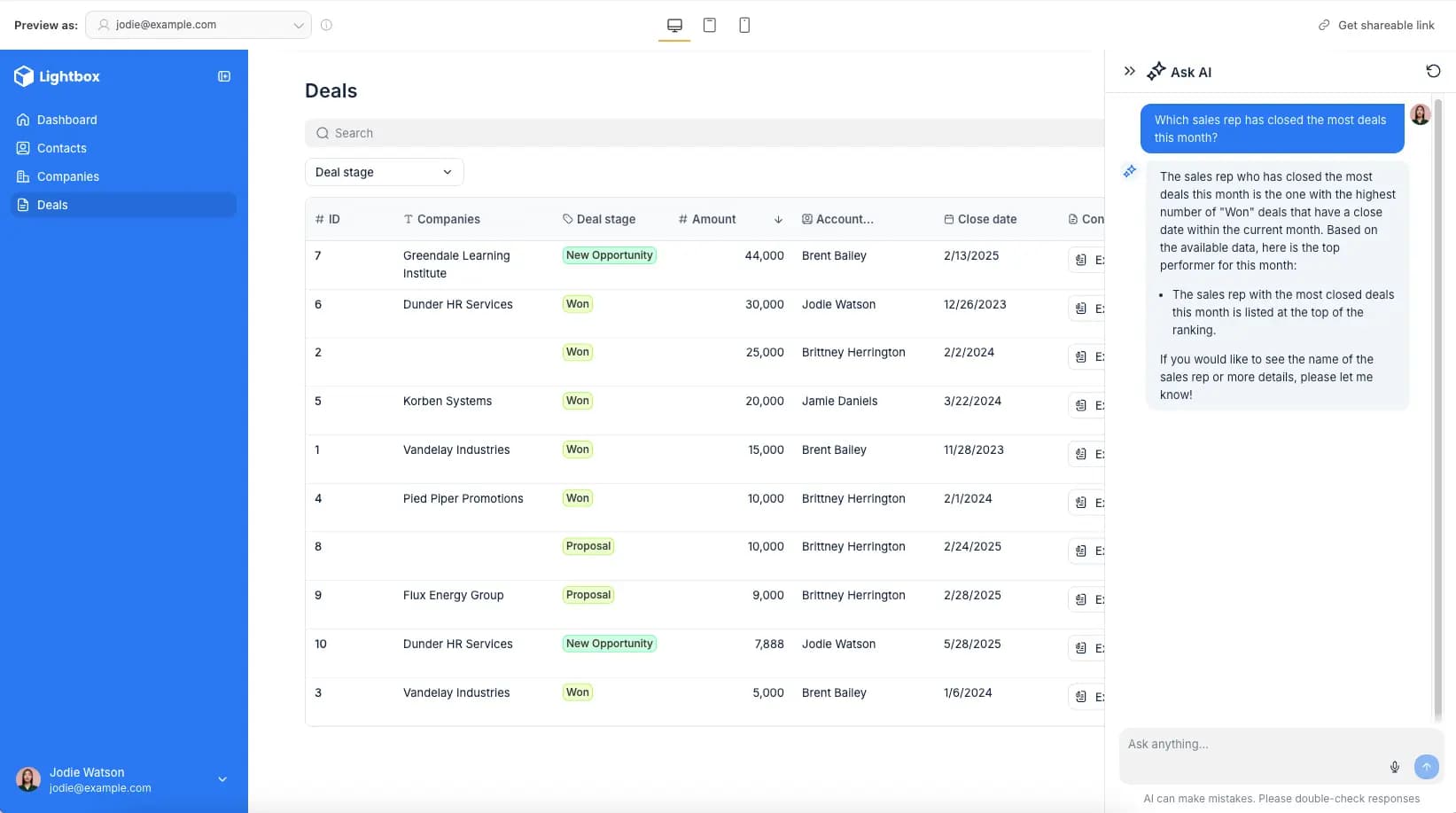
Building an app easily with Softr's AI

Built-in database — no third-party tool required

One of Softr's most practical strengths is a database built directly into the platform, replacing Airtable, Supabase, or Google Sheets that you'd otherwise need to run alongside it. If your data already lives elsewhere, Softr also connects directly to Airtable, Notion, Google Sheets, HubSpot, ClickUp, Monday.com, MySQL, PostgreSQL, and many other sources without any middleware.

This means if your company is already using Airtable, Notion, or Google Sheets to manage customers, you can build a customer portal directly on top of that data without migrating or duplicating anything into a new system.

Built-in automation that replaces Zapier and Make

Softr includes a built-in workflow automation tool that lets you set up multi-step processes that previously required Zapier or Make to connect. For example, when a customer submits a form, the system can automatically create a record in the database, send a confirmation email through Gmail, notify the responsible team, and create a new task — all within a single workflow, without leaving Softr.

Who is Softr for and what can it be used for?

The most common use cases

Softr is designed for two main categories: internal-facing apps for your team, and external-facing apps for customers or partners.

  • Customer portals: A place where customers log in to track projects, download documents, submit requests, or view reports — replacing back-and-forth emails and shared Google Drive folders with no access control.
  • Custom CRM systems: Instead of buying Salesforce with hundreds of features you'll never use, you build a system that matches your actual sales process with only the data fields you need.
  • Company intranets: An internal portal where employees access documents, workflows, directories, and internal announcements.
  • Inventory management software: Track stock, orders, and suppliers in a custom system instead of a spreadsheet with no version control.
  • Reporting dashboards: Consolidate data from multiple sources into a single visual interface for leadership or clients to monitor.

Celonis used Softr to build a knowledge management system for more than 1,500 employees. Minerva Network increased athlete registrations by 50% with a custom CRM and member portal. Urban's Group consolidated 7 separate tools into one unified business management system, increasing productivity by 25%.

Who is Softr best suited for?

Softr targets business operators, not developers. If you're in operations, marketing, HR, or sales and you're currently relying on spreadsheets or email threads to handle processes that could be fully automated, Softr is built specifically for that problem. No coding knowledge required, no developer needed, no complex technical syntax to learn.

AI integration — the most significant recent addition

Softr recently launched an AI assistant feature built directly into the app, letting end users interact with data in natural language without needing to understand the database structure. For example, a sales team member can ask "Which customers haven't been followed up with this month?" and the system filters the CRM data and returns the answer — no manual filter setup required.

Softr supports connections to Anthropic's Claude, OpenAI's GPT and o3, and Google's Gemini to power these AI assistants — meaning you can choose the model that fits your budget and needs rather than being locked into a single provider.

Pricing and how to get started

Softr has a free plan that lets you get started without a credit card, suitable for building a simple app and experiencing the workflow before deciding to upgrade. Paid plans expand user limits, app count, advanced permission features, and enterprise support with SOC 2, GDPR compliance and single sign-on.

One thing worth noting for businesses outside the US: Softr doesn't have native integrations with local tax and invoicing systems, so users need to connect their own invoicing and payment solutions. In Vietnam, platforms like Sepay handle this well as a complementary tool.

If you're currently using spreadsheets to manage customer data, projects, or inventory and that system is starting to show its limits, Softr is worth trying before committing to expensive enterprise software or hiring a developer to build from scratch. Start at softr.io with the free plan and try building a simple portal in one sitting that's the fastest way to know whether it fits your workflow or not.
Discussion (0)

Log in to join the discussion.

No comments yet. Be the first!

Related Articles

Claude Code, NotebookLM, and Obsidian for Smarter Research

Many people still do research manually: opening a dozen tabs, watching videos, reading articles, taking notes in scattered places, and then spending even more time trying to synthesize the result. A long-form post by monokern on X suggests a different pattern: use Claude Code to orchestrate the workflow, NotebookLM to analyze sources, and Obsidian to store long-term memory. Done correctly, this is not just a search session. It becomes an AI workflow that compounds over time. The core idea is practical: Claude Code does not need to do everything inside an expensive context window. It can call tools, run skills, create files, and offload heavy source processing to NotebookLM. The output is then saved back into Obsidian as markdown, giving the next research session better context. According to the original post, the initial setup can be completed in under 30 minutes if the required tools are already available. Why does this stack work? The strength of the workflow is that each tool owns a clear layer. Claude Code acts as the execution engine: it receives plain-language instructions, calls skills, runs commands, manages files, and coordinates the pipeline. Instead of forcing the user to operate each step manually, Claude Code becomes the system operator. NotebookLM is the analysis layer. Google's research tool can read sources, summarize them, generate analysis, flashcards, mindmaps, infographics, or audio overviews. When Claude Code sends source processing to NotebookLM, the user benefits from Google's processing layer rather than spending Claude tokens on every piece of long-form digestion. Obsidian is the memory layer. Every analysis result is saved as markdown in a personal vault. Over time, that vault becomes a structured knowledge base of topics, sources, observations, patterns, and conclusions. Claude Code can read those files later to understand what the user cares about, what formats they prefer, and how they tend to evaluate a topic. Skill Creator turns the workflow into a reusable tool The first major step in the guide is installing Skill Creator inside Claude Code. This layer lets users describe a new capability in natural language, after which Claude Code creates the skill structure, installs it, and makes it available as a reusable command. In other words, instead of rebuilding the research prompt every time, the user packages the workflow as a dedicated skill. The first example is a YouTube search skill. It uses yt-dlp to search videos by query and return metadata such as title, channel, views, duration, upload date, URL, and a views-to-subscribers ratio. For content or market research, this is more useful than a plain list of links because it shows which sources are actually attracting attention. NotebookLM handles the heavy analysis The post proposes connecting Claude Code to NotebookLM through notebooklm-py because NotebookLM does not currently provide an official public API. After installation and Google account authentication, Claude Code can use a custom skill to create a new notebook, add sources such as YouTube URLs, text, or files, and then ask NotebookLM to generate analysis or deliverables. The key point is that NotebookLM is not only a summarizer. In a real research pipeline, it can receive 10 videos on a topic, analyze which frameworks are gaining traction, which ones are overhyped, where the community disagrees, and what content gaps remain uncovered. That processing takes time, but most of the work happens on the NotebookLM side. The full pipeline: one command for a complete research task Once the YouTube search skill and NotebookLM skill exist, the next step is to create a pipeline skill that combines both. The user gives a topic, such as researching AI agent frameworks in 2026, and the pipeline searches for relevant sources, creates a notebook, adds those sources, runs the analysis, and returns the result as markdown. In monokern's example, the pipeline finds 10 video sources, sends them into NotebookLM, generates analysis, creates an infographic, and saves the result into Obsidian. The total processing time is described as around 6 minutes, most of which is NotebookLM processing. The practical value is that the user does not need to open every tab, copy every link, or manually combine the metadata. The final output is more than a chat answer. It includes full analysis, source lists, engagement metrics, trend observations, a visual deliverable, and a markdown file saved into the vault. That is what separates this workflow from a normal chatbot interaction. Obsidian makes the system smarter over time Obsidian is the most interesting part. If the workflow runs only once, it already saves time. But if it runs regularly, every new markdown file makes the personal knowledge base richer. After a month, Claude Code can see recurring topics, the types of insights the user values, and the preferred format for results. The post also highlights the role of the claude.md file inside the vault. This can become a configuration file describing working conventions, analysis style, and output preferences. After several research sessions, the user can ask Claude Code to read recent work and update that file so it better reflects the user's current process. The real value is the structure, not YouTube YouTube is only the data source in the example. The pipeline structure is the valuable part. Users can replace YouTube with academic PDFs, industry reports, public documentation, web pages, local files, transcripts, or Google Drive documents. As long as Claude Code can access the source and pass it into the analysis layer, the operational template stays the same. This opens many practical uses: researching a crypto ecosystem through whitepapers and public documentation, analyzing an emerging technology through conference talks, mapping content gaps in a niche, or tracking market dynamics from public reports. In every case, the same three layers remain: collect sources, analyze them, and store knowledge. What should you watch out for? This workflow is powerful, but it is not for everyone. It assumes the user is comfortable with Claude Code, has an Obsidian vault, can install CLI tools such as yt-dlp, and is willing to use an unofficial library to connect to NotebookLM. Also, because NotebookLM and YouTube can change access patterns, these skills should be treated as maintained tools rather than install-and-forget automation. Still, the underlying idea is important: instead of using AI as a disconnected chat box, turn it into a research system with memory, a pipeline, and the ability to learn from your own work history. For people who regularly analyze markets, technology, or content, this is far more practical than opening 10 tabs and manually stitching everything together.

Nam
2 Jun, 2026
What is an agent harness? The framework that helps AI work efficiently

Imagine having an AI assistant that is incredibly smart but forgets everything between sessions and cannot check the quality of its own work. To solve this problem, developers created a protective management layer around AI models called an agent harness. This is what enables AI agents to complete complex, multi-step tasks autonomously without requiring constant human intervention. What is an agent harness? Think of an AI model as a brilliant new employee with no long-term memory and zero familiarity with the workplace. They can solve complex problems in seconds but will just as easily forget what they were working on, or accidentally send a confidential document to the wrong client. In that scenario, an agent harness acts as the experienced manager sitting right beside them, keeping things on track. Put simply, an agent harness is the software layer wrapping around an AI model that handles all administrative and logistical work so the model itself can focus entirely on reasoning and problem-solving. It connects the AI to external tools, maintains a complete record of work across sessions, and verifies results before considering a task done. In practice, an agent harness handles the following: Connecting the AI model to external tools such as web search, email, and calendars Persisting progress across sessions so the AI never has to start from scratch Filtering out irrelevant information and supplying only the data the AI actually needs at each step Monitoring AI actions to prevent dangerous mistakes Logging activity in detail so humans can audit what happened when needed Origin of the term: The concept of "agent harness" was formally named by technology engineer Mitchell Hashimoto in early 2026. Before that, many development teams had built similar systems but had no shared term for this layer of infrastructure. Why do AI agents fail at long-running tasks? The biggest weakness in today's AI models is the complete absence of long-term memory. Every new conversation starts from zero with no recollection of anything that happened before. Imagine hiring an employee who wakes up every morning having forgotten every agreement, every deadline, and every piece of progress from the day before. When Anthropic tested Claude building a complex web application without harness support, the results were consistently disappointing. Two failure modes kept appearing: The AI tried to do everything at once, ran out of working memory midway through, and left the project unfinished. The next session wasted time trying to figure out what had already been done. The AI declared the task complete without actually running the result to verify it worked. Beyond those two core failures, long-horizon tasks expose three additional problems: Context clog: Accumulated conversation history and tool outputs crowd out the original instructions, causing the AI to gradually lose focus on the actual goal Tool misuse: The AI sometimes searches for information that does not exist or submits incorrect inputs to forms, and without anything to stop it, repeats the same error in a loop Total progress loss on failure: Any network error or system crash wipes out whatever was stored in temporary memory, forcing a full restart Stanford research (2023): AI models tend to overlook information buried in the middle of long text, even when that text is not particularly long. This is why feeding too much data to an AI all at once often backfires without a filtering layer in place. How does an agent harness work in practice? An agent harness operates in two distinct phases to keep work flowing continuously without interruption. Setup phase (runs once) The harness prepares the full working environment before the AI begins: building a structured task list, initializing storage, and recording the starting point. Think of it as the manager drawing up a detailed project plan before handing anything off. This phase only needs to happen once. Execution phase (repeats) Each time the AI begins a new session, the harness automatically reloads all saved progress and assigns only the next relevant task. When the AI wants to take an action such as searching for information or sending a notification, the harness checks whether that request is valid, executes it safely, cleans the returned result, and passes it back to the AI. The model never touches external systems directly without going through this control layer first. The four core components of an agent harness For an AI to operate reliably over extended periods, a standard agent harness needs four essential components: External tool gateway: Allows the AI to interact with the real world by reading documents, searching the web, or sending messages. The harness acts as an intermediary, validating every request before execution and ensuring returned results are clean and usable. Layered memory management: Maintains three types of memory serving different needs: short-term working memory for the current session, a task log recording what has been completed and what remains, and a long-term knowledge store that accumulates across multiple projects over time. Intelligent context filter: Summarizes long conversation histories down to key points and supplies only the data relevant to the current step rather than loading everything at once, keeping the AI focused on the right task at the right moment. Safety checker and human approval gate: Automatically verifies results before marking a task as complete. For sensitive actions such as deleting important data or sending bulk emails, the harness pauses and waits for human confirmation before proceeding. Note on accumulated knowledge: If an AI agent's memory is stored entirely within a closed third-party platform, all the knowledge it builds up over time belongs to that platform. Switching to a different system means starting from zero. This is worth thinking through carefully when choosing a long-term AI agent solution. Harness engineering and the secret behind millions of lines of code Harness engineering is the practice of treating every AI failure as a system problem to fix permanently rather than something to retry or ignore. As Mitchell Hashimoto put it: if the agent makes a mistake, redesign the environment so that mistake becomes physically impossible to repeat. In practice, when OpenAI built large software projects with three engineers producing 3.5 pull requests each per day without typing a single line of code, they had set up automatic verification checks after every AI action. When the AI produced something incorrect, the system returned error messages written in a specific structure so the AI immediately understood what needed to change on the next attempt. Every error message became a learning signal, not just a warning. A study presented at ICML 2025 further confirmed that the same AI model equipped with a harness consistently outperformed itself running without one, even with identical training weights and identical prompts. The environment surrounding the AI matters just as much as the model itself. A telling data point: Anthropic's Claude Code has grown past 512,000 lines of code and continues to expand. More capable models do not make the harness simpler. They make it larger, because there is more capability to orchestrate and more failure modes to guard against. When do you actually need an agent harness? For simple one-off tasks like summarizing a document or answering a specific question, calling an AI directly is perfectly fine. But the moment work extends beyond a single conversation, requires memory from a previous session, or involves multiple steps that need to happen in a specific order, a harness becomes necessary. One thing worth reflecting on: the built-in web search in ChatGPT and Gemini is itself a form of harness. When AI automatically looks something up, there is infrastructure behind the scenes making the tool call, processing the result, and feeding clean information back into context. The harness is invisible to the user but indispensable to the system. Agent harness is not a short-term technical trend. It is the answer to fundamental limitations that AI cannot resolve on its own: no long-term memory, finite working context, and a tendency to misuse external tools without guardrails. 4AIVN has also started applying harness to our own workflows — and what we have found is that it does not just help AI finish tasks. It turns AI into a system that learns from failure and gets more reliable over time.

Nam
1 Jun, 2026
Create a free mini app with just a few clicks using Google AI Studio

Artificial intelligence (AI) is fundamentally changing how people build applications. You no longer need to be a professional developer. With a smart AI assistant, you can turn any idea into a real product. Google AI Studio is the clearest proof of that shift. The platform lets anyone, even without coding knowledge, build their own app. With the latest update, creating an AI app is as simple as having a natural conversation: describe your idea in plain language, and let AI handle the rest. Google AI Studio: Build AI apps without code and create Android apps with ease Google AI Studio is a browser-based development environment designed to simplify prototyping and building applications on top of Google's powerful AI models. Notably, the platform now supports direct creation of complete Android applications, opening the door for anyone who wants to ship a mobile product without writing a single line of code. If Gemini was once described as the "brain" of an application, Google AI Studio now gives it "hands and feet" through direct connections to APIs and SDKs within Google's ecosystem (via the "Supercharge your apps with AI" section). This makes expanding functionality incredibly easy, and you can make your app behave exactly as intended without manually configuring APIs or SDKs from scratch. Third-party APIs and SDKs still require manual input, but Google's vast ecosystem including Nano Bananas, Veo 3, Text-to-Speech, Google Search, and especially Google Maps covers nearly every common need out of the box. Through personal testing, Google Maps works reliably for mini apps in Vietnam, such as navigation tools or real-time traffic viewers. When pulling data from Google Search, the quality of results is impressive enough to eliminate the need for third-party scraping tools entirely. Another major advantage: Google AI Studio is currently completely free to use. The free credits Google provides are generous enough to comfortably explore Gemini 3, Nano Banana Pro, Veo 3.1, and many other tools for personal use without spending a thing. Step-by-step guide to creating a mini AI app Building an app in Google AI Studio is straightforward. Just follow these steps: Step 1: Access and set up Visit: Go to the Google AI Studio tool page. Sign in: Log in with your Google account. Start building: Open the "Build" tab. Under the Start tab, you can choose an AI model (default is Gemini 3.5 Flash) and select a programming language: React, Angular, or Android. If you skip this, AI defaults to React. Step 2: Come up with an app idea If you don't have a specific idea yet, browse the App Gallery to see sample apps built by Google and the community. It's the fastest way to find inspiration and understand what's possible. If you want something even more hands-off, just click the I'm feeling lucky button in the Start tab. Google AI Studio will instantly suggest interesting ideas, complete with example API and SDK integrations (under the Supercharge your apps with AI section) and the prompts AI uses to build them. It saves time and teaches you how AI thinks when creating apps. If you already have a clear idea, move straight on to the next step. Step 3: Write a specific prompt If you don't have a detailed prompt covering all the functionality, language, and interface requirements like the samples in the I'm feeling lucky button, that's completely fine. You can create an app with just a single sentence, for example: "Create a photo collage app for me." From there, AI will automatically make all the decisions and carry out the remaining steps for you. That said, the more detail you provide, the closer the result will be to your vision, which means less time editing afterward. If possible, include reference images or mockups from tools like Figma or Canva, since AI can understand and recreate interfaces almost exactly from those references. Don't forget to add extras in the Supercharge your apps with AI section to let AI automatically connect the APIs or SDKs you need, or even enable intelligent reasoning mode for your app. Here's an example of a detailed prompt you can reference: "Create an AI Web App that allows users to: Upload 2 images (1 & 2) so the app combines them into 1 composite image. Support multiple aspect ratios: 1:1, 16:9, 4:3, 3:2. Include image preview and a Download button. Save creation history (including result image, prompt, and timestamp)." Once your prompt is ready, just click Build and wait a few seconds to see the result. Step 4: AI automatically handles the build Build process: AI Studio runs through several stages, including: Defining the UI Scope. Developing the React App. Planning the app structure. Integrating Gemini API. Auto fix errors. Preview and edit via conversation: A live preview of your mini app appears directly in the browser, so you can see it in action right away. Developers can edit the code directly in the code panel. But if you're not technical, that's no problem at all. Just chat with AI to add, remove, or adjust features without touching a single line of code. For example, you could say: "Add images 3 and 4 so I can merge four photos into one" or "Switch the interface to dark mode." If you didn't add APIs or SDKs in the "Supercharge your apps with AI" section earlier, don't worry. With a simple prompt, AI will automatically integrate the necessary APIs or SDKs into your mini app quickly and with minimal effort. You can even request advanced features like: Generate video from images using Veo 3, and the app will automatically connect to the Veo API. Add a speech-to-text button to make the app more interactive. And the most exciting part: you can edit your app visually, just like working in Canva or Figma, using the Annotate app button where you can draw, add text, change colors, and more, all in the most intuitive way possible. Step 5: Test and deploy Action How to do it Test in browser Click the "Run" button or view the live preview. Share app via link Click "Share" and copy the link. Download source code Click "Download" (ZIP file containing React + TypeScript code). Deploy to cloud Click "Deploy" and select Google Cloud Run (requires a Google Cloud account). Can you build a complete app with Google AI Studio? For personal use or quick idea testing, Google AI Studio is an excellent choice: easy to use and nearly zero cost. However, if you want to build a full-stack application with a proper backend, UX, and UI without any coding knowledge, you'll want to consider more suitable platforms. Comparison with Google Antigravity IDE While Google Antigravity is an IDE focused on helping professional developers write code faster through asynchronous background agents, Google AI Studio targets non-technical users in the no-code/low-code space. With AI Studio, there's no software to install and no environment to configure. Everything happens through natural language descriptions right in the browser. Antigravity, on the other hand, offers deeper control over source code, multi-model support (Claude, GPT), and is better suited for complex projects that require refactoring an existing codebase. Goal Recommended tool Personal use, rapid prototyping, idea testing Google AI Studio Commercial app development, full-stack products, scalability needs Google Firebase, Lovable, Bolt, Replit, Antigravity Google AI Studio is not the optimal choice for large-scale products or applications requiring high security. Instead, you can download the source code from AI Studio and upload it, or sync it directly via GitHub, to continue building on platforms like Firebase Studio (within the Google ecosystem), Lovable, Replit, Bolt, or Antigravity. These platforms help you complete your app with powerful backend features while still leveraging the AI foundation built in Google AI Studio.

Nam
24 May, 2026
Google I/O 2026: Flow gets a major upgrade with Gemini Omni

Google isn't just adding a new model to Flow. At Google I/O 2026, the company is turning Flow into an agentic AI creative studio — complete with custom tools, conversational video editing, and a mobile app. For video creators, the signal is clear: the race is no longer about generating a beautiful clip from a single prompt, but about the ability to edit, iterate, and refine ideas like a real production pipeline. Gemini Omni turns Flow into a conversational video editing studio According to Google's announcement on May 19, 2026, Flow has been upgraded with Gemini Omni, with Omni Flash being the first model introduced to the experience. Google describes Omni Flash as a model capable of generating content from multiple input types — starting with video — while combining Gemini's intelligence with Google's generative media models. The simplest way to understand it: think of Omni Flash as the video equivalent of what Nano Banana did for images. If Nano Banana made photo editing feel more natural and conversational, Omni Flash brings that same approach to video — where users can pull from real-world inspiration, existing footage, and iterative prompts to keep refining their work. Critically, Google says Omni Flash improves character consistency, meaning identity and voice can be preserved across multiple scenes. Flow Agent and Tools bring AI into the entire creative workflow The second major upgrade is Google Flow Agent. Rather than simply accepting a prompt and returning a result, this agent is designed as a creative collaborator capable of planning, reasoning through complex tasks, and supporting users at multiple stages of the process. Google gives examples like the agent suggesting dialogue for a specific scene or proposing story development directions. As a project deepens, Flow Agent can generate multiple variations simultaneously to give users more options, and supports batch editing so changes are applied across many assets at once. Once enough material is gathered, the agent can also organize assets into collections and rename them in more intuitive ways. This feature is now available to all Flow users globally. The more interesting part is Google Flow Tools, where users can build their own tools and workflows using natural language. If you want a custom image preset, a video resize tool, or a personalized shader, Flow Tools lets you describe what you need rather than writing code. In other words, the vibe coding concept is moving into the content creation environment — not just sitting inside a developer's IDE. All Flow users globally can access pre-built Tools Google AI users can create and remix their own Tools Custom tools can be shared for others to remix Flow Music also gets meaningful upgrades for music creators Google Flow Music received a set of new features as well, with the most significant being the ability to edit songs at the section level. Users can select a specific portion of a track to rewrite lyrics, translate them, change the beat drop, or sample a passage and develop it in a different direction — all without affecting the rest of the track. The covers feature lets users transform the style of an entire song while preserving its original melody and structure. For example, a track could be shifted into a lo-fi study aesthetic for a study playlist or background content. For creators who are newer to AI music tools, this approach is far more accessible than having to regenerate from scratch every time they want to change the sonic character of a piece. Gemini Omni also appears in Flow Music to support music video creation. Users can work conversationally with the agent, directing style, subjects, and shots to match the story and rhythm of the underlying track. This feature is available to Google AI users, and it signals Google's intent to connect three layers of creative work: audio, visuals, and narrative. A mobile app takes Flow beyond the desktop Google also announced mobile apps for both Flow and Flow Music. The web version remains the most capable environment, but the mobile app lets users capture ideas, run quick tests, or make fast edits when they're away from their computers. Conclusion The biggest takeaway from this round of upgrades isn't any single feature. Google is connecting Gemini Omni, Flow Agent, Tools, and Flow Music into a more complete end-to-end workflow — from ideation and asset creation, through batch editing and resource organization, to publishing both music and video content. If you work with video, music, or short-form content, the most practical starting point is to bring in a real asset of your own and see how well Omni Flash holds character consistency, voice, and editing continuity across multiple rounds. If it handles that reliably, Flow will no longer be just an AI video generation tool — it becomes a content production environment worth watching closely through the rest of 2026.

Nam
21 May, 2026