4AIVN
Back to News

Automate Excel & Google Sheets Reports with OpenAI Codex

Published on 24 August, 2026
Automate Excel & Google Sheets Reports with OpenAI Codex

Quick Summary

Automating Excel and Google Sheets reporting is no longer limited to programmers thanks to OpenAI Codex and GPT models. Office workers can easily transform weekly reporting tasks into automated Python or Google Apps Script workflows using plain natural language prompts. This comprehensive guide covers Codex usage options (Web, Desktop App, CLI), a practical 4-step deployment process for non-coders, essential data privacy precautions, and quota optimization tips.

Automating Excel and Google Sheets reporting is no longer exclusive to software engineers. With the rapid evolution of AI models like GPT, office workers can now create custom workflow automation tools using simple instructions with Codex, freeing up hours of repetitive daily tasks.

Why Excel Formulas and VBA Are No Longer Enough

For weekly recurring reports or automated integrations with email, Slack, and messaging apps, traditional methods like nested Excel formulas or recording VBA (Visual Basic for Applications) macros require specific technical skills and break easily whenever a single column in the source file changes. This is the exact gap that OpenAI Codex fills: you describe precisely what needs to be done in natural language, and Codex generates complete Python or Google Apps Script code ready to run in seconds.

Codex Is Not a Single Product

A common misconception is how Codex is accessed: it can be used via CLI in the terminal, IDE extensions in VS Code, Codex Web on the cloud at https://chatgpt.com/codex/cloud for developers and coding enthusiasts, as well as desktop applications for both macOS and Windows. For office workers unfamiliar with command-line tools, the easiest way to start is downloading the Codex desktop app. It lets you manage multiple agents simultaneously right from a visual interface without opening a terminal or configuring API keys—just log in with your existing ChatGPT account.

What an Example Prompt Looks Like

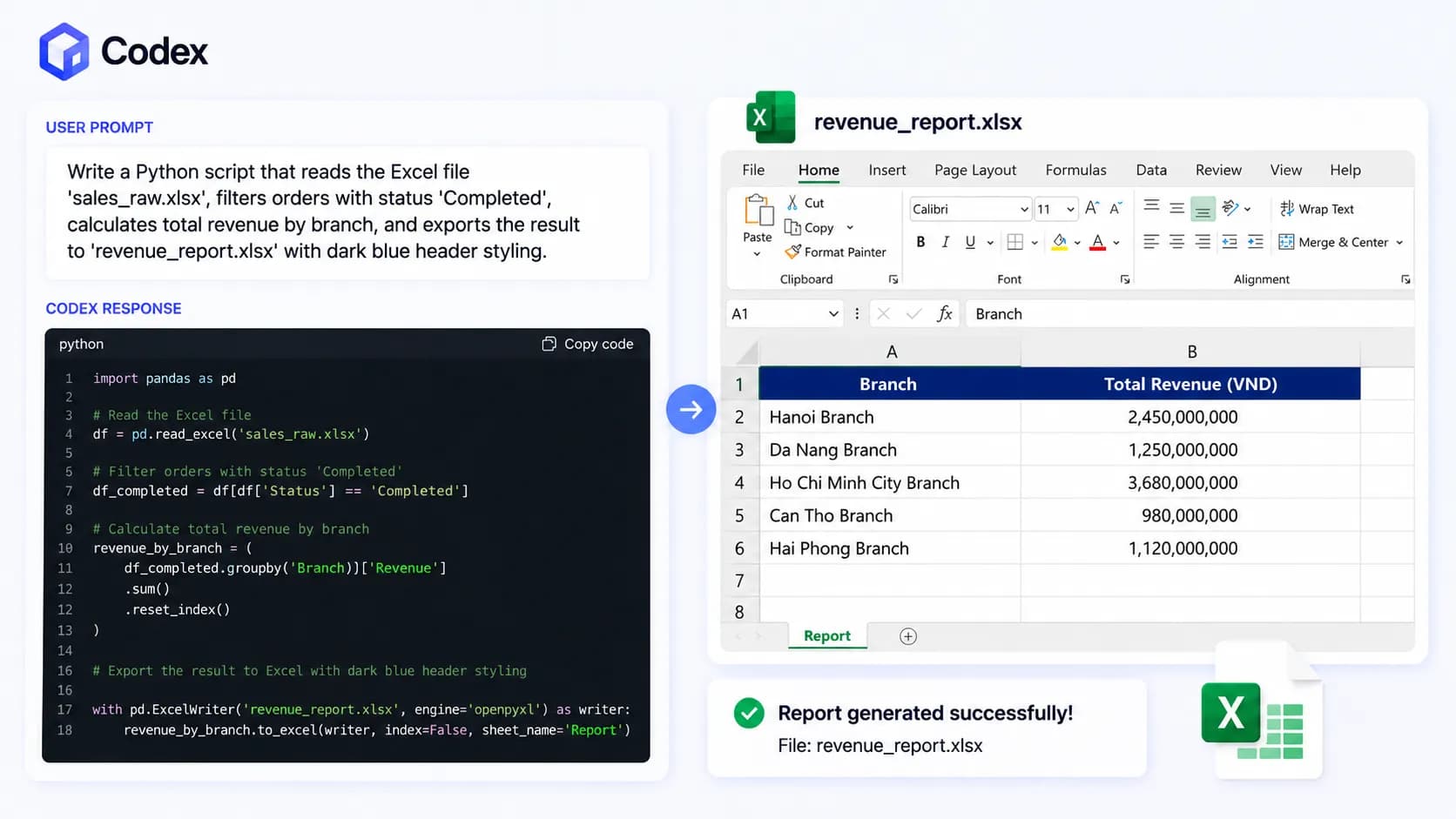
You only need to provide Codex with a detailed prompt like: "Write a Python script that reads the Excel file 'sales_raw.xlsx', filters orders with status 'Completed', calculates total revenue by branch, and exports the result to 'revenue_report.xlsx' with dark blue header styling." Codex will instantly generate standard, high-quality code, and you simply run the script to get your finalized report.

Codex Web generating Python code from a prompt to automate branch revenue reports

Automating Local Excel Reports with Python and Codex

For Excel files stored locally, combining Codex with two popular Python libraries—pandas and openpyxl—delivers outstanding processing speed. Pandas handles hundreds of thousands of data rows in seconds, while openpyxl manages cell formatting, header colors, and formula insertion as illustrated in the example above.

Automating Google Sheets in the Cloud

When your team collaborates on Google Sheets instead of offline Excel files, the Python library gspread or Google Apps Script is the ideal choice. Codex can write code that connects directly to the Google Sheets API via a Service Account (JSON credential file) to read and write data continuously without opening a browser.

A Sample Workflow

  • Automatically pull new form submissions from Google Forms into the spreadsheet
  • Automatically categorize customer feedback by priority
  • Automatically send daily summary emails to leadership at 17:00

This entire pipeline runs in the background with zero manual intervention once configured.

4-Step Implementation Process for Non-Coders

  • Step 1 - Standardize input data: Ensure the Excel or Google Sheets file has clean, clear headers without arbitrary merged cells.
  • Step 2 - Write clear prompts for Codex: Explicitly mention file names, column names, filtering/calculation steps, and desired output formats.
  • Step 3 - Test and paste errors for AI auto-debugging: If the script encounters an error, copy the full error traceback and paste it back into Codex for automatic correction.
  • Step 4 - Schedule automatic runs: Use Windows Task Scheduler (Windows) or Cron jobs (macOS/Linux) to run the script automatically on a set schedule.

Risks and Considerations Before Handing Reports Over to AI

Codex is powerful but not completely free; however, simple operations with Excel or Google Sheets consume very little quota, so light users can comfortably rely on the free tier. If heavier workloads are required, consider Plus or Pro plans—avoid the Go tier as Codex capabilities there offer little advantage over the free plan.

Automating reports with Codex does not make you a programmer, nor should it. The true value lies in understanding your own data and business processes well enough to describe them clearly to AI—Codex handles the coding. If your company has weekly recurring reports, start today by picking the simplest one, writing a prompt following the sample above, and running your first automated test.

Discussion (0)

Log in to join the discussion.

No comments yet. Be the first!

Related Articles

How to combine Codex and Claude Code with one plugin

Is anyone else using Codex and Claude Code side by side? I only recently discovered the Codex plugin for Claude Code, published by OpenAI itself. The useful part is not simply having another AI available. It is being able to call Codex from the current Claude Code session for a code review, an adversarial design challenge, or a separate delegated task without constantly switching tabs and sessions. What makes the Codex plugin for Claude Code useful? The openai/codex-plugin-cc plugin is intended for developers who already work in Claude Code and want to add Codex to that workflow. Instead of allowing both agents to edit the same file at the same time, you can assign clear roles: Claude Code implements and Codex reviews, or Claude Code keeps the main thread while Codex investigates an independent problem in the background. The official plugin provides review commands such as /codex:review and /codex:adversarial-review, delegation through /codex:rescue, and job or session management through /codex:transfer, /codex:status, /codex:result, and /codex:cancel. Codex therefore becomes a collaborator inside the Claude Code workflow rather than a separate window. It does not create a separate Codex runtime The plugin uses the Codex CLI and Codex app server installed on the same machine. It also reuses the local authentication state, current repository checkout, and existing config.toml settings. Integration is straightforward, but each request still contributes to the user's Codex usage limits. Requirements before installation You need Node.js 18.18 or later and either a ChatGPT subscription, including Free, or an OpenAI API key. If Codex CLI is missing, /codex:setup can offer installation guidance. You can also install it manually with npm install -g @openai/codex and sign in with !codex login. How to install the Codex plugin in Claude Code Run these commands in Claude Code: /plugin marketplace add openai/codex-plugin-cc /plugin install codex@openai-codex /reload-plugins /codex:setup The last command checks whether Codex is installed and authenticated. Once setup is complete, the Codex slash commands should appear in Claude Code, along with the codex:codex-rescue agent under /agents. Try a background review first A low-risk first run is /codex:review --background. Use /codex:status to monitor it and /codex:result to retrieve the final review. Multi-file reviews can take time, so background mode keeps Claude Code available for other work. Three effective Codex and Claude Code workflows The value of the plugin comes from role design. If both agents modify the same area without boundaries, the result may be conflicting edits, repeated analysis, and wasted context. The following workflows make ownership clearer. Let Claude implement and Codex review After Claude Code completes a feature, run /codex:review for a read-only review. It can inspect current uncommitted changes or compare the branch against a base with /codex:review --base main. Because Codex does not edit files in this mode, the developer keeps control of what is accepted. For example, after Claude adds a payment flow across several modules, Codex can inspect logic errors, edge cases, and cross-file side effects. Claude Code can then evaluate the findings and apply only the changes that make sense. Delegate an entire task to Codex Use /codex:rescue for a problem that can be isolated, such as /codex:rescue --background investigate why the integration test is flaky. Claude Code can continue working on the interface or documentation while Codex investigates in the background. Rescue supports --background, --wait, --resume, and --fresh. Define the expected output and file scope before delegating. A vague instruction to fix everything while Claude Code is also editing the repository can still create collisions. A good task has a specific goal, completion criteria, and a clearly owned part of the codebase. Use adversarial review to challenge the project direction /codex:adversarial-review is designed to question implementation and design decisions rather than merely find bugs. For example, /codex:adversarial-review --base main challenge the caching and retry design asks Codex to inspect assumptions, trade-offs, alternatives, and risks such as data loss, race conditions, rollback, or reliability. This is where the two agents may appear to argue, but the debate only helps when a human sets a narrow question, requests evidence, and defines a decision rule. Otherwise, the review can become a chain of opinions with no practical outcome. Transfer sessions and manage background jobs /codex:transfer creates a persistent Codex thread from the current Claude Code session and prints a codex resume <session-id> command. It is useful when a discussion has grown beyond a short review and you want to continue directly in the Codex App or TUI without manually rewriting the context. Monitor, retrieve, and cancel work For background tasks, /codex:status shows progress, /codex:result returns the stored output and session ID, and /codex:cancel stops an active job. These commands prevent multi-agent work from becoming a black box. When a task drifts from its goal, canceling early is usually cheaper than waiting and starting over. Watch for review loops and usage limits Important: OpenAI explicitly warns that the optional review gate can create a long-running Claude/Codex loop and drain usage limits quickly. When enabled with /codex:setup --enable-review-gate, the plugin uses a Stop hook, which is an automated trigger that runs when Claude is about to finish its response, to start a targeted Codex review. If it finds an issue, Claude's response is blocked so Claude can address it first. This can be valuable before shipping, but it should not be left unattended. A practical safety checklist Assign roles before running: one agent implements while the other reviews, or each owns a separate task. Limit the scope by naming the branch, files, risk area, and completion criteria. Use background mode for large reviews and check progress periodically. Enable the review gate only while actively monitoring it, then disable it with /codex:setup --disable-review-gate. Do not let Claude review all Codex output and then ask Codex to review every Claude revision without a clear stopping rule. Use /codex:cancel when a task moves in the wrong direction. How can Codex and Claude Code work well together? The official OpenAI plugin offers a cleaner alternative to keeping Codex and Claude Code open in separate tabs or letting both agents edit the same file. Claude Code can remain the coordinator while Codex reviews, challenges a design, or owns a separate task. A sensible starting point is one small /codex:review --background run, followed by status, result, and cancel. Try rescue, transfer, and the review gate only after the basic workflow is familiar. The two systems can complement each other well, provided a person still sets the boundaries, budget, and stopping point.

Nam
14 Jul, 2026
GPT-5.6 vs Claude Fable 5: What Is New?

Sol, Terra, and Luna make GPT-5.6 look more like a product family than a single model. The naming also signals what OpenAI is trying to change: users no longer have to choose only between an expensive flagship and a much smaller model. Instead, they get three capability tiers designed for different workloads. The important caveat is that GPT-5.6 is currently in limited preview, and OpenAI says it is not available in ChatGPT during this preview period.On the other side, Anthropic positions Claude Fable 5 as a frontier model for reasoning, software engineering, scientific research, and long horizon agentic work. The useful question is therefore not simply which model is smarter. It is which product architecture helps a team complete real work with predictable quality, latency, and cost.What GPT-5.6 actually isAccording to OpenAI's preview announcement, GPT-5.6 consists of Sol, Terra, and Luna. Sol is the flagship and most capable option, Terra is a strong lower cost model, and Luna is the fastest and most cost efficient member of the family.The important change is how OpenAI divides demand into three tiers. A research team might use Sol for a difficult reasoning problem, a product team might run most daily work on Terra, and a high volume system might use Luna for thousands of short requests. This looks more like an infrastructure strategy than the launch of a single new chatbot.Availability matters: OpenAI says GPT-5.6 is not available in ChatGPT during the preview. An experience in an API, developer tool, or partner platform should not be treated as the final ChatGPT experience.Sol is designed for difficult, extended workSol is positioned as the strongest GPT-5.6 model for deep reasoning, complex coding, and long multi step tasks. A software team might ask it to understand a repository, identify the cause of a bug, propose a minimal patch, and write regression tests. Sol's value is not answering a short question quickly. It is maintaining the objective while working through a longer chain of decisions.OpenAI also highlights stronger cyber capability as reasoning increases. That can be useful for authorized security testing and vulnerability analysis, but it also makes access controls, logging, sandboxing, and human approval more important.Terra aims for the practical middleTerra targets the broadest category of work: document analysis, content production, application development, research synthesis, and operational support. If Sol is the specialist called for the hardest problem, Terra is the strong team member expected to work throughout the day without making every request unnecessarily expensive.A marketing team could use Terra to read market reports, extract insights, build an outline, and draft several content variants. A development team could use it for code review, test generation, and tickets with a clear scope. This tier could become the default if its real world quality remains consistent.Luna prioritizes speed and scaleLuna is designed for low latency and lower cost. Classification, conversation summaries, field extraction, drafting, and ticket routing do not always require the strongest model. In these cases, response time and total operating cost matter more than maximum reasoning capability.Fast does not mean suitable for everything. If a task requires source verification, a long plan, or a code change with a large blast radius, a team should move it to Terra or Sol instead of forcing Luna beyond its intended role.Claude Fable 5 takes a different routeAnthropic presents Claude Fable 5 as a frontier model for reasoning, software engineering, vision, scientific research, and long horizon agentic work. Instead of emphasizing three product tiers in one generation, Anthropic's message focuses on the capability of a powerful model working inside the Claude ecosystem.This difference changes deployment decisions. With GPT-5.6, an engineering team might build a router that sends each request to Sol, Terra, or Luna. With Fable 5, the focus may be on optimizing prompts, tools, context, and reasoning budgets around one primary model. Neither approach is universally better because the answer depends on workload and operational maturity.A fair comparison: Do not run one prompt and declare a winner. Build a test set covering short tasks, long reasoning, coding, extraction, and recovery from errors. Measure accuracy, latency, the number of human corrections, and the total cost of a completed task.Coding and agentic work depend on the surrounding toolsBoth GPT-5.6 Sol and Claude Fable 5 target complex software work, but the practical experience depends heavily on the system around the model. The ability to read a repository, execute commands, observe results, and correct mistakes can matter as much as a benchmark score. For OpenAI workflows, the Codex page is a useful starting point for understanding how a model participates in coding work.Fable 5 may be attractive to teams already invested in Claude and long running agentic workflows. Read our Claude Fable 5 coverage for more context on Anthropic's positioning and the types of work it targets.What early forum experience tells usEarly discussions on Reddit and developer communities focus on how different Sol, Terra, and Luna feel in real work. Some users describe Sol as the better fit for multi step tasks, Terra as the practical option for routine work, and Luna as the interesting choice for speed. These observations match OpenAI's positioning, but they do not establish a precise quality gap.Forum reports are useful because they reveal the questions real users care about. However, they are self selected evidence. People may use different prompts, access levels, integrations, and preview versions. A result from a developer platform does not guarantee the same result when a model eventually appears in ChatGPT.Early positivesThe three tiers make it easier to understand which model belongs to which workload.Luna creates a clear expectation of low latency for high volume systems.Terra could become a default if it delivers stable quality at a practical cost.Sol is expected to be stronger for coding, long reasoning, and tasks with several verification steps.Open questionsHow large the practical quality gap between Sol and Terra will be on common workloads.The total cost after retries, corrections, and human review are included.How Luna behaves with long prompts and many constraints.Whether performance remains stable as GPT-5.6 expands beyond preview access.Forum reports are not benchmarks: Community experience should help you choose test cases, not make a production purchasing decision by itself.Comparing GPT-5.6 and Fable 5 by workloadWriting and document analysisTerra appears positioned for most document work because it balances capability and cost. Fable 5 may be attractive when documents are long, questions are complex, and the model must maintain an argument across a large context. A useful evaluation should score citation accuracy, structural consistency, and how much editing is required before publication.Software development and debuggingSol and Fable 5 are both candidates for difficult coding tasks. A representative test should include reading existing code, identifying the root cause, producing a minimal fix, writing tests, and explaining risk. Asking a model to create an isolated function from scratch does not reflect how well it works in a real repository.High volume processingLuna has the clearest positioning advantage when speed and cost dominate. At thousands of extraction or classification requests per day, a small difference in price and latency can have a large effect. Fable 5 may be unnecessarily expensive for a workload that only needs short, structured outputs.Research and long reasoningSol and Fable 5 should be compared with tasks that have verifiable outcomes rather than open questions that merely sound impressive. Give both models the same research material and ask them to identify assumptions, detect contradictions, propose an experiment, and explain what evidence is missing. The better model is the one that helps users discover errors faster, not the one that writes the longest answer.Should you choose Sol, Terra, Luna, or Fable 5?If you want maximum capability inside the OpenAI ecosystem, Sol is the first model to test. If you need a strong model for regular use, Terra has the more practical position. If your workload contains many short and repetitive tasks, Luna could reduce operating cost. Fable 5 remains relevant for teams invested in Claude or focused on long reasoning and agentic work.Because GPT-5.6 is still in preview, replacing an entire production workload would be premature. Run the models in parallel on real but sanitized data, record failures, and use the same criteria for every candidate.A test plan you can use nowSelect 20 tasks that represent real work, including easy and difficult cases.Run each task on Sol, Terra, Luna, and Fable 5 when access allows.Score accuracy, response time, total cost, and required human correction.Track severe failures separately instead of relying only on averages.Choose a model for each workload category rather than forcing one model to do everything.Is GPT-5.6 worth switching to now?The most important change in GPT-5.6 may not be Sol's raw capability. It is OpenAI's decision to turn one model generation into three operational tiers. That could help organizations control cost, but only if they can classify workloads and route requests intelligently.The practical next step is to build a small benchmark from your own data. If Sol wins difficult tasks, Terra is good enough for routine work, and Luna handles high volume requests reliably, the three tier architecture has real value. If Fable 5 remains more consistent on long reasoning, a multi model strategy may still be better than committing to one provider.
Liên
9 Jul, 2026
How to control Codex from your phone with ChatGPT app

You're out and suddenly remember a small detail in your project that needs fixing — you don't have to open your laptop or remote desktop in. With the right connection set up, ChatGPT app on your phone can become a control panel for Codex, while your computer at home or the office keeps running the actual code. ChatGPT app doesn't run Codex on your phone The easiest thing to misunderstand is thinking Codex is running directly on your phone. In reality, your phone only sends prompts, replies, approvals and follow-up messages, while the actual working environment lives on your Mac or Windows machine running Codex. In other words, ChatGPT app is the remote controller, and the host machine is where your repo, terminal, credentials, plugins, MCP servers and other tools actually live. This makes complete sense because codebases typically live on your development machine, not your phone. When you send a request like fixing a TypeScript error, running tests or checking a diff, Codex processes it inside the selected project on the host and sends results back for you to review. If you want to understand the foundation before using remote access, check out What is Codex and how to use Codex to get a clear picture of where this tool fits in your workflow. What do you need before connecting ChatGPT app to Codex? According to the latest Codex documentation from OpenAI, ChatGPT app supports controlling Codex on both macOS and Windows, though Linux is not supported yet. Notably, this feature works with all ChatGPT account types, including Free and Go — no paid plan required. You only need to make sure you're signed into the same account or workspace on both devices: ChatGPT mobile (latest version on iOS or Android) and Codex (latest version on your host machine, online and running). Your host machine must stay on and Codex must keep running for the entire time you're controlling it remotely. If the machine goes to sleep, loses its connection or Codex is closed, the connection from your phone drops immediately and any tasks in progress may be interrupted. What's worth noting is that the entire setup process starts from Codex App on the host machine and is surprisingly simple — just scan a QR code and you're done. Inside Codex App, select the mobile setup option in the sidebar, scan the QR code with your phone, then complete the confirmation in ChatGPT app. For enterprise workspaces, an admin may need to enable Remote Control permissions before you can connect. This QR code grants control over your computer, so keep it private and never share it with anyone to avoid unauthorized access to your machine. To summarize, connecting ChatGPT app to Codex is straightforward: Host machine must be online and running Codex ChatGPT app and Codex must be signed into the same account or workspace Generate the QR code in Codex on the host and complete setup on your phone MFA, SSO or passkey requirements may still apply depending on your workspace What can you do once connected? Once the host appears in Codex on your phone, you can start a new thread inside a project on the host or pick up an existing one. This is where the experience becomes genuinely useful: you can send follow-ups, answer Codex's questions, approve commands, view output, check diffs, review test results and even receive notifications when a task finishes or needs your attention. A real example: you're at a coffee shop and remember the login form has a validation bug. You open ChatGPT app, select the connected host, and ask Codex to check the auth flow, fix the email validation error and run the related tests. Codex works directly on the repo sitting on your host machine, while you review the results, approve actions when needed and decide whether to request further changes. This is also why people are starting to think of Codex and other AI-powered IDEs as a colleague working inside a real environment, not just a code suggestion tool anymore. Its strength lies in reading files, running commands, editing code and maintaining context across multiple rounds of back-and-forth. Limitations to keep in mind when using Codex from your phone Remote control depends entirely on the host machine — if your computer goes to sleep, loses its connection, closes Codex or gets signed out of the workspace, your phone loses its working environment immediately. That said, if Codex is mid-task when the connection drops, it will continue running on the host and notify you once your phone reconnects, so there's less to worry about if your phone suddenly loses signal during a running task. One more thing to note: on Windows, tasks using Computer Use require an appropriate foreground session, so this setup is not a complete replacement for sitting directly in front of your machine. It also helps to draw a clear line between handing off a focused task and reviewing large changes. Your phone works well for small bugs, running tests, quick questions about a specific file, reviewing short tasks or checking task status. However, anything requiring a high level of attention should still be reviewed on a larger screen to avoid missing details. How to use it effectively in practice The most effective approach is to hand off tasks with a clear scope and specific expected outcomes. Instead of saying "fix the login", describe exactly where the error occurs, what the expected behavior should be after the fix, which tests to run and which parts of the codebase to leave untouched. Codex performs better when it knows the boundaries of a task, especially since remote mobile means each feedback loop takes longer than when you're sitting right at your machine. A clean working rhythm might look like this: describe the task in detail whether small or medium-sized, ask Codex to read the relevant files, let it propose a solution, only approve when necessary and wait for the result report. Once you get used to this rhythm, you'll find that idle time outside can handle real work — while keeping the final decision firmly in your hands. Compared to Claude Code Remote and Telegram bot There are many ways to control an AI coding agent from your phone, though the three most common approaches each serve a different need. Criteria ChatGPT app + Codex Claude Code Remote Telegram + Codex Natural conversation ✅ Excellent ✅ Good ❌ Requires exact syntax Granular control Moderate Highest Low Connection stability Stable Stable Frequent drops Mobile UI Well optimized Not fully optimized Uses existing Telegram app Initial setup Easy, scan QR Easy Requires manual bot configuration Computer must stay on ✅ Required ✅ Required ✅ Required Claude Code Remote Control offers the strongest level of control — you get direct terminal output, can intervene mid-task and generally feel much closer to what the agent is doing. That said, the UI on small phone screens isn't fully optimized yet, and some interactions are still difficult to perform without a physical keyboard. Telegram bot has the advantage of not requiring a separate app and is easy to get started with, but the real-world experience has clear limits: it's prone to slowdowns, occasional silent disconnections mid-task, and because it lacks genuine AI context, anything slightly more complex than a simple command quickly falls apart — forcing you to type precise instructions rather than describe what you need naturally. ChatGPT app + Codex sits at the best balance point for most users — smooth enough, smart enough, quick to set up with a QR scan and no new syntax to learn before you can get to work. Connecting ChatGPT app to Codex doesn't turn your phone into a development machine — it turns your phone into a control surface for a development machine that's already ready to work. As long as the host stays on, permissions are configured correctly and the task is scoped tightly enough, this is the most practical way to handle real coding work when you're away from your laptop.

Nam
22 Jun, 2026
What Is MCP? Why Every AI Company Is Racing to Adopt It

In March 2026, the Model Context Protocol (MCP) SDK reached 97 million monthly downloads, a 970-fold increase just 18 months after its launch. OpenAI, Google DeepMind, Microsoft, and AWS have all integrated MCP into their products. By December 2025, Anthropic officially handed over MCP to the Linux Foundation to make it an open industry standard. MCP is no longer just Anthropic's internal project, but the foundational infrastructure upon which nearly the entire AI industry is building. What is MCP? Model Context Protocol (MCP) is an open protocol released by Anthropic in November 2024. It enables AI models to connect with external data and tools such as Gmail, GitHub, Notion, and internal databases using a single unified standard, eliminating the need for custom integrations per tool. The easiest way to visualize MCP is by comparing it to USB-C. Before USB-C, every device required its own charger cable, creating a clutter of different cables. USB-C emerged to give every device a single standardized port that works everywhere. MCP does the same for AI, providing seamless connectivity to any tool, platform, or data source supporting the standard without custom code for every model-tool combination. How Does MCP Work? Host-Client-Server Architecture MCP is not just a simple two-tier client-server system as commonly thought, but actually defines three distinct roles: Host: The AI application you interact with directly, such as Claude Desktop, Claude Code, or an AI-enabled IDE. Acting as the central orchestrator, the Host manages access permissions and security policies for the entire session. Client: Created by the Host, each Client connects to exactly one Server and handles bidirectional communication between Host and Server. Server: A server connecting directly to the native tool or platform (such as Google Drive, Slack, Email, Calendar, or Database). The Server exposes capabilities and executes actions for the AI. When you connect 3 MCP servers in Claude Desktop, the Host is actually managing 3 distinct Clients, each speaking to its designated Server. Three Core Primitives: Tools, Resources, Prompts Tools: Executable functions that the AI can call to perform actions, such as send_email, create_issue, or search_database. Resources: Data that the AI can read to supply context to the LLM, such as files, records, Notion pages, or database entries. Prompts: Pre-built command templates supplied by the Server to guide the AI on how to use tools effectively for specific tasks or enable quick user triggers. A Concrete Example Suppose you ask Claude "Which recent email mentions contract ABC?". Claude Desktop (Host) initializes a Client connecting to the Gmail MCP Server. This Server calls the Gmail API to search for relevant emails and returns the result in standard MCP format. Claude reads the response and answers you in natural language. For multi-step workflows, like summarizing a YouTube video and saving the summary to Google Drive, Claude calls two different MCP Servers sequentially within the same task, requiring zero manual context switching from you. MCP does not create intelligence on its own; it is simply a standardized connectivity layer. Response quality still depends on the underlying AI model and how well the MCP server implements its tools. How Does MCP Differ from Traditional APIs or Plugins? Before MCP, if you wanted 5 different AI models (Claude, GPT, Gemini, Llama, Mistral) to connect to 5 services (Gmail, Slack, GitHub, Notion, Jira), you theoretically needed to write 25 separate integration pairs — an N×M problem. MCP solves this problem by standardizing the protocol in the middle. We only need to write one MCP server, and every MCP-compliant AI model can use it immediately. The required integrations drop from N×M down to N+M. Traditional Plugins: Each AI platform maintains its own plugin system (e.g., GPT Actions, custom Claude tool use), which cannot be used cross-platform. Traditional APIs: Developers must read documentation, write custom API calling code, and handle authentication per service, typically limited to fixed request-response patterns. MCP: A universal standard — write once and use across the entire MCP-supported AI ecosystem, featuring continuous bidirectional communication where AI can both pull data (read schedules) and push actions (create events) within a single session. When Are Traditional APIs Still Better Than MCP? MCP's flexibility does not mean it is always the best choice. For systems requiring absolute precision and deterministic behavior — such as banking operations like balance checks or wire transfers — traditional APIs with fixed, strictly controlled workflows remain safer. MCP is best suited when you need AI to autonomously decide which tool to call and in what order based on conversational context, rather than rigid transactions requiring strict risk control. Why Is the Entire AI Industry Racing to Adopt MCP? The adoption rate of MCP is unprecedented for a new tech standard. In March 2025, OpenAI officially supported MCP in its Agents SDK and ChatGPT Desktop, despite Anthropic being a direct competitor. By mid-2025, Google DeepMind integrated MCP into the Gemini API. Microsoft brought MCP support to VS Code Copilot, reaching General Availability in July 2025. The biggest turning point occurred on December 9, 2025, when Anthropic handed MCP over to the Agentic AI Foundation (AAIF) under the Linux Foundation. OpenAI and Block co-founded the foundation, while AWS, Google, Microsoft, Cloudflare, and Bloomberg joined as platinum members. This signaled clearly that MCP was no longer Anthropic's proprietary technology, but shared infrastructure that even competitors wanted to build together. Even hardware companies have joined in by opening MCP endpoints for their devices, including smartwatches and heart rate monitors. By July 2026, MCP released its largest spec update to date (2026-07-28), moving the core protocol to stateless, adding an Extensions framework, and introducing OAuth/OpenID Connect authorization. This eliminated the final hurdles for enterprise production deployments. As of 2026, over 10,000 public MCP servers are running in production, and 28% of Fortune 500 companies have deployed custom internal MCP servers. A notable indicator: OpenAI deprecated its proprietary Assistants API in favor of MCP, setting a hard sunset date for mid-2026. When a direct competitor abandons its own standard for Anthropic's open standard, market validation speaks louder than any statement. Practical Application: How to Use MCP with Claude For Claude.ai or Claude Desktop users, connecting an MCP server requires no coding skills. Navigate to Settings → Extensions to view available MCP servers (Google Drive, Notion, Slack, GitHub, Asana...) or add a custom server via URL. Once connected, Claude automatically knows when to invoke specific tools based on your prompts. Here are a few real-world use cases I use daily for 4AIVN editorial work: Claude + Google Drive MCP: Ask directly "Find last week's Gemini 3.7 article outline" instead of searching Drive manually. Claude + GitHub MCP: Review pull requests and read issues without leaving the chat window. Claude + Notion MCP: Update the content calendar database while brainstorming article ideas. Every connected MCP server is granted read/write permissions to your real data. Before enabling an unfamiliar server, verify its developer and requested permissions, especially for servers outside official listings. MCP Will Undoubtedly Keep Growing The most remarkable aspect of MCP is not the protocol itself, but how rapidly it is becoming an implicit standard when users evaluate AI tools. Just as laptop buyers now ask "Does it have USB-C?", in 1-2 years asking "Does this tool have an MCP server?" will likely become a key evaluation criterion for any SaaS or device. This is no longer just a game for OpenAI, Google, or Anthropic; any enterprise or product without MCP integration, regardless of how good it is, risks falling at a disadvantage as users grow accustomed to asking AI directly instead of opening apps manually. For small and medium enterprises, including those in Vietnam, this represents an opportunity rather than pressure. Writing an MCP server does not demand massive infrastructure like building an AI model — wrapping an existing API according to MCP spec is enough for your product to "speak" with Claude, ChatGPT, or any MCP-compliant AI client. Early movers gain a clear competitive edge while user habits are still forming.

Nam
21 Aug, 2026