4AIVN
Back to News

What Is MCP? Why Every AI Company Is Racing to Adopt It
Published on 21 August, 2026
What Is MCP? Why Every AI Company Is Racing to Adopt It

Quick Summary

By March 2026, the Model Context Protocol (MCP) SDK reached 97 million monthly downloads, a 970-fold increase in 18 months. Handed over to the Linux Foundation, MCP has become the universal 'USB-C for AI' standard adopted by OpenAI, Google DeepMind, Microsoft, and AWS.

In March 2026, the Model Context Protocol (MCP) SDK reached 97 million monthly downloads, a 970-fold increase just 18 months after its launch. OpenAI, Google DeepMind, Microsoft, and AWS have all integrated MCP into their products. By December 2025, Anthropic officially handed over MCP to the Linux Foundation to make it an open industry standard. MCP is no longer just Anthropic's internal project, but the foundational infrastructure upon which nearly the entire AI industry is building.

What is MCP?

Model Context Protocol (MCP) is an open protocol released by Anthropic in November 2024. It enables AI models to connect with external data and tools such as Gmail, GitHub, Notion, and internal databases using a single unified standard, eliminating the need for custom integrations per tool.

The easiest way to visualize MCP is by comparing it to USB-C. Before USB-C, every device required its own charger cable, creating a clutter of different cables. USB-C emerged to give every device a single standardized port that works everywhere. MCP does the same for AI, providing seamless connectivity to any tool, platform, or data source supporting the standard without custom code for every model-tool combination.
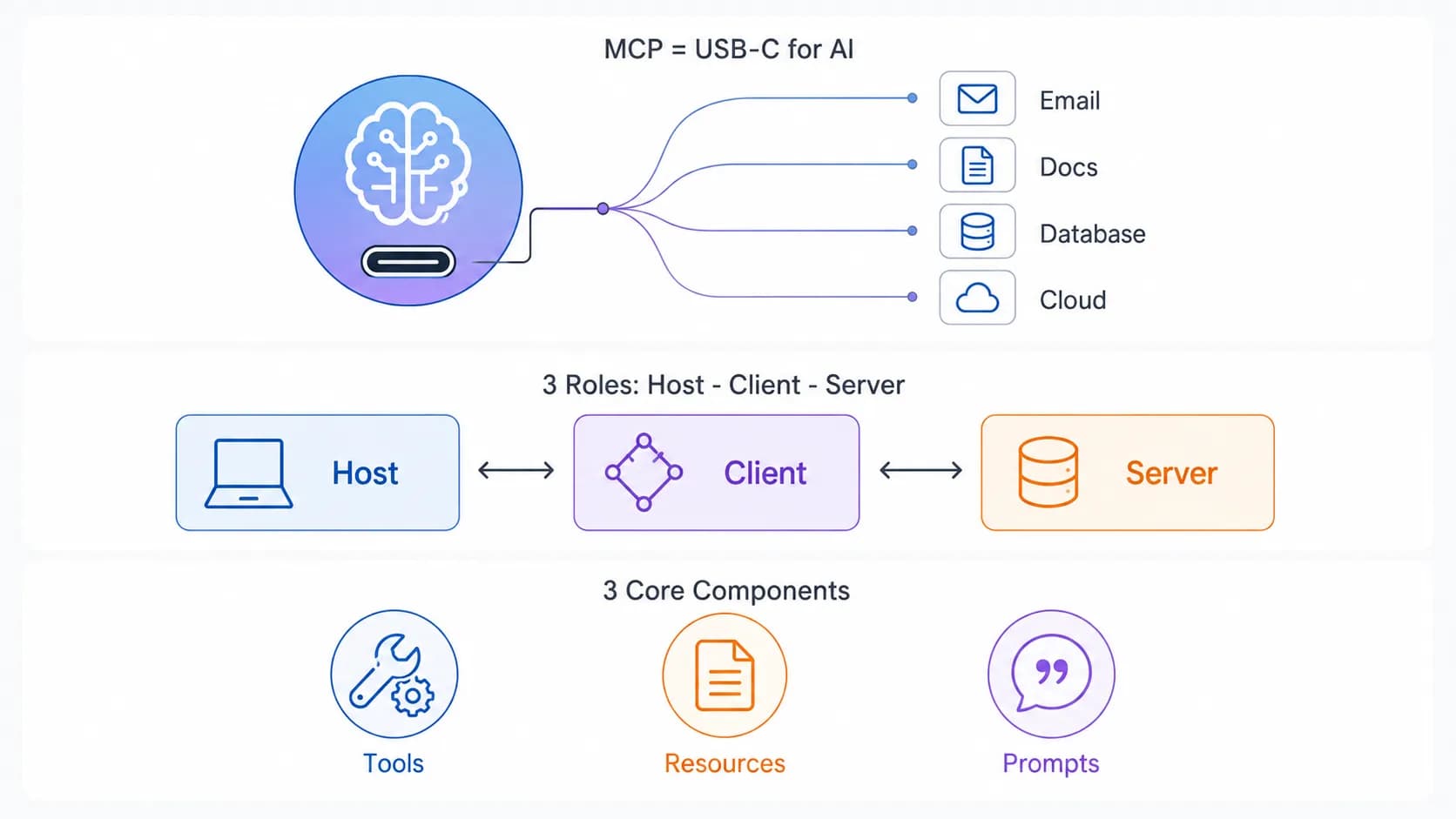
MCP acts as a standard connection port between AI models and external tools

How Does MCP Work?

Host-Client-Server Architecture

MCP is not just a simple two-tier client-server system as commonly thought, but actually defines three distinct roles:

  • Host: The AI application you interact with directly, such as Claude Desktop, Claude Code, or an AI-enabled IDE. Acting as the central orchestrator, the Host manages access permissions and security policies for the entire session.
  • Client: Created by the Host, each Client connects to exactly one Server and handles bidirectional communication between Host and Server.
  • Server: A server connecting directly to the native tool or platform (such as Google Drive, Slack, Email, Calendar, or Database). The Server exposes capabilities and executes actions for the AI.

When you connect 3 MCP servers in Claude Desktop, the Host is actually managing 3 distinct Clients, each speaking to its designated Server.

Three Core Primitives: Tools, Resources, Prompts

  • Tools: Executable functions that the AI can call to perform actions, such as send_email, create_issue, or search_database.
  • Resources: Data that the AI can read to supply context to the LLM, such as files, records, Notion pages, or database entries.
  • Prompts: Pre-built command templates supplied by the Server to guide the AI on how to use tools effectively for specific tasks or enable quick user triggers.

A Concrete Example

Suppose you ask Claude "Which recent email mentions contract ABC?". Claude Desktop (Host) initializes a Client connecting to the Gmail MCP Server. This Server calls the Gmail API to search for relevant emails and returns the result in standard MCP format. Claude reads the response and answers you in natural language. For multi-step workflows, like summarizing a YouTube video and saving the summary to Google Drive, Claude calls two different MCP Servers sequentially within the same task, requiring zero manual context switching from you.

How Does MCP Differ from Traditional APIs or Plugins?

Before MCP, if you wanted 5 different AI models (Claude, GPT, Gemini, Llama, Mistral) to connect to 5 services (Gmail, Slack, GitHub, Notion, Jira), you theoretically needed to write 25 separate integration pairs — an N×M problem.

MCP solves this problem by standardizing the protocol in the middle. We only need to write one MCP server, and every MCP-compliant AI model can use it immediately. The required integrations drop from N×M down to N+M.

  • Traditional Plugins: Each AI platform maintains its own plugin system (e.g., GPT Actions, custom Claude tool use), which cannot be used cross-platform.
  • Traditional APIs: Developers must read documentation, write custom API calling code, and handle authentication per service, typically limited to fixed request-response patterns.
  • MCP: A universal standard — write once and use across the entire MCP-supported AI ecosystem, featuring continuous bidirectional communication where AI can both pull data (read schedules) and push actions (create events) within a single session.

When Are Traditional APIs Still Better Than MCP?

MCP's flexibility does not mean it is always the best choice. For systems requiring absolute precision and deterministic behavior — such as banking operations like balance checks or wire transfers — traditional APIs with fixed, strictly controlled workflows remain safer. MCP is best suited when you need AI to autonomously decide which tool to call and in what order based on conversational context, rather than rigid transactions requiring strict risk control.

Why Is the Entire AI Industry Racing to Adopt MCP?

The adoption rate of MCP is unprecedented for a new tech standard. In March 2025, OpenAI officially supported MCP in its Agents SDK and ChatGPT Desktop, despite Anthropic being a direct competitor. By mid-2025, Google DeepMind integrated MCP into the Gemini API. Microsoft brought MCP support to VS Code Copilot, reaching General Availability in July 2025.

The biggest turning point occurred on December 9, 2025, when Anthropic handed MCP over to the Agentic AI Foundation (AAIF) under the Linux Foundation. OpenAI and Block co-founded the foundation, while AWS, Google, Microsoft, Cloudflare, and Bloomberg joined as platinum members. This signaled clearly that MCP was no longer Anthropic's proprietary technology, but shared infrastructure that even competitors wanted to build together.

By July 2026, MCP released its largest spec update to date (2026-07-28), moving the core protocol to stateless, adding an Extensions framework, and introducing OAuth/OpenID Connect authorization. This eliminated the final hurdles for enterprise production deployments. As of 2026, over 10,000 public MCP servers are running in production, and 28% of Fortune 500 companies have deployed custom internal MCP servers.

Practical Application: How to Use MCP with Claude

For Claude.ai or Claude Desktop users, connecting an MCP server requires no coding skills. Navigate to Settings → Extensions to view available MCP servers (Google Drive, Notion, Slack, GitHub, Asana...) or add a custom server via URL. Once connected, Claude automatically knows when to invoke specific tools based on your prompts.

Here are a few real-world use cases I use daily for 4AIVN editorial work:

  • Claude + Google Drive MCP: Ask directly "Find last week's Gemini 3.7 article outline" instead of searching Drive manually.
  • Claude + GitHub MCP: Review pull requests and read issues without leaving the chat window.
  • Claude + Notion MCP: Update the content calendar database while brainstorming article ideas.

MCP Will Undoubtedly Keep Growing

The most remarkable aspect of MCP is not the protocol itself, but how rapidly it is becoming an implicit standard when users evaluate AI tools. Just as laptop buyers now ask "Does it have USB-C?", in 1-2 years asking "Does this tool have an MCP server?" will likely become a key evaluation criterion for any SaaS or device. This is no longer just a game for OpenAI, Google, or Anthropic; any enterprise or product without MCP integration, regardless of how good it is, risks falling at a disadvantage as users grow accustomed to asking AI directly instead of opening apps manually.

For small and medium enterprises, including those in Vietnam, this represents an opportunity rather than pressure. Writing an MCP server does not demand massive infrastructure like building an AI model — wrapping an existing API according to MCP spec is enough for your product to "speak" with Claude, ChatGPT, or any MCP-compliant AI client. Early movers gain a clear competitive edge while user habits are still forming.
Discussion (0)

Log in to join the discussion.

No comments yet. Be the first!

Related Articles

AI Personalized Workout Planning via MCP Connector

The Model Context Protocol (MCP) standard developed by Anthropic has rapidly expanded into health wearables and smart sports watches. Strava launched the first official MCP connector for runners and cyclists, followed less than a month later by COROS releasing an official beta connector. Meanwhile, although Garmin has yet to release an official response, open-source community solutions like garmin_mcp demonstrate that full AI integration across fitness hardware is becoming mainstream.What is MCP and Why Fitness Brands are Racing to IntegrateMCP (Model Context Protocol) is an open protocol that allows Large Language Models (LLMs) like Claude, ChatGPT, and Gemini to directly interface with external real-time data sources and tools. Instead of providing generic advice based on manual text inputs, AI can read your entire personal activity history.For athletes, instead of opening apps, filtering heart rate graphs, and comparing metrics manually, you can simply ask AI: "Did my training load increase or decrease this week compared to last week?" or "Was my Easy Run pace optimal for recovery?". AI provides precise feedback backed by personal metrics, acting like a 24/7 personal coach.Strava MCP: Ecosystem Pioneer and API TighteningThe wearable MCP race escalated on June 1, 2026, when Strava debuted its official read-only MCP connector for paid subscribers. Secured by OAuth authentication, AI models can inspect workouts, GPS tracks, elevation, and power meter data.Thanks to open MCP standards, Strava MCP integrates seamlessly with Anthropic tools like Claude Cowork and Claude Code. Concurrently, Strava tightened third-party API terms by implementing monthly fees and 90-day limits on select endpoints to prevent uncompensated AI scraping.Strava MCP currently operates strictly in Read-Only mode for maximum security. AI can analyze numbers but cannot edit, delete, or create workouts inside your Strava account.Coros MCP Beta: Fast Setup with Data LimitationsJoining the movement, COROS launched an official MCP Beta in May 2026, linking COROS accounts directly to Claude and ChatGPT. Setup is simple: copy your regional MCP URL (e.g., https://mcp.coros.com/mcp), paste it into Claude Connectors or ChatGPT Developer Mode, and authorize.However, Coros MCP has key limitations:Data Granularity: Provides workout-level summaries only, lacking lap-by-lap or second-by-second telemetry.Permissions: Strictly Read-Only, unable to push workouts or schedules to watches.Platform Compatibility: Requires paid ChatGPT accounts, while Web Gemini lacks custom MCP connector support (requiring Gemini CLI).Garmin garmin_mcp: Powerful 110-Tool Community SolutionGarmin — the market leader in sports watches — has not released an official MCP connector. However, open-source developers filled this gap with the garmin_mcp project by Taxuspt on GitHub.With over 1,000 stars and 324 forks, garmin_mcp on GitHub packs over 110 tools covering 90% of python-garminconnect. It enables features unsupported by official read-only connectors:Analyze power zone distribution from your latest ride.Compare CTL (Chronic Training Load), ATL (Acute Training Load), and TSB (Training Stress Balance) over 6 weeks.Generate walk-run interval workouts and automatically sync schedules straight into Garmin Connect.Because garmin_mcp is community-built, users authenticate with Garmin Connect credentials via third-party libraries. Exercise caution before sharing account credentials.In March 2026, Garmin updated API authentication, temporarily breaking garth and python-garminconnect. This highlights the risk of unofficial MCP tools: reliance on unannounced endpoints means service can break whenever Garmin updates system APIs.Side-by-Side Comparison: Strava vs Coros vs Garmin MCPHere is a concise comparison of current MCP integration paths:Strava MCP (Official): Read-Only | Paid Subscriber | Activity, GPS, Power | High OAuth Security | No sleep, HRV, or recovery metrics.Coros MCP (Official Beta): Read-Only | Paid AI Account | Workout Summaries | Easy URL Setup | No lap or second-by-second data.Garmin garmin_mcp (Community): Read & Write | Open Source | 110+ Tools, CTL/ATL/TSB, Workout Builder | Most Feature-Rich | Uncertified, risk of broken APIs and credential storage.How to Get Started with Your Current Fitness WearableIf you use Strava or Coros, setup is effortless: navigate to Connector Settings in Claude.ai (or ChatGPT Developer Mode), paste the official MCP link, and authenticate.For Garmin users eager for AI features, install Taxuspt's garmin-mcp.dxt extension in Claude Desktop. Authenticate once via garmin-mcp-auth to store an OAuth Token, allowing seamless AI chats without re-entering passwords. This provides a powerful interim solution until Garmin releases an official MCP server.

Liên
19 Aug, 2026
Hermes Agent and MCP: Automate Real Workflows

An AI agent may plan extremely well, yet it still cannot update Notion, read GitHub issues, or retrieve reports from Google Drive without the right connection. By combining Hermes Agent with MCP, users can turn a conversation into a practical workflow while clearly controlling which tools and permissions the agent may use. If you are not yet familiar with Hermes memory and its ability to create skills, our guide to what Hermes Agent is provides the necessary foundation. This article focuses on how MCP extends Hermes beyond the terminal so it can work with everyday data and services. What does MCP add to Hermes Agent? MCP is a connection standard between an AI application and a server that provides tools or data. It can be understood as an adapter layer: Hermes remains the agent responsible for understanding the goal and choosing the next step, while each MCP server contributes specific actions such as searching Notion, reading a pull request, creating an issue, or querying files. According to the Hermes Agent MCP documentation, Hermes supports local servers over stdio and remote servers over HTTP. At startup or after a configuration reload, Hermes discovers the tools exposed by each server and registers them in its normal tool system. Users therefore do not need to write a native Hermes tool for every service that already has a suitable MCP server. MCP does not automatically make a workflow safe. A server may expose tools that read, write, create, and delete data. Hermes supports filtering per server, allowing users to enable only the operations they need instead of exposing every capability to the model. How to connect MCP without granting excessive access The standard Hermes installation already includes MCP support. Users can open the picker with hermes mcp, view the catalog with hermes mcp catalog, and test a connection with hermes mcp test. Nous Research reviews entries before they enter the Hermes catalog, but its documentation still recommends reading the manifest, source repository, and installation commands before use. For a server outside the catalog, users can add an HTTP connection or a stdio command to config.yaml. After completing OAuth or configuring the required environment variables, reload MCP and ask Hermes to list the available tools. This simple check reveals servers that failed to connect or tools that were accidentally filtered out. Begin with read access The safest setup is to connect one server, enable read only tools, and test with nonsensitive data. Add create or update permissions only after results are stable. Deletion, sharing changes, and outbound publishing should require human approval. Notion initially needs only search and page reading access. GitHub can be limited to reading repositories, issues, and pull requests. Google Drive access should be limited by folder, account, and required OAuth scope. Three practical workflows with Notion, GitHub, and Google Drive Turn Notion into a knowledge center The official Notion MCP allows an agent to search, read, and update workspace content under the authenticated user's permissions. A useful workflow lets Hermes collect meeting notes, find relevant decisions, and prepare a summary on the project page. Hermes can create a draft first so a user can review it before updating status or assigning work. Notion MCP uses user based OAuth, so it does not fit every unattended process. For scheduled automation, verify how the server maintains authentication and avoid designing a workflow around operations that OAuth cannot support in a headless environment. Coordinate development work through GitHub The GitHub MCP Server is provided and maintained by GitHub, allowing AI tools to work with software development data according to account permissions. Hermes can read new issues, compare them with repository changes, and draft a progress report. It can then prepare issue text or release notes while waiting for an owner to approve the write operation. This workflow works best with clear criteria. For example, Hermes can summarize only pull requests merged during the previous seven days, group them by label, and connect each change to its related issue. A second MCP server can then send the result to Notion as a weekly report. Summarize files and reports from Google Drive With a compatible Google Workspace MCP server, Hermes can find Drive files, read permitted content, and feed data into a reporting process. For example, the agent can locate a sales report in a fixed folder, extract selected metrics, and create a summary for Notion or a GitHub issue. Google collects its official MCP projects in the Google MCP repository, including a path for Google Workspace integration. However, several community Drive servers have different maintenance histories. Check the source, update history, and OAuth scopes of the specific server instead of installing one based only on its name. Combine multiple MCP servers into a controlled workflow A complete workflow can begin in GitHub, use Drive as a data source, and finish in Notion. Hermes reads an issue labeled for reporting, finds the corresponding spreadsheet in Drive, produces a summary, and updates the project page. Each stage uses a different MCP tool group, while Hermes plans the sequence and passes results between stages. Do not enable parallel execution merely because a server supports it. Hermes documentation allows servers to declare parallel tool support but warns that operations reading and writing shared state can conflict. Independent read operations may run together, while Notion updates, issue creation, and file changes should remain sequential. Important: An MCP server is software that can run commands and receive credentials. Install only trusted servers, keep tokens out of prompts, filter dangerous tools, and require approval for deleting, sharing, or publishing data. How should you start the first workflow? Do not connect Notion, GitHub, and Google Drive on the same day and immediately assign a critical process. Choose one input, one output, and one completion criterion that is easy to verify. A first workflow could read closed GitHub issues and create a draft report in Notion without deletion or publishing permissions. After several stable runs, you can turn the procedure into a reusable Hermes skill and add a schedule. The real value of MCP is not the number of connected servers. It is the ability to complete a recurring workflow with a small permission surface, verifiable results, and a clear data path.

Nam
16 Jul, 2026
Did Kimi K3 pressure OpenAI into cutting GPT-5.6 API prices by 80%?

Just two weeks after Kimi K3 launched, OpenAI cut GPT-5.6 Luna API pricing by as much as 80%. This is not proof that OpenAI reacted directly to Kimi K3, but it is a clear sign that the 2026 AI race is shifting from "who is smarter" to "who delivers comparable performance for less". OpenAI cuts API prices sharply, with Luna down 80% Beginning July 30, OpenAI adjusted API pricing across the GPT-5.6 lineup. GPT-5.6 Luna, the fastest and lowest-priced tier of the three, fell by 80% to $0.20 per million input tokens and $1.20 per million output tokens. Terra, the balanced tier for everyday work, fell by 20% to $2/$12 per million input/output tokens. GPT-5.6 Sol, the family flagship, keeps the same price but adds Fast mode in place of Priority Processing. OpenAI says Fast mode is up to 2.5 times faster than Standard at twice the price, with no change in model intelligence. The new pricing is also reflected in credit usage for ChatGPT Work and Codex. Terra and Luna users on those plans consume fewer credits for the same workload, although subscription prices do not change. See the details in OpenAI's official pricing announcement. Is OpenAI under pressure from Kimi K3? OpenAI does not mention Kimi K3 in its announcement, so the price cuts cannot be attributed to that model alone. Still, the timing of the two events makes the market-pressure argument worth examining. On July 16, Moonshot AI launched Kimi K3, an open-weight model with a one-million-token context window. Within days, Kimi K3 drew attention from developers for competitive API pricing and performance that exceeded expectations for an open-weight release. Where does Kimi K3 approach GPT-5.6 Sol? On several benchmarks, Kimi K3 comes close to the max version of GPT-5.6 Sol. The overall gap remains, but it is far smaller than many expected from an open-weight model. Kimi K3 also leads on several specific measurements, including FrontierSWE, BrowseComp, and Frontend Code Arena, while its API is priced at $3/$15 per million input/output tokens, below Sol. Sol still leads on many aggregate benchmarks and its Ultra multi-agent mode scored 91.9% on Terminal-Bench 2.1. Even so, an open-weight model approaching OpenAI's closed flagship at a lower price creates real competitive pressure, especially for enterprises and developers sensitive to long-term operating costs. Compare current models in the 4AIVN rankings. Linking the price cuts to Kimi K3 is an interpretation based on timing and market context, not an official confirmation from OpenAI. AI pricing across the industry is changing Kimi K3 is not the only source of pressure. DeepSeek continues to pursue a low-price strategy: DeepSeek V4 Flash is listed at $0.14/$0.28 per million tokens, while DeepSeek V4 Pro is listed at $0.435/$0.87; both have one-million-token context windows. Even after an 80% cut, GPT-5.6 Luna at $0.20/$1.20 remains more expensive than DeepSeek V4 Flash on output tokens, although the gap has narrowed substantially. OpenAI's change therefore fits a broader trend rather than a one-off response to Kimi K3. Chinese labs are pushing prices lower while maintaining competitive performance, forcing US companies to optimize pricing strategies faster than before. How do users benefit? For ChatGPT users who do not use the API, there is little direct impact because subscription prices are unchanged. For teams building applications, chatbots, or automated agents on GPT-5.6, however, the difference is meaningful. Tools such as Hermes Agent, which lets users choose GPT-5.6 Sol, Terra, or Luna as the base model, can reduce operating costs when each tier is matched to the right task. Luna suits repetitive, high-volume work that does not need complex reasoning.Terra is the balanced choice for everyday work and general-purpose assistants.Sol remains the better choice when accuracy and deeper reasoning are the priority. 4AIVN's view The capability gap among leading models is narrowing faster than the price gap. When an open-weight model such as Kimi K3 can approach a top closed model, major companies must choose between protecting margins and retaining enterprise customers. OpenAI's move suggests it is prioritizing stronger performance per dollar, at least for Luna and Terra. If you operate an application or agent on the GPT-5.6 API, this is a good time to redistribute work across Sol, Terra, and Luna rather than using one model for every task. The price difference between the three tiers is now large enough that matching the model to the task is a genuine cost-optimization decision, not merely a technical preference.

Liên
31 Jul, 2026
Claude Opus 5 Launches, Closing In on Fable 5

Anthropic has launched Claude Opus 5 at the same price as Opus 4.8 while raising response quality close to Fable 5, a model that costs twice as much. In other words, with near-Fable performance at half the price, most users will likely choose Opus 5 as their default and reserve Fable 5 for the small number of tasks that truly require the highest capability ceiling. What upgrades does Claude Opus 5 bring? According to Anthropic's launch announcement, Claude Opus 5 is the most capable Opus model to date and the first Opus release in the Claude 5 generation. Anthropic describes it as proactive and capable of deep reasoning, approaching the highest intelligence of Claude Fable 5 across many domains while using only half the token budget. The API model ID is claude-opus-5. Like Opus 4.8 and Fable 5, it has a default and maximum context window of one million tokens, a 128,000-token output limit, and thinking enabled by default. It has become the default model on Claude Max and the most powerful model available on Claude Pro. It is also offered through the Claude API, Amazon Bedrock, Google Cloud, Microsoft Foundry, and GitHub Copilot. Why will many users choose Opus 5 over Fable 5? The answer is not limited to price. Four factors make Opus 5 likely to become the default choice for daily work while Fable 5 moves into a specialized role for a small number of exceptional cases. It wins more real-world evaluations than it loses On Frontier-Bench v0.1, Anthropic's automated coding evaluation, Opus 5 scores 43.3% while Fable 5 reaches only 33.7%, a gap of almost ten points in favor of Opus 5. On CursorBench 3.2 at maximum effort, Opus 5 reaches about 70.1%, less than half a percentage point behind Fable 5 while costing only half as much. Across evaluations where both models have published results, Opus 5 wins more often than it loses, and its victories are generally larger than its defeats. The fastest way to verify this is to run the same task on both models at comparable effort levels and compare the output quality instead of relying only on published benchmarks. No mandatory 30-day data retention Fable 5 and Mythos 5 are Covered Models that require prompts and outputs to be retained for 30 days for safety purposes. They do not support zero data retention (ZDR) on any platform, even when an organization already has a ZDR agreement. Opus 5, by contrast, can still operate under ZDR like Opus 4.8. For teams handling legal, medical, or financial data, this difference alone may remove Fable 5 from consideration without any performance comparison. Fewer interruptions from safety filters Anthropic says the cybersecurity classifier intervenes about 85% less often with Opus 5 than with Fable 5. For coding agents that run for hours or overnight, a request being blocked midway because it touches a safety threshold is a real workflow risk, and Opus 5 significantly reduces that frequency. Adjustable effort makes budgets easier to predict Opus 5 supports adaptive thinking with effort ranging from low to maximum. Low or medium works for fast responses and high-volume workloads, while high or maximum suits complex coding, deep research, and multi-step workflows. Because teams pay according to the selected effort instead of being locked into a fixed Fable 5 cost level, they can optimize the budget for each task rather than paying the highest rate on every request. Initial impressions after trying Opus 5 After using Opus 5 for daily writing and coding work, the clearest impression is that it is substantially smarter than Opus 4.8, especially in understanding intent on the first request without repeated explanation. For tasks such as summarizing long documents, writing code with complex branching logic, or preparing a multi-step plan, Opus 5 works smoothly and loses the thread less often than the earlier version. There is still a gap compared with Fable 5, although it is smaller than expected. On work that demands deep reasoning or autonomous execution across many consecutive steps without intervention, Fable 5 remains slightly more dependable and makes fewer mistakes. For most daily work, however, that difference is difficult to notice without placing both models side by side. If you are using Opus 4.8, this is a sensible time to upgrade. If you are choosing between Opus 5 and Fable 5 for ordinary work, Opus 5 is almost certainly sufficient without paying the premium. When is Fable 5 still the right choice? Fable 5 retains an advantage on the hardest work. On SWE-bench Pro, which uses real GitHub issues and is considered one of the strictest measures of practical coding, Fable 5 scores about 80% while Opus 5 reaches roughly 79%, a small gap that still favors Fable. Fable 5 is also the only model Anthropic positions in the Mythos class, meaning its overall capability is designed to exceed Opus. This distinction is clearest in specialized fields such as expert medical analysis and autonomous research that continues for days without supervision. In other words, Opus 5 wins in daily coding and knowledge work, while Fable 5 retains its edge on the hardest problems and fields requiring the highest possible reliability. For most users and small teams, those problems represent a small portion of daily work, making the twofold price difference difficult to justify unless their workload falls directly into that category. Quick comparison: Opus 5 vs. Fable 5 CriterionClaude Opus 5Claude Fable 5 Input price$5/million tokens$10/million tokens Output price$25/million tokens$50/million tokens Context1 million tokens1 million tokens Maximum output128,000 tokens128,000 tokens Frontier-Bench v0.1 (coding agent)43.3%33.7% SWE-bench Pro (practical coding)~79%~80% Data retentionSupports zero data retentionMandatory 30-day retention, no ZDR Safety-filter interventionAbout 85% lowerHigher Best fitDaily work, coding agents, sensitive dataDifficult research, multi-day autonomous projects, specialized medical analysis Can Opus 5 really compete with GPT-5.6? On paper, the answer is yes, but not across every category. Opus 5 leads GPT-5.6 Sol in reasoning about novel situations, computer use, and most public coding evaluations, while GPT-5.6 Sol remains ahead on some command-line and information-retrieval tests. Neither wins outright, but for the first time a mid-priced Anthropic model stands level with, and in several areas ahead of, OpenAI's flagship model. The more useful question is not which model is stronger overall but which one fits your work. If daily tasks center on code, long documents, and multi-step execution, Opus 5 is a compelling choice on both price and quality. If you already rely on the OpenAI ecosystem or need a specific GPT-5.6 strength, the switching cost may not be worthwhile. The most reliable answer is still to run the same job on both models, because benchmark tables do not always reflect real experience.

Nam
25 Jul, 2026