4AIVN
Back to News

Gặp gỡ SIMA 2 – Trợ lý AI chơi game có thể suy nghĩ như người thật!
Published on 17 November, 2025
Gặp gỡ SIMA 2 – Trợ lý AI chơi game có thể suy nghĩ như người thật!

Quick Summary

Google DeepMind giới thiệu SIMA 2, tác nhân AI đa năng với lõi Gemini 2.5 Flash Lite, có khả năng suy nghĩ, lý luận và tự học trong thế giới ảo 3D. SIMA 2 đạt hiệu suất 65% trong các nhiệm vụ phức tạp, cải thiện đáng kể so với SIMA 1 và tiệm cận khả năng của con người. Nó có thể hiểu nhiều dạng chỉ dẫn (văn bản, giọng nói, biểu tượng cảm xúc) và các ngôn ngữ khác nhau, đồng thời khái quát hóa kiến thức giữa các trò chơi. SIMA 2 còn tự cải thiện hiệu suất qua cơ chế học hỏi thử-và-sai. Đây là bước tiến quan trọng hướng tới Trí tuệ nhân tạo tổng quát (AGI) và ứng dụng trong robot thực tế.

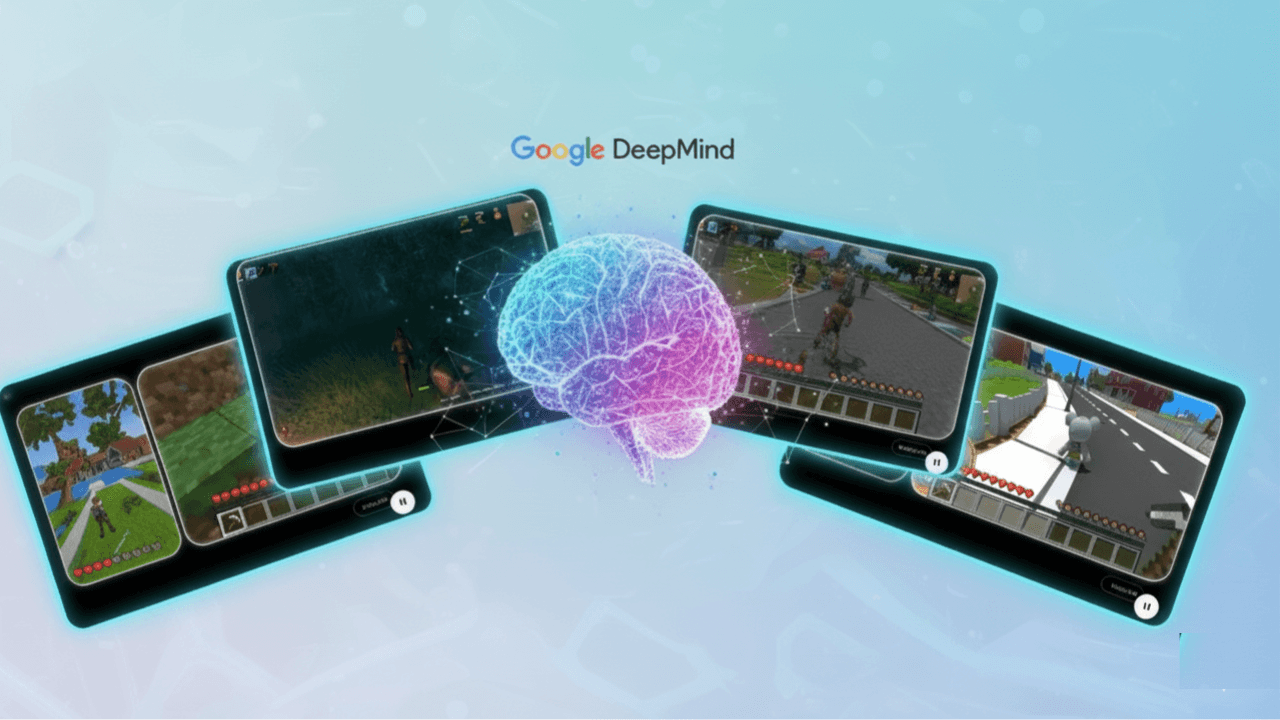
Bạn đã từng chơi game cùng một đồng đội AI (bot) hoặc NPC chỉ biết làm theo lệnh cứng nhắc? Hãy quên điều đó đi! Google DeepMind vừa công bố SIMA 2 (viết tắt của Scalable Instructable Multiworld Agent) tiếp nối SIMA 1, một tác nhân AI thế hệ mới, đa năng, được thiết kế để không chỉ chơi game mà còn suy nghĩ, lý luận và tự học trong các thế giới ảo 3D phức tạp.

Việc ra mắt SIMA 2 có thể được coi là một cột mốc quan trọng, đưa chúng ta tiến gần hơn đến trí tuệ nhân tạo tổng quát (AGI). AGI luôn luôn là mục tiêu tối thượng của toàn bộ các ông lớn như Google, Open AI, Microsoft tạo ra hệ thống AI có thể thực hiện nhiều loại nhiệm vụ trí tuệ khác nhau, giống như con người.

Nâng cấp bộ não với sức mạnh Gemini 2.5 Flash Lite

SIMA 2 đã được nhận được cập nhật lớn về trí tuệ nhờ được tích hợp mô hình ngôn ngữ lớn Gemini 2.5 Flash Lite làm lõi suy luận. Điều này đã giúp SIMA từ một tác nhân AI chỉ biết "thực hiện chỉ thị" (instruction-follower) thành một người bạn đồng hành hơn.

Tỷ lệ hoàn thành nhiệm vụ

Nguồn: Google DeepMind

SIMA 2 thông minh hơn SIMA 1 so sánh với con người như thế nào?

  • SIMA 1 (ra mắt năm 2024) chỉ đạt tỷ lệ hoàn thành các nhiệm vụ phức tạp khoảng 31%.
  • SIMA 2 đã tăng gấp đôi hiệu suất, đạt mức trung bình 65% tỷ lệ hoàn thành nhiệm vụ trên bộ đánh giá chính, tiệm cận với khả năng của con người (khoảng 76%).

Khả năng suy nghĩ thật sự (Không phải hành động lặp lại)

Nhờ có Gemini, SIMA 2 sở hữu khả năng lý luận trừu tượng mà các bot trước đây không làm được. Nó không chỉ làm theo lệnh mà còn hình thành kế hoạch nội bộ và giải thích các bước hành động của mình.

Nhìn ví dụ về lý luận dưới đây: Nếu bạn đang chơi game và nói: "Hãy đi đến ngôi nhà có màu giống quả cà chua chín".

  • Một bot cũ sẽ bị "đứng hình" vì bạn không nói màu cụ thể, nhưng đối với SIMA 2 thì nó sẽ sử dụng lõi Gemini để suy luận: "Quả cà chua chín có màu đỏ. Vậy mình phải tìm và đi đến ngôi nhà màu đỏ".
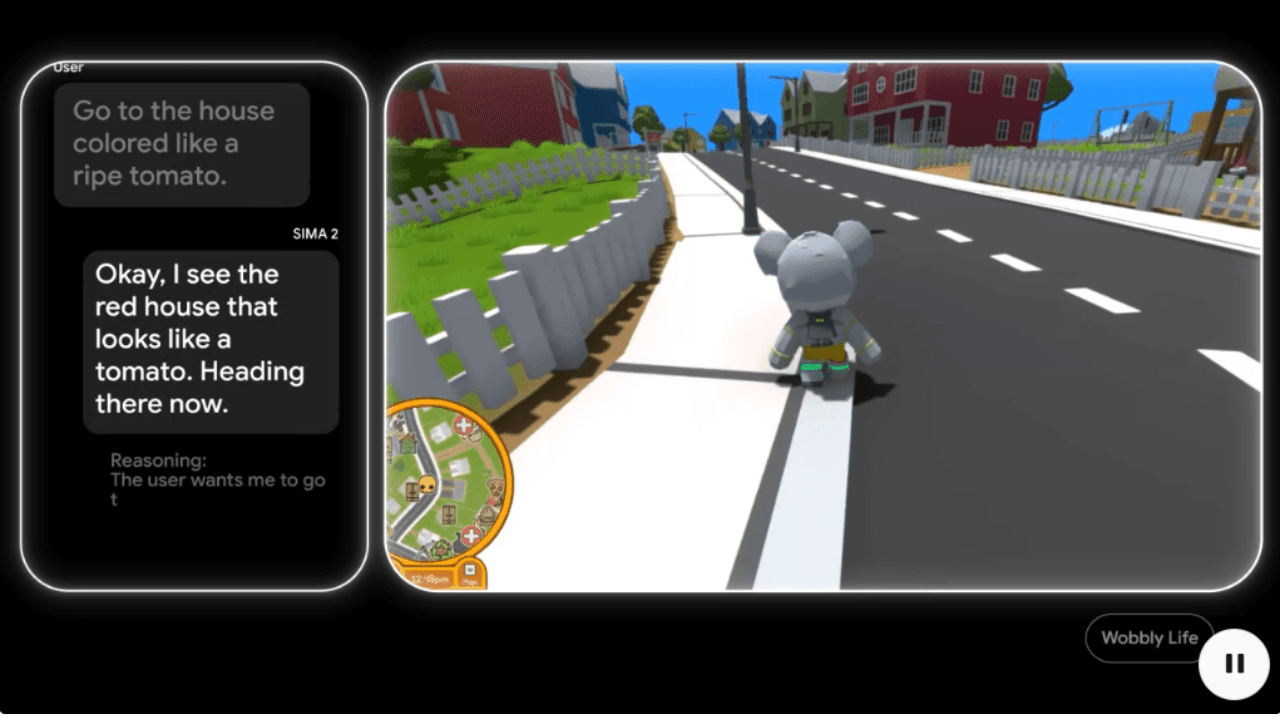
Ví dụ SIMA 2 hiểu ngôi nhà màu đỏ
SIMA 2 Agent

SIMA 2 thực hiện các hành động này bằng cách quan sát hình ảnh trên màn hình và sử dụng bàn phím/chuột ảo để điều khiển nhân vật hoặc công cụ mô phỏng hành vi giống hệt như một người chơi bình thường. Đây là lý do tại sao nó được gọi là một tác nhân hiện thân (embodied agent)—một hệ thống tương tác cho phép AI cảm nhận trong thế giới ảo (hoặc thực) và tất nhiên là có đi kèm với điểm hiệu suất sau đó.

Có thể hiểu nhiều thứ: từ ngôn ngữ đến biểu tượng cảm xúc (Emojis)

Với sự hỗ trợ của Gemini thì SIMA 2 có thể hiểu vượt xa giới hạn của ngôn ngữ văn bản đơn thuần, cho phép người dùng giao tiếp với nó bằng nhiều cách thức đa dạng:

  • Chỉ dẫn đa phương thức: Nó có thể tuân theo các lệnh bằng văn bản, giọng nói, các bản phác thảo trên màn hình, và thậm chí là biểu tượng cảm xúc (emojis).
    • Ví dụ: Bạn chỉ cần nhập tổ hợp 🪓🌲 (cây rìu và cây thông), và SIMA 2 sẽ hiểu đó là lệnh "đi chặt cây".
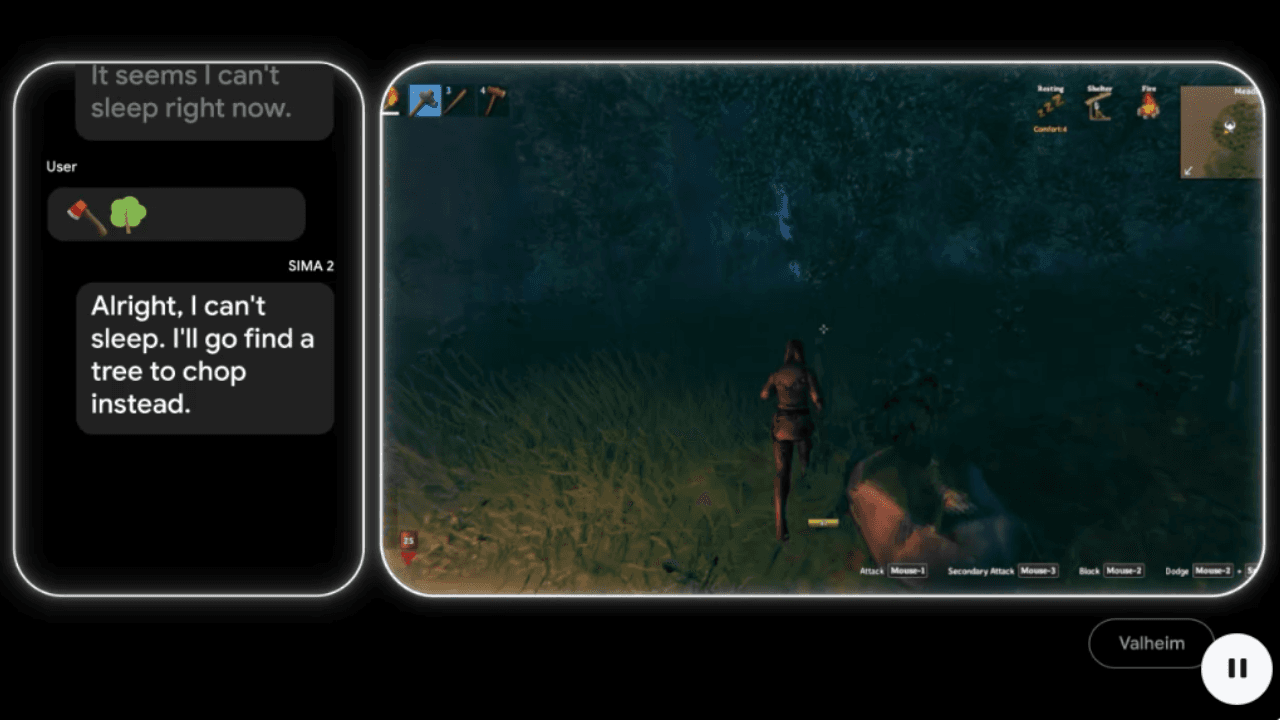
Ví dụ SIMA 2 hiểu Emoji
SIMA 2 Agent
  • Đa ngôn ngữ: Tất nhiên SIMA 2 còn có khả năng hiểu và thực hiện các lệnh bằng nhiều ngôn ngữ tự nhiên khác nhau như tiếng Pháp, tiếng Trung, tiếng Đức và tiếng Tây Ban Nha.
  • Khái quát hóa: SIMA 2 có khả năng chuyển đổi các khái niệm trừu tượng đã học được từ một trò chơi sang một trò chơi hoàn toàn khác.
    • Ví dụ: Nếu nó học cách "khai thác" quặng trong một game sinh tồn, nó có thể áp dụng ngay khái niệm đó để thực hiện lệnh "khai thác" trong một game Minecraft. Hoặc cũng có thể mở rộng ra với các tựa game phổ biến như PUBG tự động loot đồ, hoặc LOL tự động farm quái kiếm kinh nghiệm lên cấp.
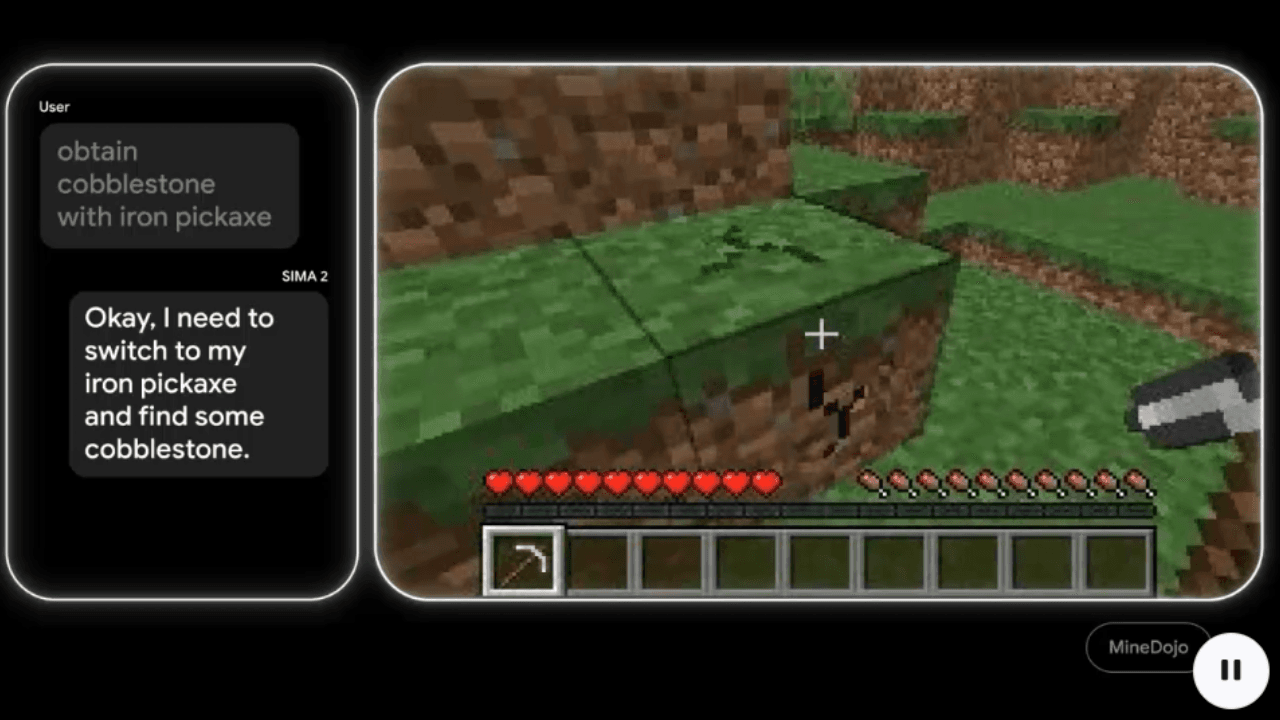
  • Ví dụ SIMA 2 sự khái quát
    SIMA 2 Agent

    Tự học hỏi không cần đến sự hướng dẫn của con người

    Một trong những đóng góp nghiên cứu quan trọng nhất của SIMA 2 là cơ chế tự cải thiện.

    Thay vì chỉ dựa vào dữ liệu người chơi cung cấp, sau giai đoạn đào tạo ban đầu, SIMA 2 có thể tự chuyển sang chế độ học hỏi thông qua thử và sai (trial-and-error).

    • Quá trình tự học: Một mô hình Gemini riêng biệt sẽ tạo ra các nhiệm vụ mới cho SIMA 2 trong môi trường ảo, và một mô hình đánh giá (reward model) sẽ chấm điểm hiệu suất của nó.
    • Kết quả: Những trải nghiệm của chính nó, mà dân gian hay gọi là "Mỡ nó rán nó" sẽ được lưu trữ và dùng để huấn luyện các phiên bản SIMA 2 sau, giúp tác nhân tự nâng cao hiệu suất mà không cần thêm dữ liệu đầu vào, hoặc sự hỗ trợ từ con người.

    Bộ phận DeepMind của Google đã kiểm tra SIMA 2 trong các thế giới 3D hoàn toàn mới, được tạo ra theo thủ tục bằng mô hình Genie 3 (mô hình tạo thế giới ảo tương tác từ văn bản hoặc hình ảnh). SIMA 2 đã thành công trong việc điều hướng, nhận diện vật thể (như ghế dài hay hoa hoặc cả máy bay), và thực hiện các hành động được yêu cầu trong những thế giới hoàn toàn xa lạ này.

    Video DeepMind về SIMA 2

    Tương lai không chỉ là game mà hướng đến AGI và robot

    Mục tiêu của Google DeepMind không phải chỉ là tạo ra một Faker AI mới trong làng game mà họ xem các trò chơi điện tử là môi trường đủ sự an toàn và phức tạp để xây dựng và thử nghiệm sự thích nghi của AI.

    Các kỹ năng cấp cao mà SIMA 2 học được trong môi trường ảo như điều hướng không gian, sử dụng công cụ và tự hợp tác để giải quyết vấn đề là những thành phần cơ bản cần thiết cho các ứng dụng robot và xe tự lái trong thế giới thực.

    Giống như việc bạn cần hiểu “tủ lạnh” và "bát đũa" là gì và cách di chuyển trong nhà để lấy chúng, robot cũng cần học rất nhiều về điều này khi mà sư chính xác được đặt lên hàng đầu hiện nay những robot như vậy hoàn toàn do con người điều khiển vì vậy chắc chắn SIMA 2 sẽ tập trung vào việc học những hành vi cần độ chính xác cao này.

    Vậy SIMA 2 chính là minh chứng cho việc các ông lớn như Google chắc chắn chưa thay đổi mục tiêu AGI của họ, từ đó chắc chắn tạo ra tương lai AI có thể tương tác và hỗ trợ chúng ta trong nhiều lĩnh vực hơn nữa.
    Discussion (0)

    Log in to join the discussion.

    No comments yet. Be the first!

    Related Articles

    Gemini powers Argentina and Messi at World Cup 2026

    Gemini has won big in the most literal sense, right as Messi scored his first hat-trick at the 2026 World Cup, leading Argentina to a crushing 3-0 victory over Algeria and equaling Miroslav Klose's record of 16 World Cup goals. That historic moment became the perfect launchpad for Gemini. Back in March 2026, Google and the Argentine Football Association (AFA) made a bold decision: rather than simply printing a logo on training kits, they signed a deal for the AI to actively support tactical preparation and professional decision-making. That bet has now proven to be the right call. From training kit to the tactical meeting room The agreement between AFA and Google was unveiled at Times Square, New York, a venue deliberately chosen to capture global media attention. The Gemini logo appears across all training apparel for Argentina's men's, women's and youth squads, sitting alongside Adidas and American Express in AFA's top sponsorship tier. But the interesting part isn't the jersey. According to Inside World Football, Argentina's coaching staff will use Gemini for three specific purposes: tactical analysis, injury prevention and decision support. In other words, Gemini now has a seat in meetings that previously belonged only to Scaloni and his assistants. Google has not publicly disclosed which specific Gemini tools have been integrated into AFA's workflow. What is clear is that they are using the World Cup to bring Gemini into the reality of professional football, and the results will be graded in public. What is Gemini actually doing in the dressing room? Argentina arrives at the 2026 World Cup as the reigning champion. Every decision Scaloni makes, from the squad list to the starting eleven, is scrutinized more closely than any other team, and that is precisely why Argentina has become the most ideal testing ground Google has ever had for Gemini in professional football, especially at a major tournament. Tactical analysis Gemini is used to process match data for both Argentina and their opponents, covering movement statistics, attacking patterns and defensive vulnerabilities. Instead of the coaching staff spending hours reviewing footage, AI synthesizes the data and generates tactical diagrams automatically, saving significant preparation time before each match. Injury prevention This is a problem every major team wants to solve, especially when Messi and several key players are at an age that requires careful management of training loads. Gemini analyzes biometric data and injury history to issue early warnings, helping the coaching staff adjust intensity before problems actually occur. That is part of the reason why, immediately after completing his hat-trick, Scaloni chose to substitute Messi off, prioritizing fitness and safety for the matches ahead. AI in injury prevention is nothing new. Premier League clubs have had Microsoft as a partner for similar purposes. What is different this time is that Gemini is integrated directly into the workflow of a national team competing at a major tournament, not just at club level. For fans: create Messi content, follow scores without unlocking your screen Alongside supporting the coaching staff, Gemini has also rolled out a range of features aimed at fans, and this is the side that hundreds of millions of people will actually experience. Gemini lets you create content about players directly Users can generate images, songs and digital content featuring Argentina players like Messi directly inside the Gemini app. The feature is designed to bring the World Cup experience closer to those who cannot attend matches in person. Real-time scores and automated daily briefings On Google Search, live match scores can be pinned to the lock screen and update in real time, with dedicated animations for goals and red cards, all without needing to unlock the phone. For paid Gemini users, the Scheduled Actions feature allows an automated daily football briefing to be set up, covering scores, news and fixtures, delivered at a chosen time without needing to prompt it each day. Match-day infrastructure Google has updated Street View at all 16 host stadiums and optimized routing on Waze for match days. Waze also surfaces live scores when the car is stopped at red lights, so drivers do not need to pick up their phones while on the move. The 2026 World Cup is the real test for AI in sport Google is not sponsoring Argentina alone. Gemini also appears on the kits of France, Morocco, Iraq, Turkey and the United States, while Pixel is the official phone of the French squad, which is also using Gemini for internal communications. This is clearly a comprehensive strategy from Google, not a one-off deal. What makes the 2026 World Cup particularly significant is that it will answer a question no lab environment can: what do users actually do with AI when a World Cup runs for six weeks across 104 matches? Features that run on initial novelty will fade after the group stage. Whatever users keep coming back to all the way through the final is the honest answer to where AI actually fits in everyday life, and Google knows it. Google's communications director for Latin America, Flor Sabatini, stated that the 2026 World Cup will mark a before and after in the history of football because of AI. It sounds like marketing, but the reality is that this is the first time a major AI model has been integrated into the preparation of the reigning world champions, right in the middle of the most-watched sporting event on the planet. The 2026 World Cup is Gemini's real test The most significant part of this entire story is not the Gemini logo on Messi's jersey. It is the fact that Argentina, still the most expected to win and the most scrutinized team, carrying the pressure of defending the title, has committed part of its preparation process to AI. If Argentina succeeds, Gemini will have a case study that no advertising budget can buy. If Argentina falls short and the coaching staff attributes any part of it to AI, the narrative will flip entirely. Either way, this is the first time AI has been held accountable on a stage that genuinely matters, not a benchmark, not a demo, but the World Cup. For AI users, what is worth watching is not just whether Argentina wins, but whether Gemini actually changes how a football team operates, or whether it turns out to be nothing more than a logo on a training kit that looks better than previous years.

    Nam
    17 Jun, 2026
    Create a free mini app with just a few clicks using Google AI Studio

    Artificial intelligence (AI) is fundamentally changing how people build applications. You no longer need to be a professional developer. With a smart AI assistant, you can turn any idea into a real product. Google AI Studio is the clearest proof of that shift. The platform lets anyone, even without coding knowledge, build their own app. With the latest update, creating an AI app is as simple as having a natural conversation: describe your idea in plain language, and let AI handle the rest. Google AI Studio: Build AI apps without code and create Android apps with ease Google AI Studio is a browser-based development environment designed to simplify prototyping and building applications on top of Google's powerful AI models. Notably, the platform now supports direct creation of complete Android applications, opening the door for anyone who wants to ship a mobile product without writing a single line of code. If Gemini was once described as the "brain" of an application, Google AI Studio now gives it "hands and feet" through direct connections to APIs and SDKs within Google's ecosystem (via the "Supercharge your apps with AI" section). This makes expanding functionality incredibly easy, and you can make your app behave exactly as intended without manually configuring APIs or SDKs from scratch. Third-party APIs and SDKs still require manual input, but Google's vast ecosystem including Nano Bananas, Veo 3, Text-to-Speech, Google Search, and especially Google Maps covers nearly every common need out of the box. Through personal testing, Google Maps works reliably for mini apps in Vietnam, such as navigation tools or real-time traffic viewers. When pulling data from Google Search, the quality of results is impressive enough to eliminate the need for third-party scraping tools entirely. Another major advantage: Google AI Studio is currently completely free to use. The free credits Google provides are generous enough to comfortably explore Gemini 3, Nano Banana Pro, Veo 3.1, and many other tools for personal use without spending a thing. Step-by-step guide to creating a mini AI app Building an app in Google AI Studio is straightforward. Just follow these steps: Step 1: Access and set up Visit: Go to the Google AI Studio tool page. Sign in: Log in with your Google account. Start building: Open the "Build" tab. Under the Start tab, you can choose an AI model (default is Gemini 3.5 Flash) and select a programming language: React, Angular, or Android. If you skip this, AI defaults to React. Step 2: Come up with an app idea If you don't have a specific idea yet, browse the App Gallery to see sample apps built by Google and the community. It's the fastest way to find inspiration and understand what's possible. If you want something even more hands-off, just click the I'm feeling lucky button in the Start tab. Google AI Studio will instantly suggest interesting ideas, complete with example API and SDK integrations (under the Supercharge your apps with AI section) and the prompts AI uses to build them. It saves time and teaches you how AI thinks when creating apps. If you already have a clear idea, move straight on to the next step. Step 3: Write a specific prompt If you don't have a detailed prompt covering all the functionality, language, and interface requirements like the samples in the I'm feeling lucky button, that's completely fine. You can create an app with just a single sentence, for example: "Create a photo collage app for me." From there, AI will automatically make all the decisions and carry out the remaining steps for you. That said, the more detail you provide, the closer the result will be to your vision, which means less time editing afterward. If possible, include reference images or mockups from tools like Figma or Canva, since AI can understand and recreate interfaces almost exactly from those references. Don't forget to add extras in the Supercharge your apps with AI section to let AI automatically connect the APIs or SDKs you need, or even enable intelligent reasoning mode for your app. Here's an example of a detailed prompt you can reference: "Create an AI Web App that allows users to: Upload 2 images (1 & 2) so the app combines them into 1 composite image. Support multiple aspect ratios: 1:1, 16:9, 4:3, 3:2. Include image preview and a Download button. Save creation history (including result image, prompt, and timestamp)." Once your prompt is ready, just click Build and wait a few seconds to see the result. Step 4: AI automatically handles the build Build process: AI Studio runs through several stages, including: Defining the UI Scope. Developing the React App. Planning the app structure. Integrating Gemini API. Auto fix errors. Preview and edit via conversation: A live preview of your mini app appears directly in the browser, so you can see it in action right away. Developers can edit the code directly in the code panel. But if you're not technical, that's no problem at all. Just chat with AI to add, remove, or adjust features without touching a single line of code. For example, you could say: "Add images 3 and 4 so I can merge four photos into one" or "Switch the interface to dark mode." If you didn't add APIs or SDKs in the "Supercharge your apps with AI" section earlier, don't worry. With a simple prompt, AI will automatically integrate the necessary APIs or SDKs into your mini app quickly and with minimal effort. You can even request advanced features like: Generate video from images using Veo 3, and the app will automatically connect to the Veo API. Add a speech-to-text button to make the app more interactive. And the most exciting part: you can edit your app visually, just like working in Canva or Figma, using the Annotate app button where you can draw, add text, change colors, and more, all in the most intuitive way possible. Step 5: Test and deploy Action How to do it Test in browser Click the "Run" button or view the live preview. Share app via link Click "Share" and copy the link. Download source code Click "Download" (ZIP file containing React + TypeScript code). Deploy to cloud Click "Deploy" and select Google Cloud Run (requires a Google Cloud account). Can you build a complete app with Google AI Studio? For personal use or quick idea testing, Google AI Studio is an excellent choice: easy to use and nearly zero cost. However, if you want to build a full-stack application with a proper backend, UX, and UI without any coding knowledge, you'll want to consider more suitable platforms. Comparison with Google Antigravity IDE While Google Antigravity is an IDE focused on helping professional developers write code faster through asynchronous background agents, Google AI Studio targets non-technical users in the no-code/low-code space. With AI Studio, there's no software to install and no environment to configure. Everything happens through natural language descriptions right in the browser. Antigravity, on the other hand, offers deeper control over source code, multi-model support (Claude, GPT), and is better suited for complex projects that require refactoring an existing codebase. Goal Recommended tool Personal use, rapid prototyping, idea testing Google AI Studio Commercial app development, full-stack products, scalability needs Google Firebase, Lovable, Bolt, Replit, Antigravity Google AI Studio is not the optimal choice for large-scale products or applications requiring high security. Instead, you can download the source code from AI Studio and upload it, or sync it directly via GitHub, to continue building on platforms like Firebase Studio (within the Google ecosystem), Lovable, Replit, Bolt, or Antigravity. These platforms help you complete your app with powerful backend features while still leveraging the AI foundation built in Google AI Studio.

    Nam
    24 May, 2026
    Google I/O 2026: Flow gets a major upgrade with Gemini Omni

    Google isn't just adding a new model to Flow. At Google I/O 2026, the company is turning Flow into an agentic AI creative studio — complete with custom tools, conversational video editing, and a mobile app. For video creators, the signal is clear: the race is no longer about generating a beautiful clip from a single prompt, but about the ability to edit, iterate, and refine ideas like a real production pipeline. Gemini Omni turns Flow into a conversational video editing studio According to Google's announcement on May 19, 2026, Flow has been upgraded with Gemini Omni, with Omni Flash being the first model introduced to the experience. Google describes Omni Flash as a model capable of generating content from multiple input types — starting with video — while combining Gemini's intelligence with Google's generative media models. The simplest way to understand it: think of Omni Flash as the video equivalent of what Nano Banana did for images. If Nano Banana made photo editing feel more natural and conversational, Omni Flash brings that same approach to video — where users can pull from real-world inspiration, existing footage, and iterative prompts to keep refining their work. Critically, Google says Omni Flash improves character consistency, meaning identity and voice can be preserved across multiple scenes. Flow Agent and Tools bring AI into the entire creative workflow The second major upgrade is Google Flow Agent. Rather than simply accepting a prompt and returning a result, this agent is designed as a creative collaborator capable of planning, reasoning through complex tasks, and supporting users at multiple stages of the process. Google gives examples like the agent suggesting dialogue for a specific scene or proposing story development directions. As a project deepens, Flow Agent can generate multiple variations simultaneously to give users more options, and supports batch editing so changes are applied across many assets at once. Once enough material is gathered, the agent can also organize assets into collections and rename them in more intuitive ways. This feature is now available to all Flow users globally. The more interesting part is Google Flow Tools, where users can build their own tools and workflows using natural language. If you want a custom image preset, a video resize tool, or a personalized shader, Flow Tools lets you describe what you need rather than writing code. In other words, the vibe coding concept is moving into the content creation environment — not just sitting inside a developer's IDE. All Flow users globally can access pre-built Tools Google AI users can create and remix their own Tools Custom tools can be shared for others to remix Flow Music also gets meaningful upgrades for music creators Google Flow Music received a set of new features as well, with the most significant being the ability to edit songs at the section level. Users can select a specific portion of a track to rewrite lyrics, translate them, change the beat drop, or sample a passage and develop it in a different direction — all without affecting the rest of the track. The covers feature lets users transform the style of an entire song while preserving its original melody and structure. For example, a track could be shifted into a lo-fi study aesthetic for a study playlist or background content. For creators who are newer to AI music tools, this approach is far more accessible than having to regenerate from scratch every time they want to change the sonic character of a piece. Gemini Omni also appears in Flow Music to support music video creation. Users can work conversationally with the agent, directing style, subjects, and shots to match the story and rhythm of the underlying track. This feature is available to Google AI users, and it signals Google's intent to connect three layers of creative work: audio, visuals, and narrative. A mobile app takes Flow beyond the desktop Google also announced mobile apps for both Flow and Flow Music. The web version remains the most capable environment, but the mobile app lets users capture ideas, run quick tests, or make fast edits when they're away from their computers. Conclusion The biggest takeaway from this round of upgrades isn't any single feature. Google is connecting Gemini Omni, Flow Agent, Tools, and Flow Music into a more complete end-to-end workflow — from ideation and asset creation, through batch editing and resource organization, to publishing both music and video content. If you work with video, music, or short-form content, the most practical starting point is to bring in a real asset of your own and see how well Omni Flash holds character consistency, voice, and editing continuity across multiple rounds. If it handles that reliably, Flow will no longer be just an AI video generation tool — it becomes a content production environment worth watching closely through the rest of 2026.

    Nam
    21 May, 2026
    Three Effective Ways to Delegate Tasks to Antigravity

    Receiving a task and then staring at the screen for an hour not knowing where to start is something that happens to Antigravity users no less than regular workers. The problem isn't that you're incompetent or lazy, but that your brain doesn't fear difficult tasks; it fears unclear ones. And when you give AI a vague request, the results Antigravity produces will be equally vague. Why does delegating tasks to Antigravity still yield poor results? Antigravity is a true agent because it can plan, write code, execute commands, and self-verify results. But this is precisely why many people are disappointed on their first use: they immediately assign Antigravity a huge and vague task, and the agent runs for 30 minutes in the wrong direction, exhausting the quota with unusable results. Cognitive scientists call the state of freezing before a large task "cognitive overload." The brain doesn't know where to start processing, so it chooses the safest option: doing nothing, and the familiar loop looks like this: Brain fears making mistakes → freezes Cannot start → deadline approaches Becomes more fearful → freezes again With Antigravity, user cognitive overload directly leads to poor prompts, and poor prompts cause the agent to run in the wrong direction. This loop, of course, consumes more tokens and time than any technical error. There are three approaches to break that loop, depending on how well you understand the requirements and how much you've established the process. Three Effective Approaches to Working with Antigravity Method 1: Download Source Code from Experienced Users This is the fastest way to get started without spending time setting up from scratch, especially suitable when you don't yet know what your process should look like. Antigravity works best when it has sufficient project context, meaning it can see the rules, workflows, skills, and memory directories that record old knowledge. Instead of building everything yourself, you copy the source code from someone who has fully set it up, download it, and let the agent read the entire existing configuration, provided, of course, that person has agreed or made it public. Note: Many people have exploited this to spread malware, so only install source code officially from Anthropic, Google, xAI, OpenAI,... or reputable individuals. When you copy the code repository from someone who has fully set it up, download it, and let the agent read the entire existing configuration, you gain two benefits simultaneously: The agent immediately understands the writing style for skills, workflows, technical foundations, and project rules from day one without you needing to re-explain. You learn how experienced individuals set up processes — from organizing memory directories to writing rules for the agent — without having to figure it out from scratch. However, if you don't understand the author's intentions, you won't be able to fully utilize the functions of this source code, much like wearing an oversized shirt. Method 2: Solve Small Steps Yourself Before Delegating Large Tasks This is the most quota-saving method and also a lesson I learned after many instances of waste due to delegating overly large tasks from the start. The 4C framework — Clarify, Chunk, Consult, Commit — originally used for human task management, is extremely effective when applied to Antigravity for a simple reason: the clearer you are before delegating, the less the agent has to guess. Clarify Step: Before typing anything into Antigravity, answer these 4 questions yourself: What does the final result look like? Who will use this? What is the actual deadline? What constitutes successful completion of this task? Five minutes spent answering will completely change the quality of your command. Instead of "build me a login system," you'll be able to write "build a login system using Google OAuth for a Next.js application, save the session to Firestore, redirect to the main page after successful login, run it locally, and take a screenshot for me to review." Chunk Step: Based on the Zeigarnik effect, once you start even a small step, your brain automatically wants to complete the subsequent steps. Ask the agent "break the task into the smallest steps to begin?" and go through each step. Allocate a specific amount of time to understand the structure and check if the agent correctly understands the requirements before letting it run a large task. But remember to only allocate a specific amount of time, because many problems only truly emerge during execution, and that's when we find solutions. In this step, we can immediately use Fast Mode for the agent to execute without needing to create a framework or deep thinking, or even if there's nothing special, Gemini Flash can perfectly handle this part, saving significant tokens for Gemini Pro and Claude Opus. Consult Step: Don't make it hard on yourself when others have gone before you. Similar to Method 1 of downloading others' source code, this step involves actively finding and reading how they approach problems, how they break down tasks, how they write commands, and how they set up processes, then distilling suitable methods to apply to your own work. You don't need to copy verbatim; just learn from their thought structure. This is especially valuable for tasks you've never delegated to an agent before, as those who have done it often discover common pitfalls you might not be aware of. Commit Step: Instead of trying to plan the entire task perfectly before starting, commit just the first 10 to 15 minutes to understanding it. Ask the agent a small question, see how it responds, and always add the prompt: “If the problem is unclear, you can always ask again; do not make arbitrary decisions.” There will certainly be shortcomings, but we will feel that we have come a long way with Antigravity and the task, instead of spending hours writing perfect prompts without accomplishing anything, which would surely be very boring. Method 3: Delegate Large Tasks Immediately When a Process is Already Established This method only works when you have gone through the previous two methods — having clear processes, contextual memory skills, and the agent being familiar with the rules and workflows. This can be considered the Commit step in the 4C framework: instead of worrying about the entire task, you need to guide the agent towards a specific outcome and let the agent handle the rest. At this point, Plan Mode is a better choice than Fast Mode because the agent must create a detailed execution plan before performing the task, allowing you to review that plan and leave notes for adjustments before letting the agent run. This method combines the agent's speed with your strategic vision because the process is already in place, so the clarification step should be integrated into the rules, workflows, and skills, eliminating the need for you to re-explain the context each time. This is especially a favorite method for Pros who use Claude for excellent planning and then feed it to GLM for task execution to save tokens. Which Method Should We Choose for Our Work? These three methods used with Antigravity are not mutually exclusive but are ordered from less to more context: Vague tasks, don't know where to start: Copy others' source code or use the 4C framework to clarify first. Understood but large and complex tasks: Go through small steps, use Flash for simple steps, and reserve Pro for steps requiring deep thought. Tasks with clear processes: Delegate directly with Plan Mode, letting the agent handle it while you work on other things. The common thread among all three methods is that you must do one thing before opening Antigravity: think. Not long thinking — just 5 to 10 minutes to clarify the requirements before delegating to the agent. That amount of time saves more quota than any other prompt optimization technique.

    Nam
    3 Apr, 2026