4AIVN
Back to News

Building a second brain with Karpathy's LLM Wiki

Published on 11 April, 2026
Building a second brain with Karpathy's LLM Wiki

Quick Summary

Andrej Karpathy, co-founder of OpenAI and former Director of AI at Tesla, has built an remarkably intelligent second brain system called LLM Wiki. Instead of using AI just to answer questions or write code faster, Karpathy lets AI autonomously build, maintain, and link a personal research wiki. His wiki has now reached over 100 articles and 400,000 words, all written and updated by AI. Unlike traditional RAG which only retrieves temporarily, LLM Wiki operates on a "compilation" principle: AI compiles raw documents into structured knowledge, automatically creates backlinks, detects contradictions, and continuously updates. The system requires only a raw folder for source documents and a wiki folder for Markdown files, running entirely local with Obsidian, with no complex database or vendor lock-in. LLM Wiki marks a shift from using AI to "ask and answer" toward using AI to "build and manage knowledge long-term," and is considered one of the most powerful and practical Second Brain approaches available today.

Andrej Karpathy, co-founder of OpenAI, former Director of AI at Tesla, and the person who coined the term "vibe coding," shared on X how he uses AI, and the answer isn't writing code faster. It's building a self-maintaining, self-linking, self-updating knowledge system for a second brain, which he calls LLM Wiki. His research wiki on a single topic has reached 100 articles and 400,000 words, and notably, every word was written by AI without him typing a single character.

The problem with how we currently use AI to organize knowledge

Does RAG accumulate knowledge over time the way our brains do?

Most current AI tools process documents using a RAG model: you upload a document, ask a question, the system finds relevant passages, and the AI synthesizes an answer. Google's NotebookLM, ChatGPT with file uploads, and most AI workflows use this approach because it's simple and easy to deploy.

But Karpathy points to a core problem that few people notice: RAG does not accumulate knowledge. Every time you ask a question, the system starts from scratch, reading the documents again, finding relevant passages, assembling an answer. Ask the same question the next day and it repeats the entire process as if nothing happened before. A document from March and a document from October don't connect to each other on their own. Nothing accumulates and nothing is learned from the previous session, which is nothing like how our brains actually work.

Karpathy describes the shift in his own thinking with one short sentence that says a lot: most of the tokens he now consumes are no longer going into manipulating code but into manipulating knowledge.

How does LLM Wiki work?

LLM Wiki is not software, it's an Obsidian thinking architecture

Karpathy's idea is not a new piece of software or library. He published it as an "idea file" to create an Obsidian-like architecture. He created a GitHub Gist designed to be copy-pasted directly into an AI agent like Claude Code or OpenAI Codex, then let the agent build the system according to that architecture together with the user. This means you install nothing. Instead, you describe the architecture to the AI and the AI implements it for you.
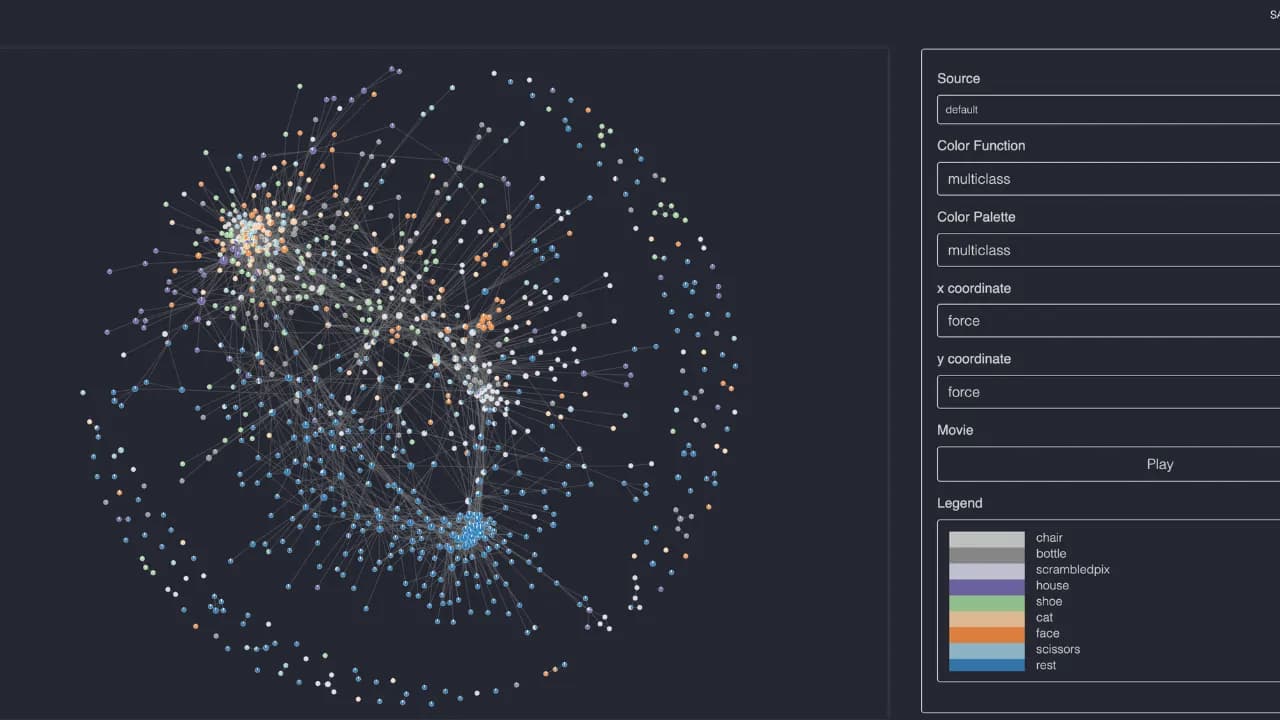
You can build your own Wiki with Obsidian

Three core architectural layers of the Wiki

The system is organized into three distinct layers, each playing an irreplaceable role:
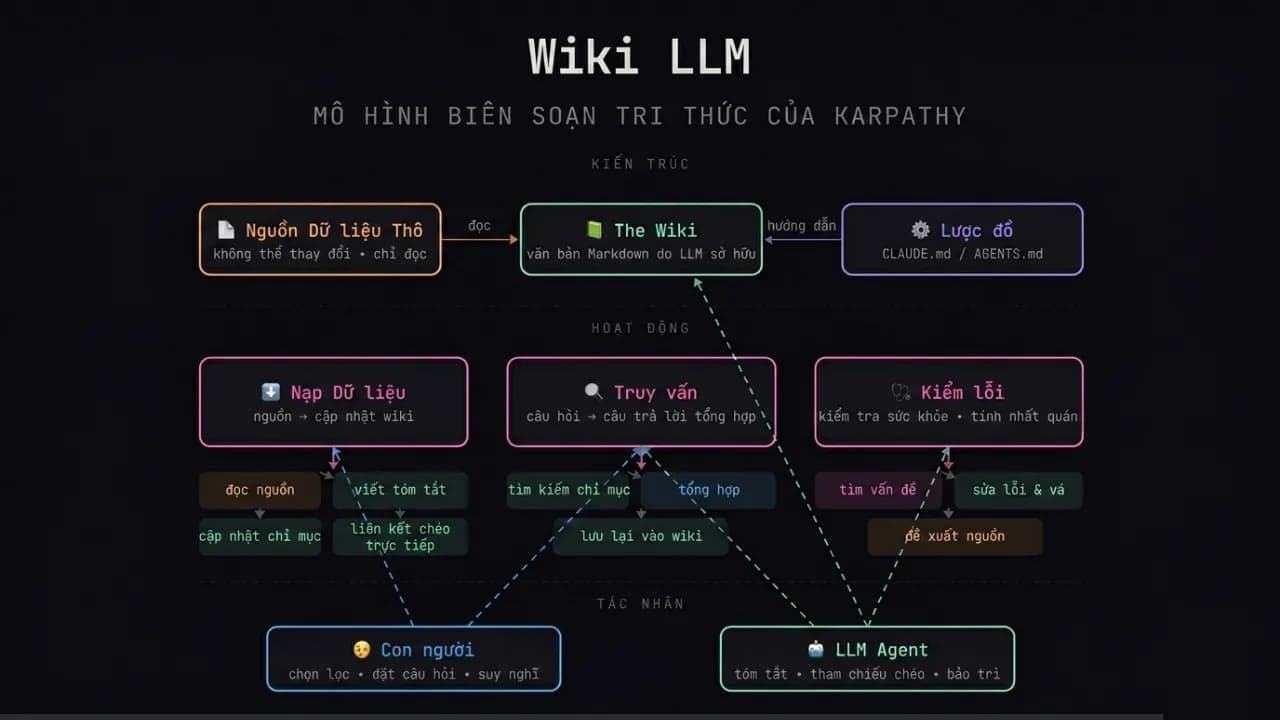
Diagram of Karpathy's LLM Wiki architecture layers
  • Raw source folder (raw/): Where you drop any document, whether PDF, article, transcript, note, or tweet, and AI reads it but never modifies this folder. The design principle here is important: collect first, organize later. You don't need to sort or prepare documents before adding them.
  • Wiki folder (wiki/): This holds all the Markdown files that AI creates and maintains. It's where knowledge is compiled, linked, and synthesized. Every document in raw/ gets read by AI and integrated into the wiki, updating existing pages, noting contradictions, and creating backlinks to related concepts.
  • Configuration file (CLAUDE.md or equivalent): A ruleset that tells the AI how to organize the wiki, format articles, handle contradictions, and maintain consistency across the entire system.

Karpathy describes the relationship between components with one vivid sentence: "Obsidian is the IDE. The LLM is the programmer. The wiki is the codebase." You don't write the wiki yourself. Instead, you ask questions and explore while AI handles the tedious work of maintaining and updating the knowledge base.

The self-maintaining loop is the real differentiator

Three operations running continuously without intervention

What makes LLM Wiki different from ordinary AI note-taking tools is the active loop that runs after the wiki is built. AI doesn't just summarize documents once and stop. It runs three continuous operations:

  • Ingest: When you drop a new document into the source folder, AI reads it, extracts key information, and integrates it into the wiki by updating existing pages, creating new ones where needed, and flagging where new information contradicts old information rather than arbitrarily deleting either.
  • Query: You ask in natural language, and because the wiki has already been compiled and structured, AI answers with high accuracy and can cite specific pages rather than assembling an answer from scattered passages the way standard RAG does.
  • Lint: AI periodically scans the entire wiki to detect broken links, isolated pages with no connections to the rest, contradictions between pages, and knowledge gaps not yet covered. Karpathy calls this "CI/CD for the knowledge base," meaning the system audits its own quality continuously.

Karpathy explains why this system is more sustainable than human-maintained wikis with one simple but precise observation: "People give up on wikis because the maintenance burden grows faster than the value they deliver. LLMs don't get tired, don't forget to update cross-references, and can edit 15 files in a single run."

Why RAG isn't needed at personal scale

Context windows are now large enough to replace vector databases

The most debated argument in Karpathy's proposal is that RAG is unnecessary at personal scale. His logic is this: a comprehensive second brain covering an entire research domain typically compiles to somewhere between 500,000 and 2 million tokens in Markdown. With the long context windows available in current models, that entire wiki can fit into a single query context without needing any complex vector search infrastructure.

Karpathy reports that at around 100 articles and 400,000 words, the system handles complex questions well without any vector database or RAG infrastructure, because AI builds and maintains its own index and summary files and navigates the full text collection efficiently through that self-built structure.

One important caveat: this limit is real. When a wiki grows past a certain threshold, perhaps a few million tokens, the context window does become a genuine bottleneck, and at that point search tools like qmd (a hybrid BM25/vector search tool for Markdown) will need to be integrated to maintain performance.

How to get started in 15 minutes

The first steps to building your first wiki

Karpathy designed this system so that anyone with Claude Code or an equivalent AI agent tool can deploy it immediately without deep technical knowledge. The basic process has four steps:

  • Create a new Obsidian vault. This is simply a folder on your computer where all Markdown files will be stored. Obsidian is just the interface you use to read and navigate.
  • Create two subfolders: raw/ for source documents and wiki/ for AI to write and maintain. These two folders are all you need to set up manually.
  • Copy Karpathy's GitHub Gist at GitHub and paste it into Claude Code or whichever AI agent you're using. The Gist is written as a set of instructions for the agent, letting the agent build the detailed implementation together with you rather than you doing everything yourself.
  • Drop a few initial documents into raw/ and let the agent begin compiling the wiki. From here everything runs on its own.

The entire system runs locally with just two dependencies: Obsidian for viewing and navigation, and an AI agent for writing and maintenance. This means no vendor lock-in, no data sent to the cloud if you use a local model, and no subscription fees beyond the API costs of whichever model you choose.

LLM Wiki compared to MemPalace, Mem0, and Zep

Four different philosophies for the same problem

Around the same time Karpathy's LLM Wiki gained attention, the AI community was also discussing MemPalace, an open-source memory system built by actress Milla Jovovich and engineer Ben Sigman that scored 96.6% on the LongMemEval benchmark. All four systems, LLM Wiki, MemPalace, Mem0, and Zep, address the problem of AI not remembering context between sessions, but they do so through four very different philosophies suited to four different needs.

The easiest way to understand the differences is through a concrete scenario: you have six months of AI conversations about a research project, covering every decision, every argument, every discarded option. You open a new session and ask: "Why did we choose direction A over B back then?" Each system answers in a completely different way.

  • Mem0 works like a secretary who takes meeting notes. It uses AI to read conversations, extract important facts such as preferences and decisions made, and stores them in a vector database. When you ask again, it finds the fact closest to your question and returns it. Fast, easy to integrate, and well suited to commercial chatbots, but the reasoning behind a decision and the chain of logic that led there is usually gone because the AI already decided that part wasn't important.
  • Zep goes one step further with a time-aware knowledge graph. It doesn't just remember "you preferred X" but "in January you thought X, in March you switched to Y because of Z." Its strength is understanding change over time and it suits applications that need to track user progress, but Zep still uses AI to decide what enters the graph, so there's still a risk of losing important context, especially complex reasoning the AI judged as unnecessary.
  • MemPalace takes the opposite philosophy entirely: store everything, then make it findable. Instead of letting AI decide what's worth remembering, MemPalace stores the full verbatim text of every conversation into ChromaDB and organizes it in a hierarchical structure inspired by the ancient Greek memory palace technique: Wing, Hall, Room, Closet, Drawer. Nothing is filtered out but everything has a clear address for retrieval, and the system runs entirely locally without sending data anywhere.
  • Karpathy's LLM Wiki solves a fundamentally different problem from the other three. Instead of remembering conversations, it compiles documents into structured knowledge. You don't feed it chat history but rather articles, transcripts, and research notes, and AI builds a linked, summarized, queryable Markdown wiki. Each new document isn't just stored but integrated into existing knowledge, creating new connections between concepts and enriching what is already known.

Comparison table to choose the right tool for the right need

Criteria LLM Wiki MemPalace Mem0 Zep
Data source Research documents, articles, transcripts AI conversation history Conversation history Conversation history
Storage method Structured Markdown, AI compiled Full verbatim text, spatial hierarchy Facts extracted by AI Time-aware knowledge graph
Does AI filter information? Yes, AI decides how to organize No, everything is stored Yes, AI selects important facts Yes, AI selects entities and relations
Runs locally? Yes, only Obsidian and a model needed Yes, ChromaDB and SQLite on device No, cloud service No, cloud service
Best suited for Research, learning, document synthesis Long-term AI context memory Chatbots, commercial applications Apps tracking user progress over time
Weaknesses Doesn't remember conversations, requires initial setup Storage-heavy, no visual UI yet Loses complex reasoning Cloud dependency, still risks losing context

The most important thing to remember when choosing: LLM Wiki and MemPalace solve two different problems and can be used together rather than choosing one over the other. MemPalace remembers the history of your conversations with AI, meaning it knows what you said, what you decided, and how your thinking changed. LLM Wiki organizes knowledge from the outside world, the articles you read, the videos you watched, the documents you collected. Combining both lets AI understand both who you are and what field you're researching, and together they form a more complete second brain.

The most thought-provoking insight from LLM Wiki

Most of us use AI as a tool for generating temporary answers. Each session starts from scratch and nothing accumulates. Karpathy's LLM Wiki suggests a different direction: using AI as a knowledge compiler, where each new document isn't just stored but integrated into an existing structure, creating new connections and enriching what is already known.

If you're researching a specific domain, whether AI, technology, finance, or anything else, this is worth trying today. Create a folder, drop in five articles you've read recently, and let Claude Code begin building the first wiki. After one week of adding documents consistently, you'll see the difference between an archive and an actual knowledge base.
Discussion (0)

Log in to join the discussion.

No comments yet. Be the first!

Related Articles

Firefox's shake to summarize feature is now available on android

Have you ever opened a 3,000-word article on your phone and instantly debated whether to read it or just leave? Mozilla has an answer: shake your phone. The "Shake to Summarize" feature — named one of TIME's best inventions of 2025 — has officially launched on Android alongside Firefox 150. What is Shake to Summarize and how does it work? Shake to Summarize is an AI feature built directly into Firefox that lets users get an instant summary of any webpage without leaving the browser or opening another app. There are three ways to trigger it: Shake your phone while viewing a page Tap the lightning bolt icon in the address bar Go to the three-dot menu → Summarize Page Within seconds, Firefox opens a small panel displaying the key points of the page. What makes it stand out is how the summary adapts to content type — recipes get the actionable steps, sports articles focus on scores and stats, and news pieces highlight the key developments. The feature works with pages under 5,000 words. For longer pages, Firefox will not be able to generate a summary. The journey from iOS to Android Shake to Summarize first launched on iOS in September 2025, initially available only to US users in English. The response was strong enough that Mozilla received a special mention in TIME Best Inventions 2025 — a recognition rarely given to a browser feature. The Android version went through careful testing on Firefox Nightly before making it into the official Firefox 150 release in April 2026. Prior to that, trying it on Android required going to Settings → About Firefox Nightly → tapping the logo three times to enter "Secret Settings" and manually enabling it — a process clearly meant for technical users only. What AI powers this feature? Mozilla doesn't use a single model — it splits the work by device: On iPhone 15 Pro and later running iOS 26+, summaries are generated entirely on-device via Apple Intelligence, meaning data never leaves the phone. On all other devices, page content is sent to Mozilla's AI servers, processed, and returned to the user. On Mozilla's end, the engineering team tested several models — including Mistral Nemo, Mistral Small, Jamba 1.5 Mini, Gemini Flash 2.0, and Llama 4 Maverick — before settling on Mistral Small as the primary model. The reasoning: Mistral Small has open weights, fast inference, and significantly lower cost compared to alternatives, while still delivering high-quality summaries. Mozilla provides Shake to Summarize for free and covers all inference costs itself, with no charge to users. What if users don't want AI? This is where Mozilla handled things fairly well. After facing pushback from long-time users concerned that Firefox was abandoning its core privacy values, Mozilla added a setting to disable all AI features entirely. On desktop, a "Block AI enhancements" option lets users turn off all current and future AI features, or selectively keep specific ones. On Android, Shake to Summarize is tied to the new AI Controls panel — when AI is turned off, both the shake gesture and the summarize button are disabled simultaneously. The feature currently supports English content only. Users outside English-speaking regions will need to switch their system language or wait for Mozilla to expand language support. What else is new in Firefox 150? Alongside Shake to Summarize on Android, Firefox 150 brings several other noteworthy updates: Open links in split view to browse two pages side by side Copy URLs from multiple tabs at once Real-time private translation on a dedicated translation page Free built-in VPN now expanded to Canada (previously limited to select markets) A new profile management system for all users Firefox 151 is expected on May 19, 2026 and may continue expanding AI Controls on mobile. Real-world assessment Shake to Summarize addresses a genuinely real problem: skimming on a phone is uncomfortable, but reading in full takes too long. Rather than asking users to open yet another AI app, Mozilla embeds summarization directly into the browsing flow — the shake gesture may look playful, but it's actually the fastest shortcut imaginable on mobile. The biggest limitation right now is the English-only restriction, which significantly reduces its value for non-English speakers. But if Mozilla continues its language expansion roadmap — as it has done with its translation feature — this could become one of the most compelling reasons to return to Firefox on mobile.

Nam
19 May, 2026
Will HTML replace Markdown when working with AI?

Markdown has been the default standard when working with AI for years, but an engineer from Anthropic's Claude Code team just raised a thought-provoking question: is that habit really the best choice? Thariq Shihipar's short post gathered over 15,000 likes on X in just a few days, and the reason is more convincing than you might think. Markdown was born in the era of token-poor AI Looking back at the days of GPT-4 with a context window of only 8,192 tokens, Markdown was an entirely reasonable choice. HTML was bulkier, consumed more resources, and in that constrained context, Markdown's simplicity was a real advantage for saving tokens. Thus, Markdown became the implicit standard, and that habit has stayed with us ever since. Even when Anthropic created the concept of Skills on Claude, they also set Markdown as the standard with the SKILL.md file—anyone who works with skills is surely familiar with this default. However, current AI models operate on a completely different scale. Many models now support context windows from 200,000 to 1 million tokens, and the cost of processing is no longer a major barrier (as Thariq Shihipar points out). He argues that this is the perfect time to reconsider that default. What can HTML do that Markdown cannot? The core reason Thariq presents is simple: some types of information are inherently spatial, but Markdown forces them to be linear text. When you compare three technical approaches, you need to see them side-by-side, not read them one after another and try to keep them in your head. When you review a code diff, you need to see the structure of the changes, not just a wall of text. HTML solves exactly that problem, which is why Thariq listed 9 specific groups of scenarios where HTML outclasses Markdown: Discovery and Planning: Comparing multiple approaches side-by-side instead of sequentially, and then transforming them into an implementation plan complete with flowcharts and timelines. Code Review and Understanding Project Structure: Highlighting changes directly with colors based on severity, and showing module diagrams as boxes and arrows—rather than plain text. UI Design: Displaying actual color palettes that can be copied instantly, and rendering UI component variants directly instead of describing them in words. Rapid Prototyping: Creating interactive animation adjustment panels with slider controls, and screens that can actually be clicked—something Markdown cannot express. Diagrams and Illustrations: Utilizing inline vector graphics to draw actual flowcharts, rather than stitching together ASCII characters. Slide Decks: A few <section> tags and 20 lines of JavaScript can form a slide deck navigatable with arrow keys, without needing specialized software or export steps. Research and Learning: Structuring documents with collapsible sections, code tabs, and glossaries—rather than dumping the entire content in a single vertical stream. Periodic Reports: Weekly status summaries with sparklines and color-coded progress indicators that actually encourage people to read, rather than just skim. Custom Editing Interfaces: Building drag-and-drop task boards or feature flag dashboards with dependency alerts—making it a functional tool rather than just text to read and forget. Thariq has assembled 20 files illustrating all of these categories at thariqs.github.io/html-effectiveness, each of which opens directly in your browser without requiring any installation. How to use HTML with AI in practice? Applying this is not complicated; it just requires a shift in how you write prompts. Instead of letting the model choose the output format, explicitly specify HTML when the content is meant to be reviewed, interacted with, or shared with others. For example, here is a prompt Thariq suggests for reviewing code: Help me review this PR by generating an HTML document that describes it. I'm not very familiar with streaming/backpressure logic, so please focus on that part. Show the actual diff with inline margin comments, color-code findings by severity, and include anything else necessary to explain the concepts clearly. Similarly, you can ask the AI to generate an implementation plan as HTML with a timeline and data flow diagram, or a weekly status report with small charts and progress-colored indicators. Simon Willison, author of the famous tech blog, also admitted that this article made him reconsider his habit of using Markdown from the GPT-4 era until now. When modern AI models can embed vector graphics, interactive widgets, and in-page navigation, Markdown is no longer the obvious default choice. Markdown still has its place, but not everywhere Thariq is not saying we should always use HTML; rather, he makes a clear distinction: Markdown is suitable for casual chats, short code snippets, brief answers, and anything that is pure text. Meanwhile, HTML shines when the output requires spatial layouts, colors, interactivity, or complex structures—where the content is multi-dimensional enough that Markdown would start flattening the information rather than conveying it effectively. The community reacted quickly: a skill named html-artifacts has appeared on GitHub, helping AI automatically recognize when it should generate HTML files instead of Markdown. It includes the 9 scenarios from Thariq's original article and can be used with any model that supports reading skills. Notably, this skill has clear exclusions for short answers and code-only outputs. You can check it out at github.com/dogum/html-artifacts. Thariq doesn't mention JSON in his article, but it is also a very popular format when working with AI, especially for those who frequently use n8n, Make, or Zapier. Nevertheless, each format brings its own flavor to specific situations. How Markdown, HTML, and JSON divide their usage The debate is actually not just about Markdown or HTML. JSON is also a very popular format when working with AI, especially in data processing workflows and system integrations. These three formats serve three different purposes, and understanding those boundaries helps you choose the right tool for each situation. Markdown is best for text read directly in chat: notes, short explanations, code snippets, simple documents. Fast, lightweight, no need to open anything else. HTML is best when the output needs to be visualized, interacted with, or shared: reports with layouts, diagrams, comparison tables, slide decks, custom interfaces. Open with a browser and you are good to go. JSON is best when the output needs to be processed by a machine: storing structured data, transferring between systems, or feeding into the next step of a workflow. Humans can read it, but it is not meant for reading. In other words, JSON does not compete with HTML or Markdown in terms of presentation; it serves an entirely different purpose. The real issue is that many AI users default to receiving output in Markdown even when they need HTML to view it or JSON to process it. By simply specifying your preference in the prompt, the AI will adapt. Quick Decision Rule: Output to read in chat → Markdown. Output to view in a browser → HTML. Output to be processed by a machine → JSON. What does this change for the average AI user? If you use AI primarily for Q&A or writing, this change has less impact. But if you are using AI for more complex tasks like data analysis, project planning, document reviews, research synthesis, or creating reports for colleagues, this is a small prompt adjustment that creates a clear gap in output quality, regardless of which AI tool you are using. You should try it once: next time you need the AI to compare options or summarize a complex document, add "generate as an HTML file" to the end of your prompt. Open that file in your browser and compare it to how you usually do it with Markdown or JSON—the results will speak for themselves.

Nam
10 May, 2026
Milla Jovovich is building a new Red Queen with MemPalace

Milla Jovovich, the face anyone who has watched the Resident Evil series will instantly recognize as Alice, and Leeloo from The Fifth Element, has surprised the AI community with the launch of MemPalace, a free, open-source AI memory system that has achieved the highest score ever recorded on the LongMemEval benchmark. The community has been joking that she never quite left the role, apparently still working for the Umbrella Corporation to build a new Red Queen. The project was developed in collaboration with programmer Ben Sigman, drawing inspiration from the ancient Greek technique of the Memory Palace. Rather than simply summarizing or storing information in disconnected fragments, MemPalace builds a structured virtual palace with clearly defined wings, corridors, rooms, closets, and drawers to organize entire conversations, ideas, and knowledge in a logical and searchable way. This shows just how vast the potential of AI has become when it enables actors, professors, and doctors alike to build powerful AI platforms that are genuinely usable in real work. Why did MemPalace catch everyone off guard? The first surprise was that the GitHub account is genuinely hers, which anyone can verify at https://github.com/milla-jovovich/. The second surprise is that Milla Jovovich is not participating in MemPalace as a celebrity endorser. She is committing code from that verified GitHub account, and for anyone who doubts it, the evidence is right there in this commit. On the purely technical side, MemPalace currently offers several notable advantages: Fully local: Runs entirely on your personal machine with no cloud required, no data sent anywhere, strong privacy, and zero ongoing cost. 100% information retention: No summarization means no loss of important detail. Easy integration: Supports multiple AI models including Claude, ChatGPT, Gemini, and Llama, and can import data from chat history, Slack, and other sources. Impressive benchmark results: Achieved the highest score, approaching a perfect score, on LongMemEval, a test measuring long-term recall, multi-step retrieval, and knowledge updates over time. MemPalace is not just a storage tool. It is a new approach to helping AI "remember like a human," organizing information spatially rather than relying purely on vector search or summarization. AAK technology: the secret language that compresses memory One standout feature in MemPalace is AAK technology, short for the experimental Abbreviation-As-A-Key system. This is an intelligent compression layer that functions like a shorthand language any LLM can read without a separate decoder. What is AAK and is it easy to understand? Imagine a thick notebook filled with months of conversation records. Instead of keeping every word intact, which consumes enormous storage and token budget, AAK compresses repeated information intelligently: It uses entity codes for frequently mentioned people, tools, or concepts. It adds structural markers to preserve relationships between ideas. It shortens sentences while retaining the core meaning. A simple example: Instead of repeating "The user prefers PostgreSQL because it is stable, open-source, and high-performance," AAK compresses this to something like "User prefers Postgres [reason: stable, open-source, high perf]," saving a significant number of tokens in the process. The advantages of AAK Strong compression, up to 30x in some cases, making it possible to fit months of data into a context window without hitting the limit. Still directly readable by any AI model without a special decoder. Fully local with no cloud dependency. Current limitations of AAK This is an experimental feature. On the LongMemEval benchmark, the AAK-compressed version sometimes scores lower than the raw uncompressed mode due to its lossy nature, meaning some information is lost in compression. The team is actively working on improvements. In short, AAK is like writing "concise but complete" personal notes, helping AI read faster and retain more without requiring a massive model to do it. Compared to Mem0 and Zep, the current leaders in AI memory Mem0 and Zep are the two most widely used AI memory frameworks for agents and chat applications. They each solve the "AI forgets everything" problem in different ways. Mem0, like a personalized companion How it works: Automatically extracts important information from conversations and stores it in a vector database with an optional knowledge graph layer. Strengths: Easy to use, token-efficient, well suited for long-term personalization. Weaknesses: Can miss details if summarization is too aggressive. LongMemEval benchmark score is approximately 49%. Zep, like a professional historian How it works: Builds a temporal knowledge graph where every event is anchored to a specific point in time. Strengths: Strong at complex queries and tracking how things change over time. Benchmark score approximately 64%. Weaknesses: Building and maintaining the graph requires more time and computational resources. Quick comparison table table { width: 100%; border-collapse: collapse; margin: 20px 0; font-family: Arial, sans-serif; } th, td { border: 1px solid #ddd; padding: 12px; text-align: left; } th { background-color: #f4f4f4; font-weight: bold; } tr:nth-child(even) { background-color: #fafafa; } tr:hover { background-color: #f1f1f1; } Criteria Mem0 Zep MemPalace (Milla Jovovich) Approach Personalization-focused, token-efficient Temporal, deep historical tracking Memory Palace, spatial organization Storage method Vector database with optional graph Temporal knowledge graph Full data retention with room structure and AAK compression Benchmark score ~49% ~64% Highest recorded, near 100% in some configurations Cost and resources Low Medium to high Very low, runs locally and free Ease of use Very easy Moderate Easy, single installation command Privacy Good, self-hosting available Good, cloud option available Excellent, 100% local What MemPalace brings to the AI community Milla Jovovich's MemPalace brings a fresh perspective to AI memory research, demonstrating that you don't need a massive model or expensive cloud infrastructure to achieve outstanding results. A creative idea drawn from ancient technique, combined with modern engineering, can outperform systems built with far greater resources. If you're building an AI agent or simply want your personal AI to remember things reliably over time, MemPalace is worth trying today since it installs via pip and runs entirely locally. This isn't just another tool. It's a meaningful step toward making AI more trustworthy and genuinely useful for the people who rely on it.

Nam
8 Apr, 2026
Nvidia's DLSS 5: AI renders better than reality, but is this still the original game?

Is this the Van Dijk we know? Looking at two photos of Van Dijk in EA Sports FC: one labeled "DLSS 5 Off", one labeled "DLSS 5 On" with the exact same frame and play. But the face looks different—it is sharper and has more depth, plus more natural lighting and shadows, which naturally makes it look less like the original character. This is exactly what Nvidia has just introduced at GTC 2026, and it is precisely why the gaming community is in an uproar. What is DLSS and the journey from version 1 to 5 DLSS stands for Deep Learning Super Sampling, a technology that Nvidia uses AI to solve the classic gaming dilemma: gamers want beautiful graphics which require a powerful GPU, but to get high FPS, they must reduce image quality. DLSS was born to break that vicious cycle using AI. The journey through each version clearly shows how Nvidia's thinking has shifted: DLSS 1 (2018): Appeared with the RTX 20 series. The basic idea was to render the game at a lower resolution and use AI to upscale it to 4K. The result looked so blurry and lacked detail that many gamers did not bother enabling it. DLSS 2 (2020): A real leap forward. Nvidia significantly improved the AI model by introducing temporal accumulation, meaning the AI learns to combine information from multiple consecutive frames to reconstruct sharper details. This was when DLSS started to be widely used by gamers. DLSS 3 (2022): Added Frame Generation, enabling the AI to generate entirely new frames between real frames to double the FPS. It was criticized for causing input lag in some games. DLSS 3.5 (2023): Added Ray Reconstruction, using AI to reconstruct ray tracing effects instead of calculating everything manually. DLSS 5 (2026): A breakthrough of a completely different nature. From here, Nvidia no longer just upscales or adds frames. The AI starts to redraw all lighting, materials, and surface details in real time. What AI technology is behind DLSS 5 The core difference between DLSS 5 and all previous versions lies in the fact that, for the first time, AI not only improves existing images but generates entirely new visual content based on the 3D scene data. Specifically, DLSS 5 takes the color data and motion vectors of each frame and uses a neural rendering model to reconstruct photorealistic lighting and materials. What prevents it from "hallucinating" like normal AI image generators is that it is tightly anchored to the game engine's scene graph—the original 3D structure of each object in the game. The AI knows that this is a human face, this is shirt fabric, and this is a shadow, so it reconstructs them with correct physics instead of inventing random details. Jensen Huang called this the "GPT moment of graphics", the point when AI begins to replace part of the traditional rendering process. Nvidia expects an official launch in fall 2026, with confirmed integrated titles including: Starfield (Bethesda) Resident Evil Requiem (CAPCOM) Hogwarts Legacy (Warner Bros. Games) Assassin's Creed Shadows (Ubisoft) The demo at GTC required two RTX 5090 cards, though Nvidia claims the commercial version will run on a single GPU. What gamers are worried about: when AI starts to "redraw" your character Looking back at the comparison at the beginning, the DLSS 5 On version indeed looks sharper and more photorealistic. However, the gaming community is not happy about that. The problem is that the faces are modified. Not much, but enough to notice. And this is exactly the concern thousands of people are expressing on forums: when AI has the right to intervene in every single pixel of a game, who guarantees the character looks exactly as the game developer intended? The community is calling this "AI slop"—content that looks better on the surface but loses accuracy and the original artistic intent. Some compare the results to the "Harry Potter Balenciaga" style, implying the soulless and industrialized nature of mass-produced AI content. Especially for games with licenses for real players' faces, rendering the face differently, even slightly, is a serious issue. How does Nvidia respond? Facing criticism, Nvidia asserts that developers have full artistic control through the SDK, which includes: Adjusting AI effect intensity scene-by-scene Color correction and masking to protect sensitive image areas Completely disabling DLSS 5 on specific characters or objects Nvidia emphasizes that this is not just a filter, but a tool tightly integrated with the original 3D content. But the practical question remains: will all studios have enough resources and diligence to fine-tune each of those details, or will most just leave it on by default and let the AI decide? DLSS 5 is a point of no return The question is no longer whether DLSS 5 is better, because technically the answer is clearly yes. The real question is: when AI starts to participate in the rendering of every frame, where is the boundary between the "original game" and the "AI-enhanced game"? For AAA studios, this is an opportunity to cut rendering costs and push image quality to unimaginable heights. For gamers concerned about the integrity of the product, this is the first time they must ask: am I playing a game created by a developer, or a game generated by AI based on the developer's concept?

Nam
18 Mar, 2026