4AIVN
Back to News

WordPress.com officially lets AI automate content management

Published on 21 March, 2026
WordPress.com officially lets AI automate content management

Quick Summary

WordPress has officially added support for AI assistants to automatically create and manage content. This major update lets users operate their websites using nothing more than plain natural language commands.

WordPress.com just did what many people have been waiting for

43% of all websites on the internet run on WordPress, and now AI can manage all of them on its own. WordPress.com has officially allowed AI agents to access, edit, and publish content directly on users' websites through the MCP protocol. This is undeniably a massive shift, especially since WordPress only opened MCP for analytics and reporting in 2025.

Previously, updating or writing a new post required too many steps: log in, find the right post, edit each field, then hit save. Using AI meant connecting through third-party tools that were cumbersome to set up. Now you simply tell the AI: "Update the latest post title to X and add this excerpt." The AI edits directly on WordPress and handles the rest without switching to any other platform.

What is MCP and why is it behind all of this?

MCP stands for Model Context Protocol, a protocol that lets AI see and interact with external applications. It was created and backed by Anthropic, which is why it has become the common standard for so many AI developers, giving users confidence in its long-term staying power. MCP differs from a regular API in an important way: if an API is a gateway that lets developers connect two systems together, MCP is a gateway designed specifically for AI, helping language models understand the context of each application rather than just receiving raw data.

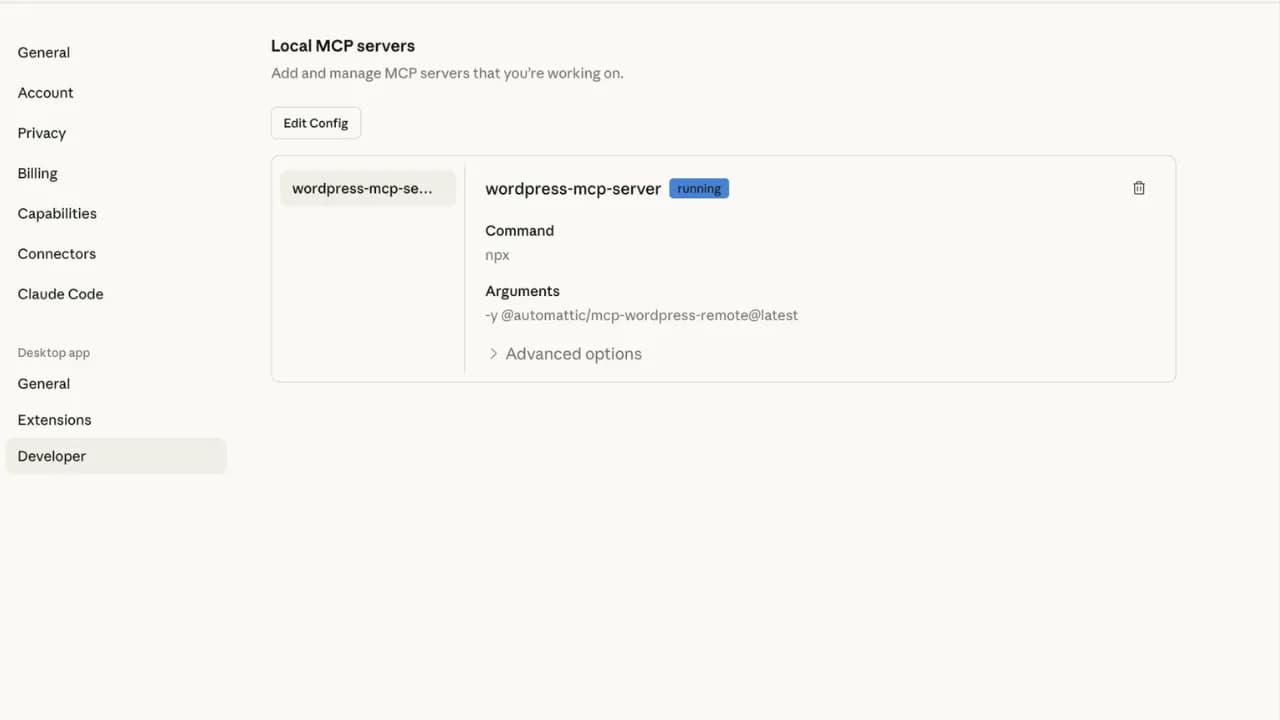
WordPress.com deployed MCP late last year, and this new AI agent capability is built entirely on top of that foundation. The key advantage is that you are not locked into one specific AI. You can connect Claude, ChatGPT, Cursor, or any MCP-compatible AI client to the same WordPress.com account. To activate it, visit wordpress.com/mcp, enable the MCP features you want, and AI tools like Claude, Gemini, and ChatGPT will then be able to connect.
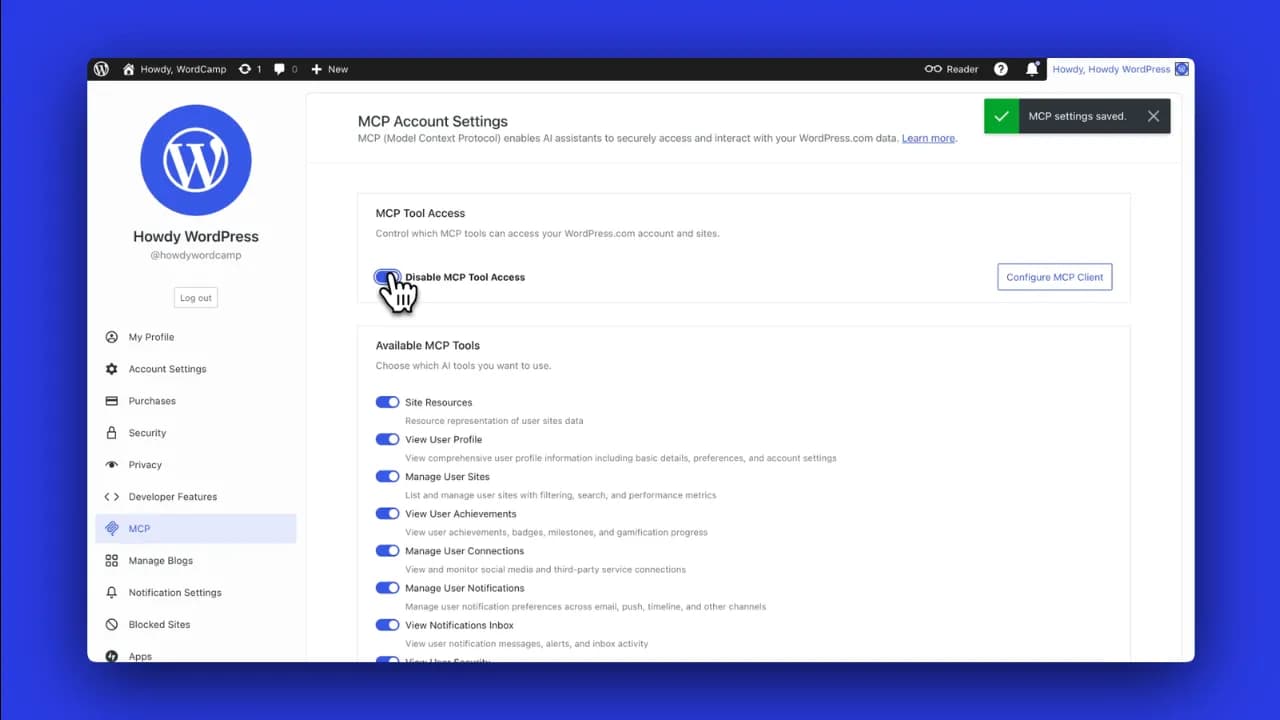
Enable MCP in WordPress before connecting (source: WordPress)
Then connect WordPress to your AI of choice (source: WordPress)

What can an AI agent actually do on WordPress?

The list of supported features is probably longer than you expect. Once connected, you can issue commands in natural language to perform almost anything covered in this MCP update.

Content management: Ask the AI to create a new post, edit a title, add an excerpt, or move a draft to published status and back. The AI can even write a blog post in your usual style and save it as a draft for review before it goes live.

Comment moderation: Approve pending comments, mark spam, delete inappropriate responses, and reply to the latest comment on a specific post, all from a single instruction.

Content organization: The AI can create new categories, add tags to posts, and reorganize your content taxonomy without you having to navigate through each dashboard menu.

Media updates: Fixing alt text on recently uploaded images or updating captions is tedious work when done manually across dozens of posts. The AI handles it in seconds.

Discovery and reporting: Ask which pages get the most traffic, request a summary of recent comments, or get suggestions for ten future post topics based on your existing content.

Bulk cleanup: Delete all drafts older than a year or move a batch of posts from one status to another, tasks that previously required a plugin or manual one-by-one effort.

What to keep in mind before letting AI touch your WordPress site

Convenient as it sounds, giving AI direct edit access to your website is still something worth thinking through carefully. WordPress.com has built in some basic guardrails: AI-generated posts are saved as drafts by default and do not publish automatically, and every change is logged in the Activity Log so you can review it at any time. However, actions like bulk-deleting posts or changing post statuses in bulk have no simple undo mechanism, so commands need to be deliberate and clearly worded before you send them.

On content quality, AI can write posts in your style based on older articles, but "in your style" does not mean the output will match your actual quality. AI-drafted posts still need a human read-through before publishing, especially on specialized topics or anything where accuracy matters. Additionally, features like viewing the user list and checking plugin status are only available to administrator accounts, which is a reasonable limit to prevent unnecessary security risks.

The bigger picture as platforms open up to AI agents

WordPress.com currently handles 20 billion page views and 409 million visitors every month. When the platform powering 43% of the global web officially opens its doors to AI agents, the question is no longer whether AI will change how content is created. The real question is what percentage of the web will be AI-generated content within the next two years.

This trend is accelerating across the board. Meta acquired Moltbook, a social network where AI agents can post and interact, while Anthropic is also testing AI-written blog content under human supervision. WordPress.com is not the first to have this idea, but they are the first to deploy it at a scale large enough to create a real impact.

For everyday users, this move by WordPress brings the barrier to running a website closer to zero. You no longer need to understand how WordPress works. You only need to know what you want and say it. But precisely because the barrier is so low, low-quality content will also spread more freely, and the ability to distinguish what is actually worth reading will become an increasingly important skill for anyone navigating the web. If you are already on WordPress.com, go to WordPress now and start connecting your writing skills to it.

Discussion (0)

Log in to join the discussion.

No comments yet. Be the first!

Related Articles

Claude Code, NotebookLM, and Obsidian for Smarter Research

Many people still do research manually: opening a dozen tabs, watching videos, reading articles, taking notes in scattered places, and then spending even more time trying to synthesize the result. A long-form post by monokern on X suggests a different pattern: use Claude Code to orchestrate the workflow, NotebookLM to analyze sources, and Obsidian to store long-term memory. Done correctly, this is not just a search session. It becomes an AI workflow that compounds over time. The core idea is practical: Claude Code does not need to do everything inside an expensive context window. It can call tools, run skills, create files, and offload heavy source processing to NotebookLM. The output is then saved back into Obsidian as markdown, giving the next research session better context. According to the original post, the initial setup can be completed in under 30 minutes if the required tools are already available. Why does this stack work? The strength of the workflow is that each tool owns a clear layer. Claude Code acts as the execution engine: it receives plain-language instructions, calls skills, runs commands, manages files, and coordinates the pipeline. Instead of forcing the user to operate each step manually, Claude Code becomes the system operator. NotebookLM is the analysis layer. Google's research tool can read sources, summarize them, generate analysis, flashcards, mindmaps, infographics, or audio overviews. When Claude Code sends source processing to NotebookLM, the user benefits from Google's processing layer rather than spending Claude tokens on every piece of long-form digestion. Obsidian is the memory layer. Every analysis result is saved as markdown in a personal vault. Over time, that vault becomes a structured knowledge base of topics, sources, observations, patterns, and conclusions. Claude Code can read those files later to understand what the user cares about, what formats they prefer, and how they tend to evaluate a topic. Skill Creator turns the workflow into a reusable tool The first major step in the guide is installing Skill Creator inside Claude Code. This layer lets users describe a new capability in natural language, after which Claude Code creates the skill structure, installs it, and makes it available as a reusable command. In other words, instead of rebuilding the research prompt every time, the user packages the workflow as a dedicated skill. The first example is a YouTube search skill. It uses yt-dlp to search videos by query and return metadata such as title, channel, views, duration, upload date, URL, and a views-to-subscribers ratio. For content or market research, this is more useful than a plain list of links because it shows which sources are actually attracting attention. NotebookLM handles the heavy analysis The post proposes connecting Claude Code to NotebookLM through notebooklm-py because NotebookLM does not currently provide an official public API. After installation and Google account authentication, Claude Code can use a custom skill to create a new notebook, add sources such as YouTube URLs, text, or files, and then ask NotebookLM to generate analysis or deliverables. The key point is that NotebookLM is not only a summarizer. In a real research pipeline, it can receive 10 videos on a topic, analyze which frameworks are gaining traction, which ones are overhyped, where the community disagrees, and what content gaps remain uncovered. That processing takes time, but most of the work happens on the NotebookLM side. The full pipeline: one command for a complete research task Once the YouTube search skill and NotebookLM skill exist, the next step is to create a pipeline skill that combines both. The user gives a topic, such as researching AI agent frameworks in 2026, and the pipeline searches for relevant sources, creates a notebook, adds those sources, runs the analysis, and returns the result as markdown. In monokern's example, the pipeline finds 10 video sources, sends them into NotebookLM, generates analysis, creates an infographic, and saves the result into Obsidian. The total processing time is described as around 6 minutes, most of which is NotebookLM processing. The practical value is that the user does not need to open every tab, copy every link, or manually combine the metadata. The final output is more than a chat answer. It includes full analysis, source lists, engagement metrics, trend observations, a visual deliverable, and a markdown file saved into the vault. That is what separates this workflow from a normal chatbot interaction. Obsidian makes the system smarter over time Obsidian is the most interesting part. If the workflow runs only once, it already saves time. But if it runs regularly, every new markdown file makes the personal knowledge base richer. After a month, Claude Code can see recurring topics, the types of insights the user values, and the preferred format for results. The post also highlights the role of the claude.md file inside the vault. This can become a configuration file describing working conventions, analysis style, and output preferences. After several research sessions, the user can ask Claude Code to read recent work and update that file so it better reflects the user's current process. The real value is the structure, not YouTube YouTube is only the data source in the example. The pipeline structure is the valuable part. Users can replace YouTube with academic PDFs, industry reports, public documentation, web pages, local files, transcripts, or Google Drive documents. As long as Claude Code can access the source and pass it into the analysis layer, the operational template stays the same. This opens many practical uses: researching a crypto ecosystem through whitepapers and public documentation, analyzing an emerging technology through conference talks, mapping content gaps in a niche, or tracking market dynamics from public reports. In every case, the same three layers remain: collect sources, analyze them, and store knowledge. What should you watch out for? This workflow is powerful, but it is not for everyone. It assumes the user is comfortable with Claude Code, has an Obsidian vault, can install CLI tools such as yt-dlp, and is willing to use an unofficial library to connect to NotebookLM. Also, because NotebookLM and YouTube can change access patterns, these skills should be treated as maintained tools rather than install-and-forget automation. Still, the underlying idea is important: instead of using AI as a disconnected chat box, turn it into a research system with memory, a pipeline, and the ability to learn from your own work history. For people who regularly analyze markets, technology, or content, this is far more practical than opening 10 tabs and manually stitching everything together.

Nam
2 Jun, 2026
What is an agent harness? The framework that helps AI work efficiently

Imagine having an AI assistant that is incredibly smart but forgets everything between sessions and cannot check the quality of its own work. To solve this problem, developers created a protective management layer around AI models called an agent harness. This is what enables AI agents to complete complex, multi-step tasks autonomously without requiring constant human intervention. What is an agent harness? Think of an AI model as a brilliant new employee with no long-term memory and zero familiarity with the workplace. They can solve complex problems in seconds but will just as easily forget what they were working on, or accidentally send a confidential document to the wrong client. In that scenario, an agent harness acts as the experienced manager sitting right beside them, keeping things on track. Put simply, an agent harness is the software layer wrapping around an AI model that handles all administrative and logistical work so the model itself can focus entirely on reasoning and problem-solving. It connects the AI to external tools, maintains a complete record of work across sessions, and verifies results before considering a task done. In practice, an agent harness handles the following: Connecting the AI model to external tools such as web search, email, and calendars Persisting progress across sessions so the AI never has to start from scratch Filtering out irrelevant information and supplying only the data the AI actually needs at each step Monitoring AI actions to prevent dangerous mistakes Logging activity in detail so humans can audit what happened when needed Origin of the term: The concept of "agent harness" was formally named by technology engineer Mitchell Hashimoto in early 2026. Before that, many development teams had built similar systems but had no shared term for this layer of infrastructure. Why do AI agents fail at long-running tasks? The biggest weakness in today's AI models is the complete absence of long-term memory. Every new conversation starts from zero with no recollection of anything that happened before. Imagine hiring an employee who wakes up every morning having forgotten every agreement, every deadline, and every piece of progress from the day before. When Anthropic tested Claude building a complex web application without harness support, the results were consistently disappointing. Two failure modes kept appearing: The AI tried to do everything at once, ran out of working memory midway through, and left the project unfinished. The next session wasted time trying to figure out what had already been done. The AI declared the task complete without actually running the result to verify it worked. Beyond those two core failures, long-horizon tasks expose three additional problems: Context clog: Accumulated conversation history and tool outputs crowd out the original instructions, causing the AI to gradually lose focus on the actual goal Tool misuse: The AI sometimes searches for information that does not exist or submits incorrect inputs to forms, and without anything to stop it, repeats the same error in a loop Total progress loss on failure: Any network error or system crash wipes out whatever was stored in temporary memory, forcing a full restart Stanford research (2023): AI models tend to overlook information buried in the middle of long text, even when that text is not particularly long. This is why feeding too much data to an AI all at once often backfires without a filtering layer in place. How does an agent harness work in practice? An agent harness operates in two distinct phases to keep work flowing continuously without interruption. Setup phase (runs once) The harness prepares the full working environment before the AI begins: building a structured task list, initializing storage, and recording the starting point. Think of it as the manager drawing up a detailed project plan before handing anything off. This phase only needs to happen once. Execution phase (repeats) Each time the AI begins a new session, the harness automatically reloads all saved progress and assigns only the next relevant task. When the AI wants to take an action such as searching for information or sending a notification, the harness checks whether that request is valid, executes it safely, cleans the returned result, and passes it back to the AI. The model never touches external systems directly without going through this control layer first. The four core components of an agent harness For an AI to operate reliably over extended periods, a standard agent harness needs four essential components: External tool gateway: Allows the AI to interact with the real world by reading documents, searching the web, or sending messages. The harness acts as an intermediary, validating every request before execution and ensuring returned results are clean and usable. Layered memory management: Maintains three types of memory serving different needs: short-term working memory for the current session, a task log recording what has been completed and what remains, and a long-term knowledge store that accumulates across multiple projects over time. Intelligent context filter: Summarizes long conversation histories down to key points and supplies only the data relevant to the current step rather than loading everything at once, keeping the AI focused on the right task at the right moment. Safety checker and human approval gate: Automatically verifies results before marking a task as complete. For sensitive actions such as deleting important data or sending bulk emails, the harness pauses and waits for human confirmation before proceeding. Note on accumulated knowledge: If an AI agent's memory is stored entirely within a closed third-party platform, all the knowledge it builds up over time belongs to that platform. Switching to a different system means starting from zero. This is worth thinking through carefully when choosing a long-term AI agent solution. Harness engineering and the secret behind millions of lines of code Harness engineering is the practice of treating every AI failure as a system problem to fix permanently rather than something to retry or ignore. As Mitchell Hashimoto put it: if the agent makes a mistake, redesign the environment so that mistake becomes physically impossible to repeat. In practice, when OpenAI built large software projects with three engineers producing 3.5 pull requests each per day without typing a single line of code, they had set up automatic verification checks after every AI action. When the AI produced something incorrect, the system returned error messages written in a specific structure so the AI immediately understood what needed to change on the next attempt. Every error message became a learning signal, not just a warning. A study presented at ICML 2025 further confirmed that the same AI model equipped with a harness consistently outperformed itself running without one, even with identical training weights and identical prompts. The environment surrounding the AI matters just as much as the model itself. A telling data point: Anthropic's Claude Code has grown past 512,000 lines of code and continues to expand. More capable models do not make the harness simpler. They make it larger, because there is more capability to orchestrate and more failure modes to guard against. When do you actually need an agent harness? For simple one-off tasks like summarizing a document or answering a specific question, calling an AI directly is perfectly fine. But the moment work extends beyond a single conversation, requires memory from a previous session, or involves multiple steps that need to happen in a specific order, a harness becomes necessary. One thing worth reflecting on: the built-in web search in ChatGPT and Gemini is itself a form of harness. When AI automatically looks something up, there is infrastructure behind the scenes making the tool call, processing the result, and feeding clean information back into context. The harness is invisible to the user but indispensable to the system. Agent harness is not a short-term technical trend. It is the answer to fundamental limitations that AI cannot resolve on its own: no long-term memory, finite working context, and a tendency to misuse external tools without guardrails. 4AIVN has also started applying harness to our own workflows — and what we have found is that it does not just help AI finish tasks. It turns AI into a system that learns from failure and gets more reliable over time.

Nam
1 Jun, 2026
Claude Opus 4.8 launches: what is new in Anthropic's strongest model?

Anthropic has introduced Claude Opus 4.8, a release the company describes as its strongest generally available model. The update is not only about stronger reasoning for complex work; it also adds practical changes for developers building AI agent, coding assistants, and long-running automation workflows. The important point is that Claude Opus 4.8 is not just a renamed Opus 4.7. Anthropic is focusing on three practical areas: more stable long-context handling, more reliable tool use, and better cost control in agent loops. With the model ID claude-opus-4-8, it is already available for Claude API and supported cloud platforms. What is Claude Opus 4.8? Claude Opus 4.8 is targets multi-step reasoning, long-running agentic coding, and work that requires a higher level of autonomy. According to Anthropic's documentation, the model supports a default 1 million token context window on Claude API, Amazon Bedrock, and Google Vertex AI, while Microsoft Foundry supports 200,000 tokens. The model also supports up to 128,000 output tokens, adaptive thinking, and the same core tool capabilities as Claude Opus 4.7. This means teams already using Opus 4.7 can likely test the upgrade with limited changes, but they should still review behavior shifts and API constraints before moving production traffic. Key new features Claude Opus 4.8 introduces several updates that directly affect prompt design, long conversation management, and API cost optimization. These are especially relevant if you run deep chatbots, coding assistants, or multi-step agents. System messages during a conversation One major change is support for adding a message with role: "system" after a user turn in the messages array, as long as Anthropic's placement rules are followed. This lets developers update instructions during a long conversation without resending the entire original system prompt. In practice, this is useful for agents that run through many steps. Instead of breaking prompt cache efficiency by repeating a large instruction block, an application can add new instructions at the right moment, preserve cache for prior conversation context, and reduce input cost across long workflows. Fast mode for Claude API Anthropic is also bringing fast mode to Claude Opus 4.8 as a research preview on Claude API. By setting speed: "fast", users can receive higher output token throughput, with Anthropic describing speedups of up to 2.5 times under supported conditions. Fast mode is especially useful for products that need lower latency while staying on the same powerful Opus model. However, the documentation also notes that this mode carries premium pricing, so engineering teams should reserve it for high-value paths or workflows where response speed clearly matters. Prompt caching becomes easier to use With Claude Opus 4.8, the minimum prompt size for caching drops to 1,024 tokens. This small change has a practical impact: many prompts that were previously too short to create a cache entry on Opus 4.7 can now be cached without code changes. For products with stable system prompts, long internal documentation, or repeated API calls, prompt caching can reduce cost significantly. Combined with mid-conversation system messages, Claude Opus 4.8 is better suited for agents that need to preserve state across many steps. Documented refusal stop details Anthropic has also documented the stop_details object for refusal responses. When the model cannot complete a request, the application can receive not only a refusal stop reason but also more structured information about why the refusal happened. This helps products handle the user experience more gracefully. Instead of showing a generic error, an application can distinguish different refusal categories and guide users toward a more appropriate next step. API constraints to watch Although Anthropic says these constraints carry over from Claude Opus 4.7 and are not breaking changes for code that already works with the previous model, developers should still check them carefully. On the Messages API, Claude Opus 4.8 does not support non-default values for temperature, top_p, or top_k. Passing these sampling parameters will return a 400 error. Another point is that adaptive thinking is the only supported thinking mode. Older configuration patterns that set a fixed thinking token budget are no longer the right approach for Opus 4.8. Anthropic recommends using thinking: {"type": "adaptive"} and controlling reasoning depth through the effort parameter. On Claude Opus 4.8, the default effort is high across all surfaces, including Claude API and Claude Code. If an application already sets effort explicitly, the current configuration remains in place; if not, the default behavior may differ from prior expectations and should be tested. Why it matters for coding agents and long workflows Anthropic says Claude Opus 4.8 targets improvements in long-running coding agents, including better long-context handling, less frequent compaction, and stronger recovery after compaction. These are hard problems for large models: after many rounds of reading files, editing code, running tests, and summarizing state, agents can lose focus or miss important details. The new model is also optimized to trigger tools at the right time more reliably. For systems that need to call search, databases, terminals, browsers, or internal APIs, fewer missed tool calls can make a large difference in reliability. This matters more than a single benchmark score because real agent quality depends heavily on knowing when to use the right tool. Should you upgrade to Claude Opus 4.8? If you already use Claude Opus 4.7 for complex reasoning, programming, or autonomous agents, Opus 4.8 is worth testing early. Changes such as the 1 million token context window, lower prompt caching threshold, and mid-conversation system messages all target real production problems, not only short prompt quality. Still, engineering teams should not upgrade blindly. Review sampling parameters, thinking configuration, default effort expectations, and cost implications if you plan to use fast mode. For products handling sensitive data or critical workflows, run an A/B test on representative tasks before moving all traffic to Claude Opus 4.8. Conclusion Claude Opus 4.8 shows that Anthropic is putting more weight behind the agent and developer market. The improvements are not only about reasoning quality; they also cover operational details such as caching, mid-conversation system messages, output speed, and refusal classification. For teams building serious AI products, this is a release worth watching because it addresses real deployment issues in long-term AI applications.

Nam
29 May, 2026
Google Antigravity AI tool changing the workflow

You type a command, AI plans it out, opens the terminal, writes code, opens the web browser to test, and reports the results back. Antigravity does all this while you are drinking coffee. That is not a future scenario; it's how Google Antigravity works, and it has completely changed how I approach building products and automated workflows. What is Google Antigravity? Antigravity is a next-generation IDE launched by Google in late November 2025, alongside Gemini 3. It is built on VS Code but with a completely different architecture: instead of AI sitting in the sidebar suggesting lines of code, the AI in Antigravity works as a true agent once granted permissions. We can assign tasks, and Antigravity completes them on its own, yielding results very similar to Manus and Flowith, but here Antigravity is more geared toward a coding workspace. The biggest difference from Cursor or GitHub Copilot is that Antigravity does not ask you step-by-step but operates asynchronously. When you assign a task, the agent runs in the background while you do other things and then return to see the results. Antigravity completed a typical Next.js + Supabase feature in 42 seconds compared to Cursor's 68 seconds, and its refactoring accuracy reached 94% compared to Cursor's 78%. Antigravity already has software supporting macOS, Windows, and Linux, so users do not need to worry about software compatibility but only about API calling costs. Besides using the default Gemini 3 and Gemini 3 Pro, Antigravity also supports Claude Sonnet, Claude Opus, and GPT-OSS quite well, which is great to not be locked into Google's ecosystem when Claude Sonnet and Claude Opus are leading the market. Key features of Antigravity IDE Direct editing with AI assistanceWith a familiar interface like VS Code, developers can edit code manually or have AI assist with specific sections. Suitable when you want to control every step or handle code sections that require high attention. Orchestrating parallel agentsThis is what truly sets Antigravity apart with its "mission control". You don't need to write code here but coordinate multiple agents running in parallel. For example, one agent is refactoring module A, another is writing tests for module B, and a third is debugging a UI error on the web browser. You monitor progress, leave comments just like on Google Docs, and the agent adjusts itself without needing to stop and wait. Accessing and controlling web browsersThis is the feature I found most impressive when I first used it. Antigravity can open web browsers like Chrome, Firefox, etc., when granted permissions. From there, it can navigate websites, fill out forms, and check interfaces completely automatically. However, note that Antigravity operates exactly like Puppeteer, so it can only interact with tasks on the browser, and when necessary, it can process images and take screenshots, and of course, it doesn't work with websites that have bot blocking enabled. Antigravity's logic is very clearThis is my favorite feature when working with Antigravity. Instead of dumping raw code onto the screen, the agent generates readable deliverables like task lists, implementation plans, and screenshots of the running app so you can check the agent's logic both before and after completing the task. This helps you always know what the agent is doing to evaluate it. What is Antigravity being used for in practice? Many people hear about Antigravity and immediately think it's a tool exclusively for professional programmers. In reality, that's not true because its application scope is much broader than its technical appearance. Building and deploying websitesThis is the most popular use case. You describe the website you want to build — tech stack, features, design style — the agent writes the code, tests it on the browser, and fixes errors itself. Combined with Google Stitch via MCP, you can go from UI design to an actually running product without switching back and forth between multiple tools. Example prompt used in Antigravity: "Build me a landing page using Next.js and Tailwind CSS for a team task management SaaS product. Include a hero section, a 3-tier pricing table, and an email registration form. Deploy it to localhost and take a screenshot of the result." Automating repetitive workflowsOne of the most practical strengths. You can ask Antigravity to automatically crawl data from multiple sources, compile and send reports on a schedule, or automatically fill out forms and perform repetitive actions on the browser — things that previously required writing custom scripts or using complex automation tools. Example prompt: "Every morning at 8 AM, go to my website's analytics page at [URL], get the pageview count and the top 5 articles, and check the info of the 5 articles on my Facebook fan page at [URL], compile it into a markdown file, and save it in the /reports/daily folder." Note: Facebook really doesn't like bots accessing their site, so make sure the bot behaves as much like a human as possible on the browser to avoid Facebook checkpoint errors, which could lead to an account lock. Building AI agent systemsThis is a use case where Antigravity truly outshines other tools. Instead of just writing a single piece of code, you can describe an entire pipeline — for example, "create a system to analyze product reviews from multiple sources, classify sentiment, and automatically tag them into the database" — and then let Antigravity design the agent architecture, divide tasks, and deploy it step by step. Example prompt: "Create a system with 3 agents: agent 1 crawls product reviews from Shopee and Lazada every day, agent 2 analyzes sentiment and classifies them by topic, agent 3 compiles them into a weekly report and saves it to Google Sheets." Refactoring and improving existing codebasesIf you have an old project that needs upgrading, Antigravity is especially useful when doing large-scale refactoring that can change the entire file structure, update dependencies, and write test coverage for untested code. The agent reads the entire codebase, understands the context, and makes consistent changes across multiple files at once instead of fixing them one by one. Example prompt: "Read the entire codebase in the /src folder, act as a security expert to check for SQL injection flaws, OWASP vulnerabilities, and propose fixes so that the logic remains unchanged and ensure there are no errors after refactoring." Researching and compiling information from the webSince Antigravity can control the browser, you can use it to automatically access multiple websites, extract information according to your predefined structure, and compile it into a report or database — suitable for research tasks that require gathering data from multiple sources, which would be very time-consuming if done manually. Example prompt: "Go to these 10 AI news websites [list of URLs] and fan pages [list of URLs], find posts in the past 7 days, extract the title, a 2-sentence summary, and the original link, and save them in a CSV file ordered from newest to oldest." Frequently asked questions when using Antigravity Is Antigravity free?There are both free and paid plans. The free plan has a weekly quota reset with limited rate limits, enough for testing and small projects. The Pro/Ultra plan has a quota reset every 5 hours and receives the highest priority, which is very suitable if you use Antigravity daily for actual work. Can Antigravity work with Word, Excel, PDF files?Antigravity installs Puppeteer, so it mainly operates through web browsers and cannot directly impact file types like Word, Excel, or PDF yet. If you need to process these files, you must add them to the workflow and mention them in the configuration so the agent knows the correct approach. What to do if AI is unresponsive or freezes?This is a fairly common error, especially during peak hours when many users are online simultaneously. In most cases, just restarting Antigravity is fine, no need to worry about losing data or having to set everything up from scratch. Additionally, use git and commit frequently before assigning large tasks to avoid losing code if the agent stops midway. Antigravity is truly a very powerful tool, so why don't we try it right now. Users can download it at antigravity.google/download and start with a small project — not just to test features but to understand this new working mindset before applying it to real projects.

An
30 Mar, 2026