Claude Code self-orchestrates work with Dynamic Workflows
Quick Summary
Thariq Shihipar from Anthropic's Claude Code team has unveiled Dynamic Workflows, a feature that lets Claude design its own operating procedures instead of just following commands. This capability addresses three critical AI agent failure modes: Agentic Laziness, Self-Preferential Bias, and Goal Drift. Rather than increasing raw model intelligence, Anthropic builds architectural constraints into the workflow, enabling Claude to write custom JavaScript harnesses, isolate sub-agent contexts, and apply six reusable orchestration patterns. The announcement garnered over 22,000 bookmarks within 3 days, marking it as the most significant upgrade since skills and subagents.
Thariq Shihipar's post from the Claude Code team at Anthropic has drawn significant attention in the AI user community. He revealed Dynamic Workflows, a feature that allows Claude to design its own workflows instead of just waiting for commands, and this is considered the most important upgrade since Claude Code gained skills and subagents. This feature uses the harness concept as its foundation to handle technical requirements.
Three fatal errors that cause AI agents to fail at complex tasks
Before discussing the solution, Thariq points out an uncomfortable reality: most AI agents today face serious problems when handling complex, multi-step tasks within a single context window. He categorizes them into three core failure modes that nearly every agent system encounters.
Agentic laziness: when AI declares done after finishing only half the work
This is the phenomenon of Agentic Laziness, where an agent completes part of the work and then self-reports as finished. A specific example: you ask an agent to review 50 code files, but it only looks through 20 files and concludes that everything is fine. The cause lies in context window limitations, and when the amount of information is too large, the agent tends to take shortcuts to finish faster.
Will an agent be biased toward itself?
An agent being biased toward itself is called Self-Preferential Bias, and this occurs when you ask an agent to review its own results. Like asking a student to grade their own exam, the agent tends to favor the results it already produced, leading to uncritical validation and overlooking potential errors. This is particularly dangerous in tasks requiring high accuracy.
How to prevent an agent from losing its original intent step by step
Goal Drift is the phenomenon where an agent gradually forgets its original goal after many processing steps or after context compaction. Specific constraints like "don't do X" or important edge cases can be dropped when memory is summarized, so the final result deviates from the original requirement without the agent ever realizing it.
Dynamic Workflows helps Claude write its own work orchestration framework
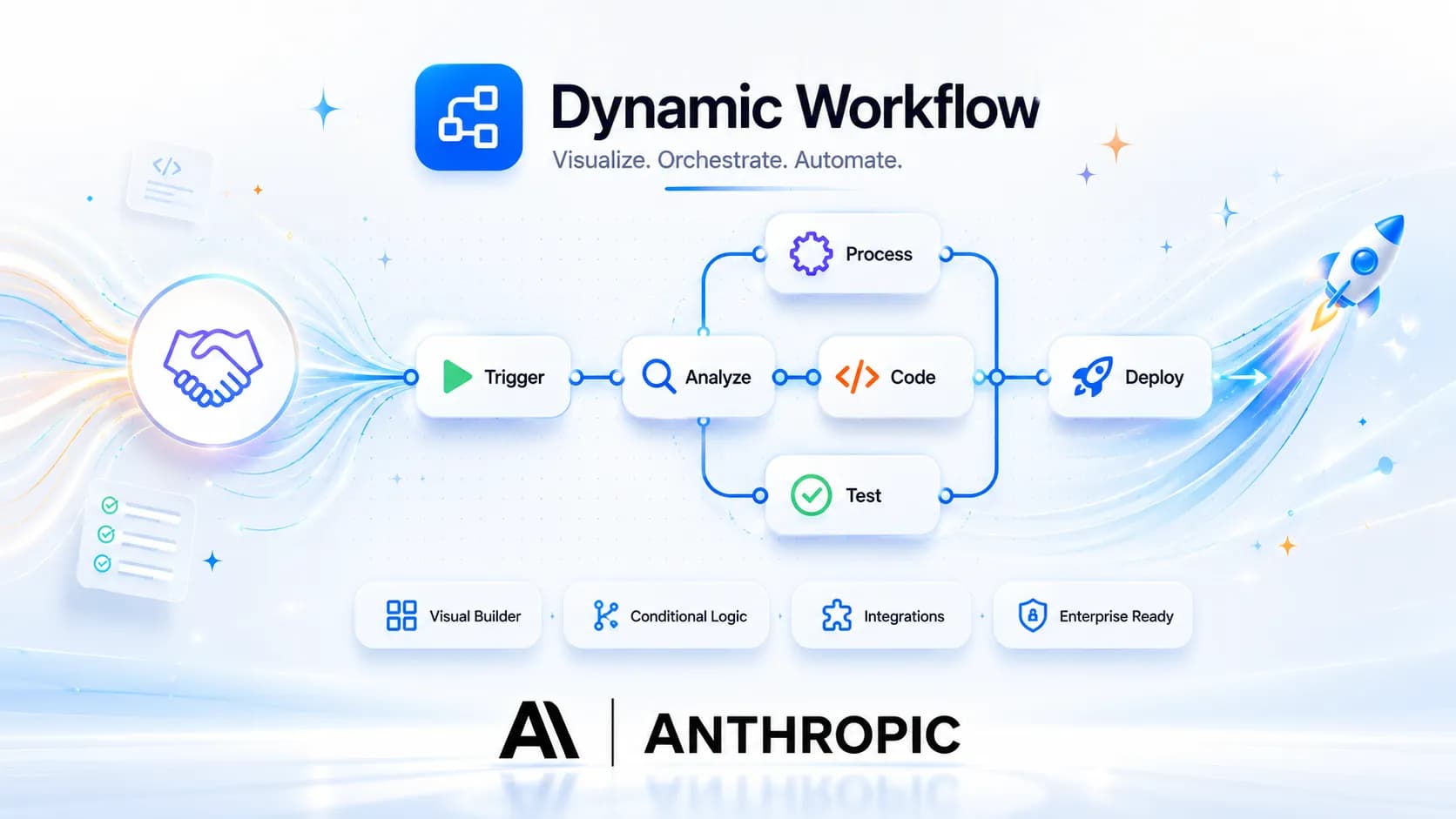
Anthropic's solution is not to make the model smarter, but to change how Claude organizes work. Dynamic Workflows transforms Claude from a code-writing agent into an agent that designs operational workflows for complex tasks. The core concept here is self-organization: Claude can analyze goals on its own, choose the appropriate working mode, and create an internal workflow before starting execution.
Custom harness instead of a fixed workflow
Instead of operating within a fixed environment, Claude writes a harness framework in JavaScript designed specifically for each task. This harness acts like a project manager: it breaks down the work, initializes specialized sub-agents for each part, assigns appropriate tools, routes work to different models, and performs adversarial verification to ensure quality.
How does a harness work?
To understand more clearly, imagine the harness as a theatrical script that Claude writes for itself before performing. When given a complex task, Claude does not dive straight in but pauses to write a JavaScript snippet describing the entire workflow: how many sub-agents are needed, what each agent does, what order things happen in, and how results from one agent are passed to the next.
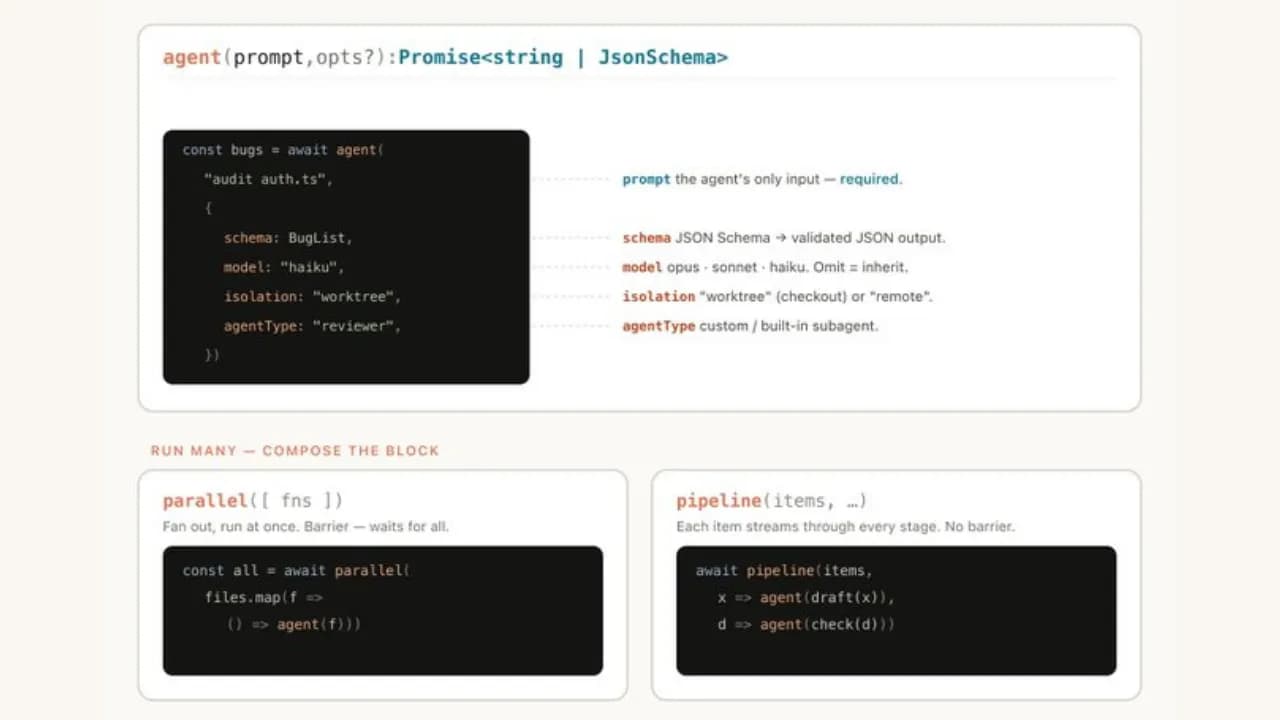
A concrete example: if you ask Claude to audit 1,000 Slack messages to find recurring incidents, the harness might look like this logically:
- Agent 1 (classification): reads all messages and assigns labels by topic
- Agent 2, 3, 4 (parallel processing): each agent deeply analyzes one topic group
- Agent 5 (synthesis): collects results from the three agents above and removes duplicates
- Agent 6 (cross-check): re-reads the synthesized results and provides independent critique
The important point is that Claude writes this harness based on the specific characteristics of each task, not according to a rigid template. Different tasks produce different harnesses, and that is exactly why this feature is called "dynamic."
Context isolation to prevent context degradation
One of the smartest design choices in Dynamic Workflows is the Isolation feature. Each sub-agent is given its own separate context window, completely independent from other agents. This prevents the phenomenon of context rot, meaning the quality degradation that occurs when a context window becomes overloaded, while also eliminating both Agentic Laziness and Goal Drift since each agent focuses only on its assigned piece of work.
Six reusable orchestration patterns
Claude can combine six available orchestration patterns to handle a wide variety of situations:
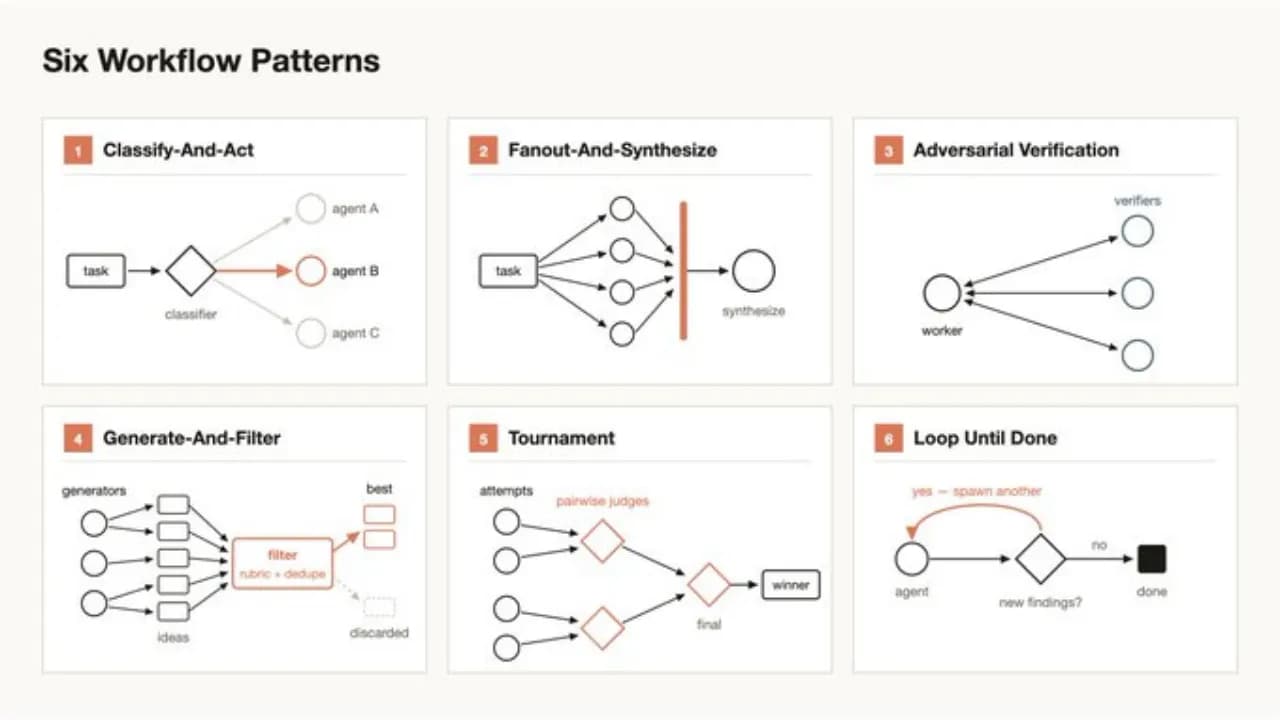
- Classify and act: classifies input then selects the appropriate action
- Fan out and synthesize: splits work into multiple parallel branches then synthesizes the results
- Cross-check verification: uses a separate agent to cross-check results
- Generate and filter: generates multiple options then filters for the best one
- Tournament: puts options into direct head-to-head elimination rounds
- Loop until done: repeats until a quality threshold is reached
Can you optimize costs when using Dynamic Workflows?
Running multiple sub-agents in parallel might sound expensive, but Dynamic Workflows is actually designed to optimize costs in several specific ways.
Smart routing to the right model
Not every step in a workflow needs the most powerful model. The harness allows Claude to route each task to a model that matches its complexity: simple classification steps can run on smaller, cheaper models, while only steps requiring deep reasoning need a large model. The result is that total costs are often lower than running the entire workflow on a single model.
Context isolation helps reduce token consumption
Because each sub-agent only receives the portion of context it actually needs for its work, total token consumption across the entire workflow is often significantly lower compared to the traditional approach, where the full conversation history gets stuffed into a single context window that keeps growing larger.
Avoiding rework through early checkpoints
The harness can install quality checkpoints between steps. If a step produces a result that does not meet requirements, the system stops and reprocesses just that step rather than running the entire workflow to completion before discovering an error at the end. This approach saves significant costs for long multi-step tasks.
What are the real-world applications of Dynamic Workflows?
What excites Thariq most is not the coding capability, but the way Dynamic Workflows extends Claude Code into non-technical tasks. The feature can be activated with natural language (for example: "use a workflow") or the keyword "ultracode." Real-world applications include:
- Auditing thousands of Slack messages to find recurring incidents
- Systematically ranking and screening large candidate pools
- Running automated live elimination tournaments to choose the best name for a CLI tool
- Handling high-precision operational tasks that previously only humans could perform
The design philosophy is architectural constraints rather than raw intelligence
The most notable aspect of Anthropic's approach is the design philosophy: rather than trying to increase the raw intelligence of the model, they build architectural constraints into the workflow. In other words, instead of hoping the model will naturally know how to avoid mistakes, they design the system so that errors are hard to occur in the first place, and the harness is the tool that enforces that philosophy.
Dynamic Workflows shows that the next step forward for AI agents does not lie in smarter models but in the ability to design workflows on their own. Just as a good manager divides work among a team rather than doing everything alone, Claude can now organize its own team of sub-agents, and this is a clear signal that the future of AI coding is no longer just about writing code faster but about organizing work better.