4AIVN
Back to News

What is Codex? OpenAI's rising star tool
Published on 15 May, 2026
What is Codex? OpenAI's rising star tool

Quick Summary

OpenAI Codex is an AI agent that runs as a desktop app on Windows and macOS, letting anyone assign tasks in natural language and receive complete results without knowing how to code. From automating reports and building websites to generating design mockups and controlling your computer in the background, Codex is expanding the definition of who can build things with AI. This article breaks down what Codex can do for you, how to install and get started, and compares it directly with Claude Code, Antigravity, and Cursor to help you choose the right tool for your needs.

Three million Codex users per week — up six times in just the first three months of 2026. That number tells you something: Codex is the rising star. OpenAI is turning it into an all-in-one tool, which means Codex is no longer just a playground for developers.

What is Codex? A tool that's not just for developers

Think about this scenario: you want to build a spreadsheet that automatically updates every week, or a small website to let customers book appointments, or simply a tool that summarizes your email reports each morning without opening dozens of tabs. Previously, these things required a developer. With Codex, you just type your request in plain English and wait for the result.

Codex is OpenAI's AI agent, launched in May 2025 and deeply integrated into the ChatGPT ecosystem. Its core difference from regular ChatGPT is that Codex doesn't just answer — it actually does the work through a code execution environment. You assign a task, Codex plans it out, executes each step, checks the result, and returns a finished product ready to use. No need to understand what code is, no need to monitor every command.

What Codex can do for you

Build apps or small websites from a description

You don't need to know HTML or JavaScript. Just describe what you need: "Create a simple appointment booking page with fields for name, phone number, and date/time selection, and send an email notification whenever someone books." Codex will build the entire interface, handle the logic, and guide you through publishing it online. A startup team in the US once shared that they completed in one weekend what would have previously taken an entire quarter — and it wasn't a team full of developers.

Automate repetitive tasks

This is where non-developer users will find the most value. For example: every week you have to consolidate revenue data from three different Excel files, merge them, and send a report to your manager. Codex can build an automated workflow that does this for you on a schedule and delivers the result without you ever opening your laptop. With the Automations feature launched in the April 2026 update, Codex can take on long-horizon tasks, pause, resume, and complete them over multiple days without needing to be reminded.

Generate images and prototypes directly in the app

Codex integrates image generation powered by GPT Image 2.0 directly inside the app. You can ask Codex to create interface mockups, product banners, or illustration assets for a document — all within the same workflow, without switching to another tool. For content creators, marketers, and solo founders, this is a genuine advantage: the entire journey from idea to finished output can happen in a single window.

Control your computer to work in the background

Since April 2026, Codex can operate Mac applications using its own cursor, viewing the screen and clicking and typing to complete tasks while you continue using the machine normally. A simpler way to picture it: you're in an online meeting while Codex has Figma open, editing a design and saving the file according to instructions you set earlier. Two things happening in parallel, neither getting in the other's way.

How to get started with Codex

Codex requires installing the desktop app on Windows or macOS — it does not run directly in a web browser. The setup process is straightforward and takes just a few minutes.

  • Step 1: Go to openai.com/codex and download the version for your operating system. On macOS, there are two separate builds for Apple Silicon (M1 and later) and Intel chips. On Windows, there is a single universal build.
  • Step 2: Install the app and sign in with your existing ChatGPT account or OpenAI API key.
  • Step 3: Choose a project folder you want Codex to work within — you can also link it to a github repository — or skip this step if you only want to assign standalone tasks like creating files, generating images, or automating a workflow.
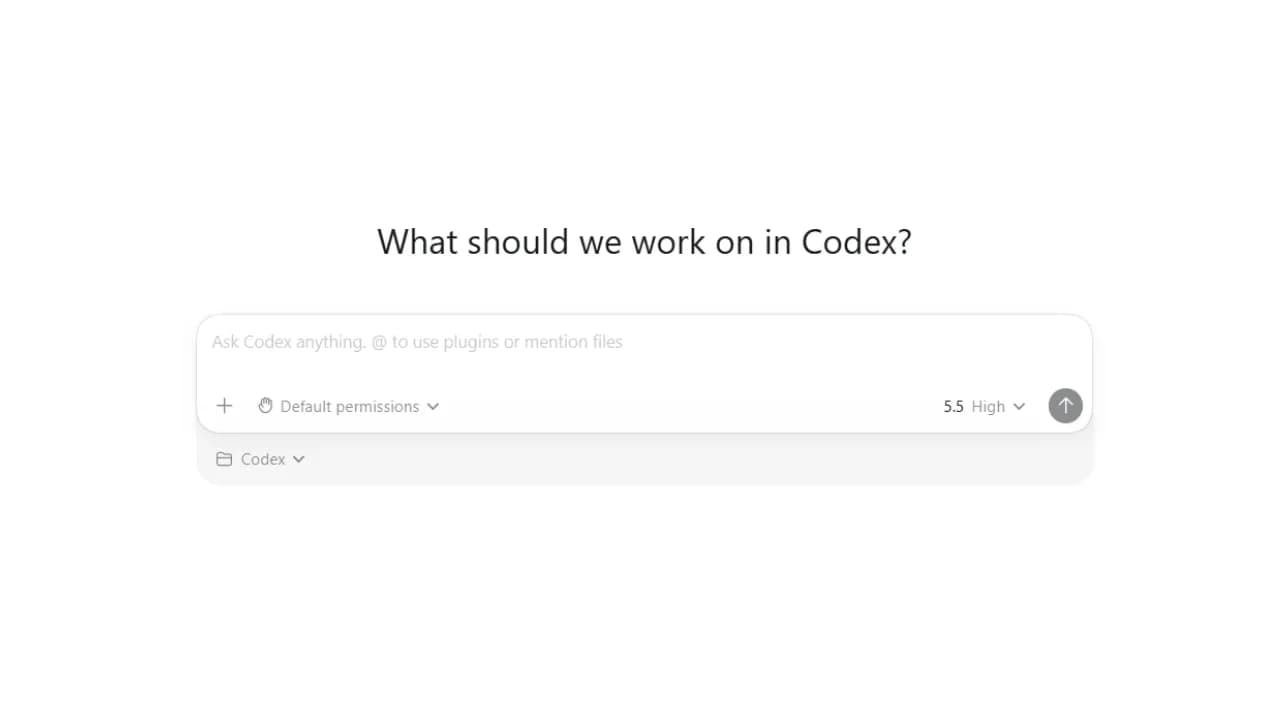
Codex working interface
  • Step 4: Type your request in natural language, and be as specific as possible. Instead of "make me something about a report," try: "Create an Excel file summarizing monthly revenue from the data I provide, add a bar chart comparing each month, and highlight the month with the highest revenue."

Codex vs Claude Code, Antigravity, and Cursor from a non-technical user's perspective

If you're not a developer, the real question isn't "which tool is technically more powerful" — it's "which tool can I use right now without learning anything new." From that angle, these four tools are clearly different from one another.

Codex and Claude Code

Claude Code from Anthropic is Codex's most direct and formidable competitor. In terms of raw technical output quality, Claude Code currently leads the pack — producing cleaner code, tighter logic, and handling large, complex codebases more effectively. However, Claude Code is explicitly designed for developers: it runs in the terminal, requires command-line installation, and notably has no image generation capability. If you're not comfortable in a terminal, Claude Code is a barrier from the very first step. Codex, by contrast, offers a more user-friendly desktop interface, integrates image generation within the same workflow, and is noticeably more accessible to non-technical users.

Codex and Antigravity

Both require a desktop app, but their underlying philosophies are completely different. Codex is built around a "hand off the task and wait for results" model: you describe what you need, the agent runs in an isolated cloud sandbox, and returns a finished product without affecting your machine at all. It suits people who want to automate workflows, create files, or build something without monitoring every step.

Antigravity works in the opposite direction: the agent runs directly on your machine, watches your screen, opens applications, and collaborates with you in real time while you work. If you want an AI colleague working alongside you — observing and reacting to what's happening on your screen — Antigravity is the better fit.

Codex and Cursor

Cursor is built on VS Code and targets developers who want to keep their familiar working environment intact. For non-coders, Cursor is largely inaccessible because the entire experience revolves around editing code inside an editor. Cursor excels at understanding an entire codebase and offers flexibility in choosing AI models, but those advantages are for developers — not for general users who need to automate workflows or build something from scratch.

In summary, from a non-technical user's perspective:

  • Codex: Friendly desktop interface on Windows and macOS, capable of generating images, well-suited for users who want AI as an automated workflow tool.
  • Claude Code: Best technical output quality, but developer-oriented and cannot generate images.
  • Antigravity: Agent works directly on your machine in real time, suited for users who want to collaborate with AI while they work.
  • Cursor: Best for developers keeping their VS Code workflow intact; not suited for general users.

Who is Codex best for?

If you're a content creator who wants to build a landing page for a campaign without hiring a developer, Codex fits. If you're a marketer who needs to automate weekly reports pulling from multiple data sources, Codex fits. If you're a solo founder who needs to ship a product fast without a technical team, Codex fits. If you're a teacher who wants to build a small quiz app for students without learning to code, Codex fits.

On the other hand, if you're a developer who needs granular control over every line of code in a large, complex codebase, Claude Code will deliver better output quality. Codex is the right tool for people who want fast results without needing to understand what's happening under the hood.

One practical limitation worth knowing: Codex currently has full support for Python, JavaScript, TypeScript, and Ruby. For tasks that don't involve code — like generating images, automating workflows, or creating documents — this language limitation has no impact on you.

The line between "can code" and "can't code" is fading

The question "do you know how to program?" is losing its weight as tools like Codex continue to evolve. What matters more now is whether you can describe clearly what you want — because that's exactly the thinking skill required to work effectively with Codex and similar AI agent tools.

If you want to try it today, start with something small and specific: ask Codex to create an Excel file consolidating data you currently process manually every week. That's the fastest test to evaluate whether Codex genuinely saves you time or not.
Discussion (0)

Log in to join the discussion.

No comments yet. Be the first!

Related Articles

Google I/O 2026: Antigravity 2.0 Major Improvements, but Interface Resembles Codex

At the Google I/O 2026 event, the search giant stunned the entire developer community by officially announcing Antigravity 2.0. No longer a conventional AI-integrated IDE, Antigravity has now transformed into a standalone desktop application powered by Gemini 3.5 Flash, accompanied by an AI Ultra subscription package priced at $100/month. However, the complete removal of the integrated source code editor in favor of a minimalist Codex-like interface is generating intense controversy. How Antigravity 2.0 Has Transformed The decision to completely separate the source code editor from Antigravity 2.0 marks a bold move by Google in reshaping the future of software development. Instead of attempting to integrate AI features into a traditional IDE, this new version functions as a dedicated AI agent orchestration hub. This means users will focus entirely on setting up tasks and monitoring workflows rather than directly editing individual lines of code. This change is most clearly demonstrated by the launch of the AI Ultra service package, priced at $100 per month. This premium subscription offers 5 times the usage limit compared to the current AI Pro package, targeting businesses and professional developers who need to operate a large number of autonomous agents simultaneously to solve complex problems. Power from Gemini 3.5 Flash and Asynchronous Execution Workflow At the heart of Antigravity 2.0 is the Gemini 3.5 Flash large language model, specially optimized for high-speed agentic tasks. Thanks to its superior processing capabilities, the new system supports highly complex multi-agent workflows, allowing multiple subagents to collaborate on a large project. More specifically, these subagents will run entirely asynchronously in the background. This mechanism ensures that the application's main interface never freezes or is interrupted during processing, helping developers maintain a smooth workflow. This is a significant improvement over its predecessor, which often experienced delays when processing large codebases. New Tool Duo: Antigravity CLI and SDK Antigravity CLI, written in Go, completely replaces the old Gemini CLI, delivering high performance and extremely fast response times in the terminal. Gemini CLI and Gemini Code Assist IDE extensions will cease service from June 18, 2026. Google AI Pro and Ultra users need to switch to Antigravity CLI before this deadline. Antigravity SDK, written in Python, allows developers to build, customize configurations, and deeply integrate autonomous agents into their projects. Minimalist Codex-like Interface and Community Controversy Despite boasting numerous powerful technological upgrades, Antigravity 2.0 is facing a wave of criticism from the user community due to radical interface changes. The new interface is now merely a minimalist console focused on a chat window for issuing commands to agents, completely eliminating the familiar IDE workspace. Many opinions suggest that this design looks exactly like a replica of the Codex or Claude Desktop application. This excessive minimalism has left many developers feeling disappointed and empty, as they no longer have the ability to quickly view and modify files directly as before. Having to switch back and forth between Antigravity and an external editor significantly reduces their actual work efficiency. How to Restore the Traditional IDE Experience for Users To appease the negative reactions from the community, Google has offered some temporary solutions for those not yet ready to adapt to the new interface. Users can visit the official Antigravity homepage to download a separate IDE version. This version will help restore the familiar integrated workspace with traditional source code editing features. However, Google also issued a warning that this is only a temporary solution. In future updates, the agent management interface will be completely removed from the IDE as the company focuses all development resources on the standalone 2.0 application. Therefore, familiarizing oneself with the new working model is inevitable for developers in the long term. The Rapid Evolution of Tools like Antigravity and Codex The separation between traditional code editors and agent control interfaces is clear evidence that AI is shifting from a supportive tool to an autonomous partner. Developers need to proactively familiarize themselves with new control tools like CLI and SDK to gradually transition their role from direct code writers to managers and orchestrators of intelligent agent ecosystems.

Nam
20 May, 2026
What is an agent harness? The framework that helps AI work efficiently

Imagine having an AI assistant that is incredibly smart but forgets everything between sessions and cannot check the quality of its own work. To solve this problem, developers created a protective management layer around AI models called an agent harness. This is what enables AI agents to complete complex, multi-step tasks autonomously without requiring constant human intervention. What is an agent harness? Think of an AI model as a brilliant new employee with no long-term memory and zero familiarity with the workplace. They can solve complex problems in seconds but will just as easily forget what they were working on, or accidentally send a confidential document to the wrong client. In that scenario, an agent harness acts as the experienced manager sitting right beside them, keeping things on track. Put simply, an agent harness is the software layer wrapping around an AI model that handles all administrative and logistical work so the model itself can focus entirely on reasoning and problem-solving. It connects the AI to external tools, maintains a complete record of work across sessions, and verifies results before considering a task done. In practice, an agent harness handles the following: Connecting the AI model to external tools such as web search, email, and calendars Persisting progress across sessions so the AI never has to start from scratch Filtering out irrelevant information and supplying only the data the AI actually needs at each step Monitoring AI actions to prevent dangerous mistakes Logging activity in detail so humans can audit what happened when needed Origin of the term: The concept of "agent harness" was formally named by technology engineer Mitchell Hashimoto in early 2026. Before that, many development teams had built similar systems but had no shared term for this layer of infrastructure. Why do AI agents fail at long-running tasks? The biggest weakness in today's AI models is the complete absence of long-term memory. Every new conversation starts from zero with no recollection of anything that happened before. Imagine hiring an employee who wakes up every morning having forgotten every agreement, every deadline, and every piece of progress from the day before. When Anthropic tested Claude building a complex web application without harness support, the results were consistently disappointing. Two failure modes kept appearing: The AI tried to do everything at once, ran out of working memory midway through, and left the project unfinished. The next session wasted time trying to figure out what had already been done. The AI declared the task complete without actually running the result to verify it worked. Beyond those two core failures, long-horizon tasks expose three additional problems: Context clog: Accumulated conversation history and tool outputs crowd out the original instructions, causing the AI to gradually lose focus on the actual goal Tool misuse: The AI sometimes searches for information that does not exist or submits incorrect inputs to forms, and without anything to stop it, repeats the same error in a loop Total progress loss on failure: Any network error or system crash wipes out whatever was stored in temporary memory, forcing a full restart Stanford research (2023): AI models tend to overlook information buried in the middle of long text, even when that text is not particularly long. This is why feeding too much data to an AI all at once often backfires without a filtering layer in place. How does an agent harness work in practice? An agent harness operates in two distinct phases to keep work flowing continuously without interruption. Setup phase (runs once) The harness prepares the full working environment before the AI begins: building a structured task list, initializing storage, and recording the starting point. Think of it as the manager drawing up a detailed project plan before handing anything off. This phase only needs to happen once. Execution phase (repeats) Each time the AI begins a new session, the harness automatically reloads all saved progress and assigns only the next relevant task. When the AI wants to take an action such as searching for information or sending a notification, the harness checks whether that request is valid, executes it safely, cleans the returned result, and passes it back to the AI. The model never touches external systems directly without going through this control layer first. The four core components of an agent harness For an AI to operate reliably over extended periods, a standard agent harness needs four essential components: External tool gateway: Allows the AI to interact with the real world by reading documents, searching the web, or sending messages. The harness acts as an intermediary, validating every request before execution and ensuring returned results are clean and usable. Layered memory management: Maintains three types of memory serving different needs: short-term working memory for the current session, a task log recording what has been completed and what remains, and a long-term knowledge store that accumulates across multiple projects over time. Intelligent context filter: Summarizes long conversation histories down to key points and supplies only the data relevant to the current step rather than loading everything at once, keeping the AI focused on the right task at the right moment. Safety checker and human approval gate: Automatically verifies results before marking a task as complete. For sensitive actions such as deleting important data or sending bulk emails, the harness pauses and waits for human confirmation before proceeding. Note on accumulated knowledge: If an AI agent's memory is stored entirely within a closed third-party platform, all the knowledge it builds up over time belongs to that platform. Switching to a different system means starting from zero. This is worth thinking through carefully when choosing a long-term AI agent solution. Harness engineering and the secret behind millions of lines of code Harness engineering is the practice of treating every AI failure as a system problem to fix permanently rather than something to retry or ignore. As Mitchell Hashimoto put it: if the agent makes a mistake, redesign the environment so that mistake becomes physically impossible to repeat. In practice, when OpenAI built large software projects with three engineers producing 3.5 pull requests each per day without typing a single line of code, they had set up automatic verification checks after every AI action. When the AI produced something incorrect, the system returned error messages written in a specific structure so the AI immediately understood what needed to change on the next attempt. Every error message became a learning signal, not just a warning. A study presented at ICML 2025 further confirmed that the same AI model equipped with a harness consistently outperformed itself running without one, even with identical training weights and identical prompts. The environment surrounding the AI matters just as much as the model itself. A telling data point: Anthropic's Claude Code has grown past 512,000 lines of code and continues to expand. More capable models do not make the harness simpler. They make it larger, because there is more capability to orchestrate and more failure modes to guard against. When do you actually need an agent harness? For simple one-off tasks like summarizing a document or answering a specific question, calling an AI directly is perfectly fine. But the moment work extends beyond a single conversation, requires memory from a previous session, or involves multiple steps that need to happen in a specific order, a harness becomes necessary. One thing worth reflecting on: the built-in web search in ChatGPT and Gemini is itself a form of harness. When AI automatically looks something up, there is infrastructure behind the scenes making the tool call, processing the result, and feeding clean information back into context. The harness is invisible to the user but indispensable to the system. Agent harness is not a short-term technical trend. It is the answer to fundamental limitations that AI cannot resolve on its own: no long-term memory, finite working context, and a tendency to misuse external tools without guardrails. 4AIVN has also started applying harness to our own workflows — and what we have found is that it does not just help AI finish tasks. It turns AI into a system that learns from failure and gets more reliable over time.

Nam
1 Jun, 2026
Google ra mắt Nano Banana 2 nâng cấp đáng giá về tốc độ tạo ảnh

Google vừa chính thức ra mắt Nano Banana 2 (Gemini 3.1 Flash Image), một bước đi đáng chú ý khi hãng quyết định đưa những tính năng từng là đặc quyền của Nano Banana Pro xuống dòng phổ thông. Đây thật sự là một bản nâng cấp mạnh mẽ và cũng là bảo chứng cho lời hứa của Google về việc phổ cập công nghệ pro tới nhiều người dùng hơn, để ngay cả người dùng miễn phí cũng có thể trải nghiệm những tính năng pro.Nano Banana 2 là gì và điểm khác biệt so với Nano Banana Pro?Nano Banana 2 tận dụng sức mạnh của mô hình Gemini 3.1 Flash Image mới nhất để thực hiện các yêu cầu tạo và chỉnh sửa ảnh chỉ với tốc độ nhanh hơn hẳn so với bản pro.Sự khác biệt cốt lõi so với phiên bản ProTốc độ: Tốc độ chính là điều Nano Banana 2 nhấn mạnh. Trong khi Nano Banana Pro tập trung vào các tác vụ yêu cầu độ trung thực cao nhất và độ chính xác tuyệt đối về dữ kiện, Nano Banana 2 ưu tiên tốc độ xử lý nhanh (tốc độ Flash) mà vẫn duy trì được chất lượng hình ảnh tương đương bản Pro.Chi phí: Nano Banana 2 API có mức giá rẻ hơn đáng kể. Ví dụ, một ảnh độ phân giải 1024x1024 trước đây có giá khoảng $0.13 thì nay với Nano Banana 2 chỉ còn khoảng $0.07. Tuy vẫn còn hơi cao nhưng Google đã cố gắng giảm giá để mọi người dễ tiếp cận hơn.Đối tượng người dùng: Nano Banana 2 chắc chắn tập trung vào nhiều người dùng hơn khi người dùng miễn phí cũng đã có thể trải nghiệm thay vì chỉ giới hạn cho các gói trả phí Pro hay Ultra như trước đây.Tính năng kế thừa: Nano Banana 2 đã được kế thừa các tính năng cao cấp từ bản Pro như khả năng duy trì tính nhất quán của nhân vật và diễn giải các câu lệnh phức tạp.Các đặc điểm nổi bật của Nano Banana 2 giống với Nano Banana ProTính nhất quán của đối tượng: Đây là một nâng cấp quá hữu dụng nhưng quen thuộc đối với những ai làm marketing, tạo truyện tranh, tạo ảnh. Tính năng này của Nano Banana 2 giống với bản Pro khi cho phép giữ nguyên ngoại hình của tối đa 5 nhân vật và độ ổn định của 14 vật thể trong cùng một quy trình làm việc.Hiển thị văn bản chính xác và đa ngôn ngữ: Nỗi lo về lỗi chính tả hay rào cản ngôn ngữ trên hình ảnh AI giờ đây không còn lo lắng khi dùng Nano Banana. Toàn bộ những tính năng vốn làm nên tên tuổi của dòng Pro từ khả năng hiển thị đúng chính tả đến tính năng dịch thuật văn bản trực tiếp trong ảnh hiện đã được tích hợp trên Nano Banana 2. Khả năng ảnh bị lỗi chính tả, vỡ font hay nhầm ngôn ngữ đã giảm xuống rất thấp, rất hiếm khi xảy ra.Kết nối thông tin thời gian thực: Nano Banana 2 sử dụng Gemini và thông tin từ web search nên có thể cập nhật các thay đổi theo thời gian thực để dựng đúng các đối tượng cụ thể, tránh tình trạng lạc đề khi tạo ảnh.Độ phân giải cũng rất pro: Nano Banana 2 cũng rút ngắn khoảng cách tính năng với dòng pro khi đã hỗ trợ độ phân giải đầu ra từ 512px đến 4K. Người dùng có thêm nhiều tùy chọn tỷ lệ khung hình mới như 4:1, 1:4, 8:1 và 1:8.Tính minh bạch: Google đã đưa tất cả hình ảnh tạo ra bởi Nano Banana 2 đều được nhúng watermark bằng hệ thống SynthID và tuân thủ chuẩn C2PA để xác minh nguồn gốc AI.Cách sử dụng Nano Banana 2 trên ứng dụng GeminiBạn có thể dễ dàng trải nghiệm Nano Banana 2 trực tiếp trên Gemini app hoặc Google AI studio dù sử dụng gói miễn phí hay pro hoặc ultra:Bất ngờ: Thật sự bất ngờ khi mà Nano Banana 2 cho chọn trực tiếp kiểu ảnh đầu ra với mẫu ở ngay trên Gemini app mà không cần phải nhập chữ vào prompt nữa. Tuy kết quả vẫn cho ra chưa được ưng ý cho lắm nhưng khi không cần nhập prompt nữa giảm thiểu khả năng quên ghi vào style ảnh để Nano Banana có thể đưa ra những tấm ảnh đúng ý người dùng.Còn đối với chọn khung hình người dùng vẫn cần chọn khung hình viết trực tiếp vào prompt, đây là điều mình rất nhiều khi quên khi vào prompt.Lưu ý: Nếu bạn là người dùng Pro/Ultra và cần độ chính xác dữ kiện tối đa, bạn vẫn có thể gọi lại Nano Banana Pro thông qua menu ba chấm (chọn regenerate/redo).Cuộc đối đầu của Nano Banana 2 với GPT Image 1.5Tuy là GPT Image 1.5 nên so sánh với dòng Pro nhưng mình vẫn muốn hướng đến sự so sánh thú vị khi mà GPT Image 1.5 và Nano Banana 2 hướng đến những mục tiêu tạo ảnh khác nhau và người dùng khác nhau:Sự khác nhau về triết lý thiết kế giữa OpenAI và GoogleGPT Image 1.5 thì được OpenAI thiết kế như là một studio sáng tạo tập trung vào độ chính xác. Nó mang lại những trải nghiệm giống với những thiết kế của những bức ảnh đời thường hơn so với Nano Banana.Nano Banana 2 thì lại được ví như một nhà quay phim khi tập trung vào sức mạnh thị giác. Google nhấn mạnh vào tri thức "thế giới thực" để tạo ra những hình ảnh có độ chân thực rất cao, ánh sáng sống động và chi tiết sắc nét nhất có thể.Trải nghiệm thực tế giữa hai mô hình có khác nhau nhiều khôngDựa trên các thử nghiệm đối đầu, kết quả cho thấy sự khác biệt rõ rệt về phong cách:Độ chân thực và phong cách ảnh: GPT Image 1.5 có khả năng tạo ra các bức ảnh mang tính đời thường, có độ nhiễu và tự nhiên hơn giống như ảnh chụp bằng iPhone có đèn flash. Ngược lại, Nano Banana thường cho kết quả quá hoàn hảo, đôi khi trông giống ảnh chụp studio hoặc ảnh quảng cáo đã được hậu kì rất phức tạp rồi.Khả năng tuân thủ prompt: GPT Image 1.5 tất nhiên là nổi bật hơn với khả năng bám sát prompt vì nếu muốn bám sát Prompt thì người dùng Google phải nâng cấp lên bản pro. Ví dụ trong bài kiểm tra tạo lưới (grid) 6x6 với 36 vật thể khác nhau, nó đã hoàn thành chính xác vị trí của từng đối tượng, điều mà các Nano Banana thế hệ trước chắc chắn thất bại. Nano Banana 2 cũng đã cải thiện rất nhiều ở mảng này nhưng đôi khi vẫn có cách hiểu mang tính sắp đặt sẵn hơn.Chữ viết trong ảnh: Cả hai đều đã khắc phục tốt lỗi chính tả trong ảnh, tuy nhiên với GPT Image 1.5 thì thường có bố cục thiết kế giống như các mẫu Canva sẵn có trong khi Nano Banana 2 mạnh về khả năng dịch văn bản ngay bên trong ảnh, ví dụ Nano Banana 2 có khả năng dịch chữ viết trên bia đá ngay trong ảnh.Chỉnh sửa trực tiếp: GPT Image 1.5 mạnh về in-painting thay đổi một chi tiết cụ thể (như màu áo) mà vẫn giữ nguyên khuôn mặt và ánh sáng. Nano Banana 2 lại mạnh về blending, có thể kết hợp tối đa 14 hình ảnh tham chiếu để tạo ra một ảnh phức tạp về độ sáng, chiều sâu, màu sắc.Tốc độ: Cả hai đều cực nhanh. GPT Image 1.5 và Nano Banana 2 đều rất nhanh bằng mắt thường khó mà thấy được cái nào nhanh hơn.Chi phí API: GPT Image 1.5 mang lại mức giá tối ưu hơn cho việc tạo ảnh tiêu chuẩn (khoảng $0.009/ảnh). Dưới đây là bảng so sánh chi phí chi tiết để mọi người tham khảo[CHART_1]Với Nano Banana 2, Google không chỉ chạy đua về mặt công nghệ mà còn tập trung vào trải nghiệm thực tế của người dùng thông qua tốc độ cực nhanh và khả năng kiểm soát hình ảnh chuyên nghiệp. Đây chắc chắn là công cụ không thể bỏ qua cho các nhà sáng tạo nội dung và marketer trong năm 2026.

Nam
2 Mar, 2026
Google đối đầu với OpenClaw khi chặn kết nối tới Antigravity

Cộng đồng người dùng AI toàn cầu đang xôn xao trước thông tin Google thực hiện chiến dịch khóa hàng loạt tài khoản liên quan đến việc sử dụng công cụ OpenClaw kết nối qua nền tảng Antigravity. Động thái này không chỉ gây gián đoạn công việc của hàng ngàn nhà phát triển mà còn dấy lên những lo ngại sâu sắc về tương lai của các tác nhân AI (AI Agents) tự chủ.Nguyên nhân từ phía Google với các “nghi vấn” hoạt động bất thườngTheo thông tin từ Google, hệ thống của hãng đã phát hiện sự gia tăng đột biến các hoạt động được cho là bất thường khi người dùng truy cập các mô hình Gemini thông qua công cụ mã nguồn mở OpenClaw và Antigravity. Google khẳng định rằng việc sử dụng công cụ bên thứ ba để kết nối với mô hình Gemini là hành vi vi phạm điều khoản sử dụng. Hệ thống bảo mật của hãng đã ghi nhận lượng lớn hoạt động bất thường xuất phát từ nền tảng Antigravity, gây ảnh hưởng đến chất lượng dịch vụ chung và buộc Google phải nhanh chóng chặn quyền truy cập để đảm bảo tài nguyên cho những người dùng hợp lệ.Hệ quả nghiêm trọng đối với người dùngĐộng thái bất ngờ của Google đã khiến nhiều người dùng chịu thiệt hại nặng nề:Mất quyền truy cập dịch vụ: Nhiều người dùng đột ngột bị khóa hoặc hạn chế quyền truy cập vào các dịch vụ thiết yếu như Gmail, Google Workspace và cả phiên bản AI cao cấp Gemini 2.5 Pro.Lỗi hệ thống: Những người chưa bị khóa tài khoản thường xuyên gặp phải thông báo lỗi “403” hoặc các thông báo về vi phạm chính sách khi cố gắng sử dụng API.Tình trạng “Phiên bản không hỗ trợ”: Một loạt người dùng báo cáo lỗi “Phiên bản Antigravity này không còn được hỗ trợ” khi cố gắng thiết lập kết nối, thực tế là do sự thay đổi trong cách Google và Antigravity xác thực phiên bản.Các nhà phát triển đã tạo bản vá và nỗ lực khôi phục thế nàoCộng đồng mã nguồn mở đã nhanh chóng tìm cách ứng phó với các rào cản kỹ thuật này:Cập nhật phiên bản: Các nhà phát triển phát hiện ra rằng mã nguồn cũ (phiên bản 1.11.x) đã bị Google từ chối. Một giải pháp tạm thời là cập nhật thủ công chuỗi phiên bản thành 1.15.8 trong các tệp cấu hình của hệ thống để “đánh lừa” sự kiểm tra của máy chủ.Hướng dẫn khôi phục tài khoản: Trên các diễn đàn như Reddit, người dùng truyền tai nhau các bước khôi phục tài khoản bị cấm, bao gồm việc ngắt kết nối OAuth trong cài đặt tài khoản Google, xóa bộ nhớ cache và tệp token cục bộ, đồng thời phải đợi từ 24 đến 96 giờ trước khi thử đăng nhập lại.Bối cảnh rộng hơn dẫn đến phản ứng từ các ông lớnKhông chỉ Google, Anthropic gần đây cũng cập nhật điều khoản để cấm rõ ràng việc sử dụng mã thông báo OAuth của tài khoản Claude trong các công cụ bên thứ ba như OpenClaw, cuối cùng chỉ còn mỗi OpenAI và các công ty đến từ Trung Quốc là đang mở cửa cho OpenClaw. Sự việc này cũng tạo ra những biến động nhân sự đáng chú ý:Peter Steinberger, nhà phát triển đứng sau Antigravity, đã chỉ trích động thái của Google là quá cứng rắn và từng có ý định ngừng dự án.Sam Altman (CEO OpenAI) ngay sau đó đã thông báo Steinberger sẽ gia nhập OpenAI để phát triển thế hệ trợ lý ảo mới, trong khi OpenClaw sẽ tiếp tục được duy trì dưới dạng dự án mã nguồn mở.Lời cảnh báo về an toàn dữ liệuĐằng sau sự tiện lợi của OpenClaw — một công cụ có thể tự động gửi mail, quản lý lịch trình và thực hiện lệnh terminal — là những rủi ro bảo mật chí mạng. Các chuyên gia cảnh báo về lỗ hổng (Prompt Injection), nơi kẻ xấu có thể điều khiển AI xóa sạch dữ liệu hệ thống (lệnh rm -rf) hoặc đánh cắp thông tin nhạy cảm của người dùng.Kết luận: Sự kiện Google chặn OpenClaw và Antigravity không chỉ là một vấn đề kỹ thuật đơn thuần, mà còn là minh chứng cho sự xung đột giữa khát vọng tự do của cộng đồng mã nguồn mở và nỗ lực bảo vệ hệ sinh thái cũng như tài nguyên kinh doanh của các tập đoàn công nghệ lớn. Đây là lời cảnh tỉnh về việc cần có sự cân bằng giữa đổi mới và an toàn trong bối cảnh AI đang ngày càng phát triển mạnh mẽ.

Nam
24 Feb, 2026