4AIVN
Back to News

Gemini 3.1 Flash-Lite Launches Faster and Cheaper Than Gemini 2.5 Flash

Published on 4 March, 2026
Gemini 3.1 Flash-Lite Launches Faster and Cheaper Than Gemini 2.5 Flash

Quick Summary

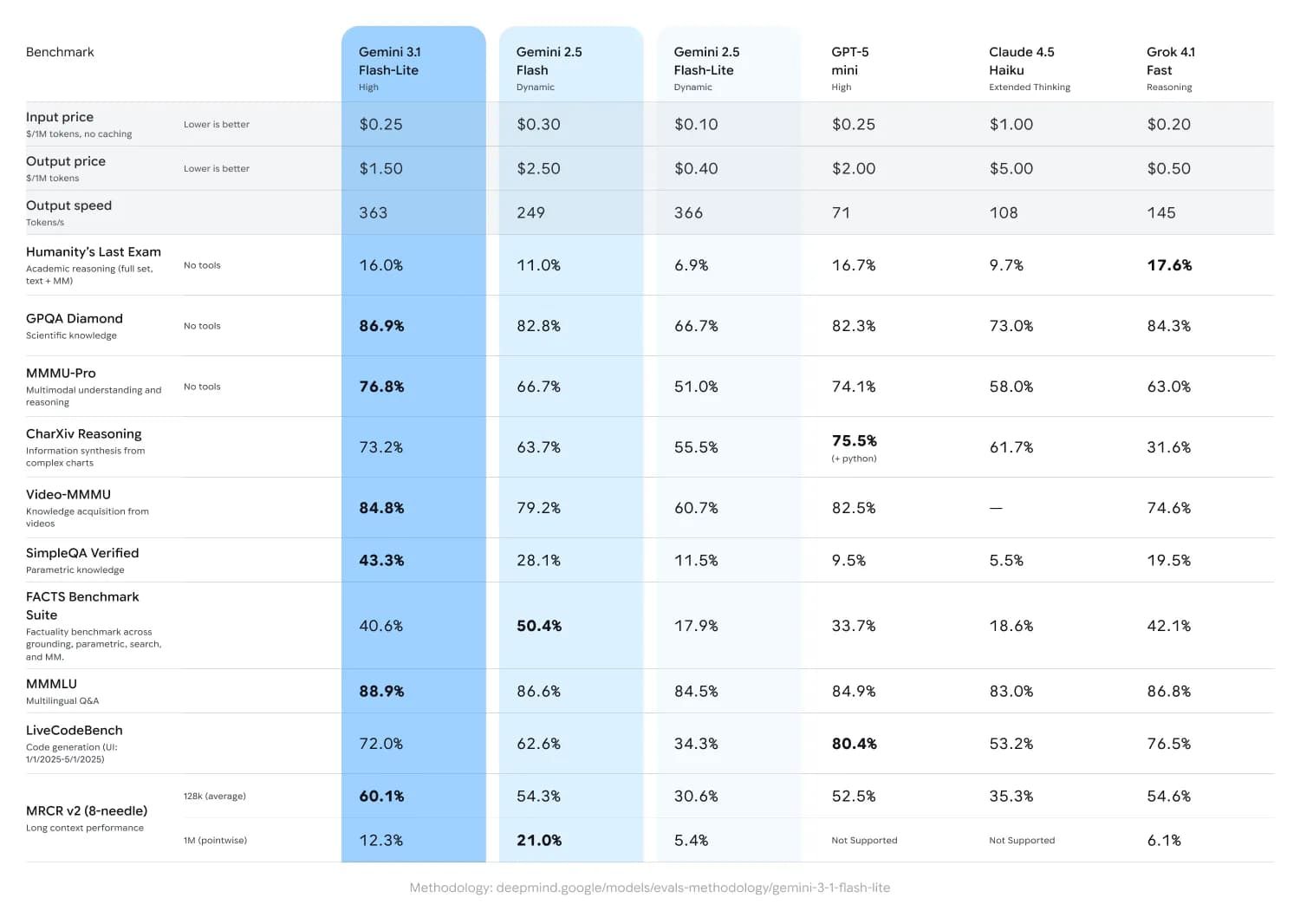
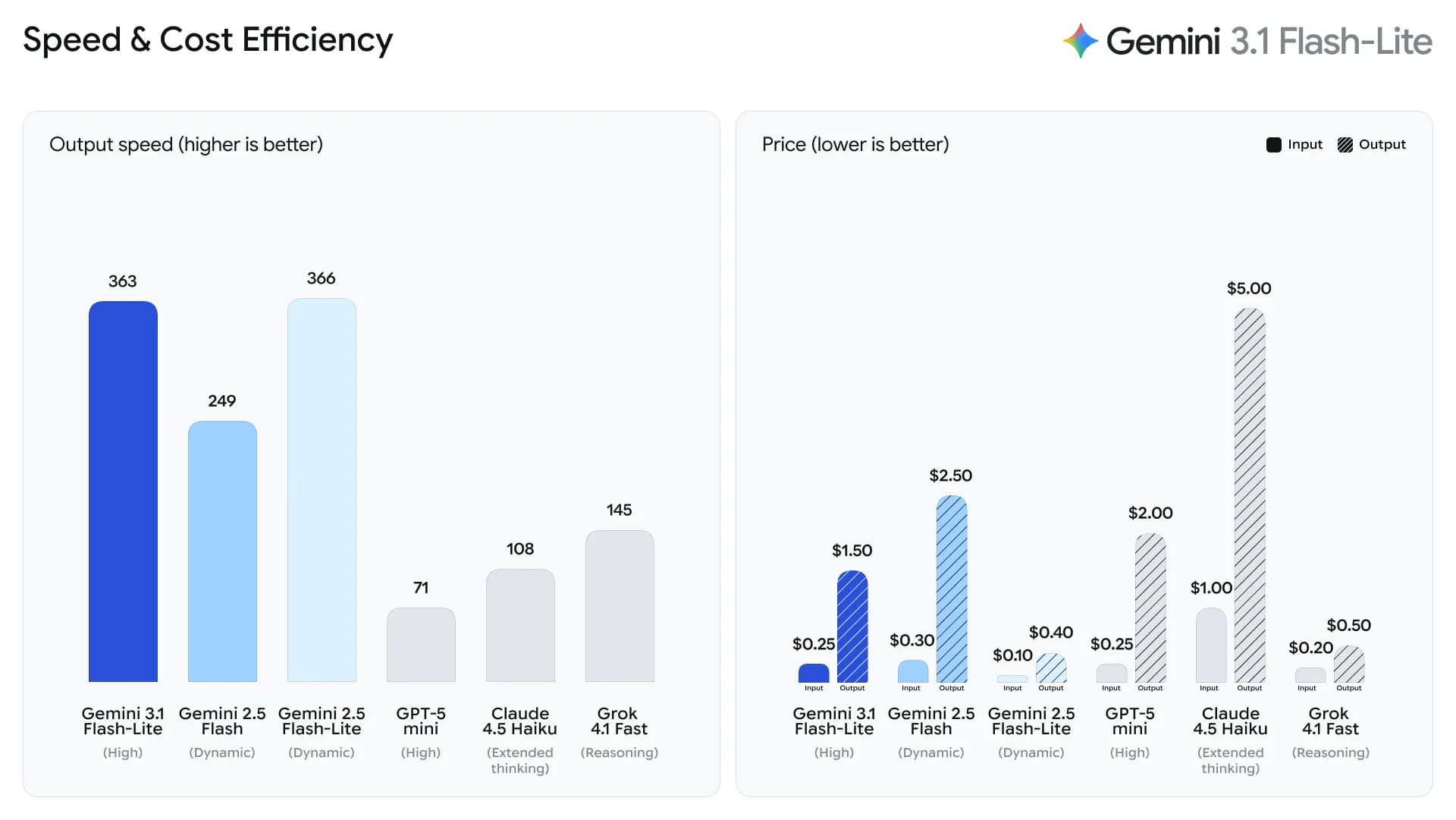
Google has launched Gemini 3.1 Flash-Lite, the fastest and most cost-efficient model in the Gemini 3 family. Built for high-volume developer workloads, it is 2.5 times faster than Gemini 2.5 Flash, increases output speed by 45%, and costs $0.25 per million input tokens. The model combines multimodal capabilities, strong reasoning performance, an Elo score of 1432, an 86.9% result on GPQA Diamond, a one-million-token context window, and an emphasis on safety. Companies including Latitude are already using it to improve performance and tackle complex workloads.

Gemini 3.1 Flash-Lite: A Fast, Capable, and Affordable Option

If you're looking for an AI solution that is both fast and economical for deploying large-scale projects, then Gemini 3.1 Flash-Lite, recently launched by Google, is the answer. This is not just a minor upgrade, but truly a step that makes AI technology more accessible to everyone.

Strong Performance at a Manageable Cost

What impressed me most about Gemini 3.1 Flash-Lite is how Google balances economic considerations with performance. For those optimizing monthly API costs, this will be a very worthwhile option, especially when popular models like Claude Opus or Claude Code can incur exorbitant costs of up to $200 if you don't want to quickly hit limits.

  • Very Reasonable Price: It only costs about $0.25 per million input tokens. This price allows us to confidently deploy large data processing features without excessive budget concerns.
  • Impressive Response Speed: The feeling of waiting for AI to respond can sometimes be inconvenient, but with Flash-Lite, the speed of the first output is 1.5 times faster than the previous 2.5 Flash version. Although the cost has increased compared to Gemini 2.5 Flash-Lite, it remains reasonable compared to the general market, and the trade-off for speed is truly appreciated by everyone.
Comparison of Gemini 3.1 Flash-Lite with Gemini 2.5 Flash

Built on Gemini 3 Pro Capabilities

Despite the "Lite" in its name, don't underestimate its capabilities. Developed based on the Gemini 3 Pro platform, this model still smoothly processes everything from text and images to audio and video.

  • Deep Comprehension: With an Elo score of 1432, Flash-Lite proves it's not inferior to competitors in its segment. Especially, a context window of up to 1 million tokens is perhaps already common for models from Google, which is truly beneficial for those who frequently work with extremely long documents.
Gemini 3.1 Flash-Lite Score, Source: Google
  • Flexibility for Developers: Another plus is that you can customize the "depth" of AI reasoning. Depending on whether you're building a simple chatbot or need complex data analysis, you can adjust it for optimal performance.

Safety and Reliability

Google has also made many refinements to make this model more user-friendly and intelligent in its communication. It minimizes unreasonable question rejections while ensuring strict safety standards, helping everyone feel confident when integrating it into real-world products.

Conclusion

Overall, Gemini 3.1 Flash-Lite is a very practical step forward from Google. It focuses on exactly what you need: speed, efficiency, and competitive pricing. If you're planning to upgrade your system to reduce tokens for tasks that don't require complex reasoning, give this Gemini 3.1 Flash-Lite version a try!

Discussion (0)

Log in to join the discussion.

No comments yet. Be the first!

Related Articles

Gemini 3.6 Flash Launches but Disappoints in Practice

Google announced Gemini 3.6 Flash on July 21, 2026, with sharp benchmark gains over 3.5 Flash: DeepSWE rose from 37% to 49%, MLE Bench from 49.7% to 63.9%, and OSWorld Verified reached 83%. Yet 4AIVN's hands-on experience tells a very different story. The model handles small jobs reasonably well, but a multi-step plan can make it forget the objective, skip steps, and drift halfway through the work. Stronger benchmarks do not reflect real-world use According to Google's official announcement, Gemini 3.6 Flash uses 17% fewer output tokens than 3.5 Flash on the Artificial Analysis Index, while tests such as DeepSWE show token reductions of up to 65%. Its input window reaches 1,048,576 tokens and its output limit is 65,536 tokens, impressive numbers on paper. The problem is that these figures come from designed tests with a fixed objective and a relatively contained run. That is not how a real plan operates. Production work changes continuously in response to feedback rather than ending after one self-contained attempt. Following a long plan is the critical weakness In hands-on use, Gemini 3.6 Flash performs poorly as soon as it moves beyond a single task. Give it a small job with explicit checks and it can work well with few unnecessary loops. Give it a multi-step plan and it may forget the original objective, skip previously agreed steps, or drift after several turns. When corrected, it sometimes apologizes and then repeats the same mistake instead of actually fixing it. A one million token window describes input capacity, not memory quality. The model may be able to “see” the full context and still miss details during execution; one overlooked constraint can push the entire plan off course. This is not a rare random failure but a repeated weakness that is difficult to ignore. Gemini 3.6 Flash is strong at completing one job quickly, but it is not yet dependable at completing a sequence of jobs correctly. That is the gap the benchmarks do not measure. A 17% price cut may not match the quality Gemini 3.6 Flash is priced at $1.50 per million input tokens and $7.50 per million output tokens, about 17% below the $9 output price of 3.5 Flash. On the surface, this is a sensible improvement: lower cost and higher benchmark scores. But if long tasks are executed poorly, the savings can quickly disappear through repeated reminders, corrections, and complete reruns of the plan. Gemini 3.5 Flash Lite is cheaper still at $0.30 per million input tokens and $2.50 per million output tokens, but it targets simple classification and data transformation workloads that do not require the model to preserve a long plan. What do you gain and lose with Gemini 3.6 Flash? Objectively, this is not a failed upgrade. Google has likely made careful tradeoffs among output quality, speed, and cost, even if real-world behavior does not fully meet the high expectations attached to its engineering team. The improvements are real rather than purely theoretical: responses are faster, output costs are lower, and the model is efficient on short, narrow tasks such as content classification, writing one code function, or answering a specific question. In those cases, it keeps unnecessary loops to a minimum. The cost becomes visible when work extends beyond a few steps. The more constraints and earlier decisions the model must preserve, the more likely it is to drift. For coding agents or long workflows already running reliably on Claude Fable 5 or GPT 5.6, there is not yet a convincing reason to switch to Gemini 3.6 Flash solely because of benchmarks or lower pricing. Gemini 3.5 Pro is still the model to wait for Google says Gemini 3.5 Pro is still being tested with partners and will be released broadly when it is ready. The central story of this launch is therefore the sizeable gap between benchmarks and real work. Anyone looking for a dependable agent for long-running workflows may still need to wait and see whether 3.5 Pro delivers a genuine step forward. If future releases remain underwhelming in practice, Google risks surrendering its advantage to competitors including Anthropic, OpenAI, and Meta.

Nam
23 Jul, 2026
Gemini powers Argentina and Messi at World Cup 2026

Gemini has won big in the most literal sense, right as Messi scored his first hat-trick at the 2026 World Cup, leading Argentina to a crushing 3-0 victory over Algeria and equaling Miroslav Klose's record of 16 World Cup goals. That historic moment became the perfect launchpad for Gemini. Back in March 2026, Google and the Argentine Football Association (AFA) made a bold decision: rather than simply printing a logo on training kits, they signed a deal for the AI to actively support tactical preparation and professional decision-making. That bet has now proven to be the right call. From training kit to the tactical meeting room The agreement between AFA and Google was unveiled at Times Square, New York, a venue deliberately chosen to capture global media attention. The Gemini logo appears across all training apparel for Argentina's men's, women's and youth squads, sitting alongside Adidas and American Express in AFA's top sponsorship tier. But the interesting part isn't the jersey. According to Inside World Football, Argentina's coaching staff will use Gemini for three specific purposes: tactical analysis, injury prevention and decision support. In other words, Gemini now has a seat in meetings that previously belonged only to Scaloni and his assistants. Google has not publicly disclosed which specific Gemini tools have been integrated into AFA's workflow. What is clear is that they are using the World Cup to bring Gemini into the reality of professional football, and the results will be graded in public. What is Gemini actually doing in the dressing room? Argentina arrives at the 2026 World Cup as the reigning champion. Every decision Scaloni makes, from the squad list to the starting eleven, is scrutinized more closely than any other team, and that is precisely why Argentina has become the most ideal testing ground Google has ever had for Gemini in professional football, especially at a major tournament. Tactical analysis Gemini is used to process match data for both Argentina and their opponents, covering movement statistics, attacking patterns and defensive vulnerabilities. Instead of the coaching staff spending hours reviewing footage, AI synthesizes the data and generates tactical diagrams automatically, saving significant preparation time before each match. Injury prevention This is a problem every major team wants to solve, especially when Messi and several key players are at an age that requires careful management of training loads. Gemini analyzes biometric data and injury history to issue early warnings, helping the coaching staff adjust intensity before problems actually occur. That is part of the reason why, immediately after completing his hat-trick, Scaloni chose to substitute Messi off, prioritizing fitness and safety for the matches ahead. AI in injury prevention is nothing new. Premier League clubs have had Microsoft as a partner for similar purposes. What is different this time is that Gemini is integrated directly into the workflow of a national team competing at a major tournament, not just at club level. For fans: create Messi content, follow scores without unlocking your screen Alongside supporting the coaching staff, Gemini has also rolled out a range of features aimed at fans, and this is the side that hundreds of millions of people will actually experience. Gemini lets you create content about players directly Users can generate images, songs and digital content featuring Argentina players like Messi directly inside the Gemini app. The feature is designed to bring the World Cup experience closer to those who cannot attend matches in person. Real-time scores and automated daily briefings On Google Search, live match scores can be pinned to the lock screen and update in real time, with dedicated animations for goals and red cards, all without needing to unlock the phone. For paid Gemini users, the Scheduled Actions feature allows an automated daily football briefing to be set up, covering scores, news and fixtures, delivered at a chosen time without needing to prompt it each day. Match-day infrastructure Google has updated Street View at all 16 host stadiums and optimized routing on Waze for match days. Waze also surfaces live scores when the car is stopped at red lights, so drivers do not need to pick up their phones while on the move. The 2026 World Cup is the real test for AI in sport Google is not sponsoring Argentina alone. Gemini also appears on the kits of France, Morocco, Iraq, Turkey and the United States, while Pixel is the official phone of the French squad, which is also using Gemini for internal communications. This is clearly a comprehensive strategy from Google, not a one-off deal. What makes the 2026 World Cup particularly significant is that it will answer a question no lab environment can: what do users actually do with AI when a World Cup runs for six weeks across 104 matches? Features that run on initial novelty will fade after the group stage. Whatever users keep coming back to all the way through the final is the honest answer to where AI actually fits in everyday life, and Google knows it. Google's communications director for Latin America, Flor Sabatini, stated that the 2026 World Cup will mark a before and after in the history of football because of AI. It sounds like marketing, but the reality is that this is the first time a major AI model has been integrated into the preparation of the reigning world champions, right in the middle of the most-watched sporting event on the planet. The 2026 World Cup is Gemini's real test The most significant part of this entire story is not the Gemini logo on Messi's jersey. It is the fact that Argentina, still the most expected to win and the most scrutinized team, carrying the pressure of defending the title, has committed part of its preparation process to AI. If Argentina succeeds, Gemini will have a case study that no advertising budget can buy. If Argentina falls short and the coaching staff attributes any part of it to AI, the narrative will flip entirely. Either way, this is the first time AI has been held accountable on a stage that genuinely matters, not a benchmark, not a demo, but the World Cup. For AI users, what is worth watching is not just whether Argentina wins, but whether Gemini actually changes how a football team operates, or whether it turns out to be nothing more than a logo on a training kit that looks better than previous years.

Nam
17 Jun, 2026
Create a free mini app with just a few clicks using Google AI Studio

Artificial intelligence (AI) is fundamentally changing how people build applications. You no longer need to be a professional developer. With a smart AI assistant, you can turn any idea into a real product. Google AI Studio is the clearest proof of that shift. The platform lets anyone, even without coding knowledge, build their own app. With the latest update, creating an AI app is as simple as having a natural conversation: describe your idea in plain language, and let AI handle the rest. Google AI Studio: Build AI apps without code and create Android apps with ease Google AI Studio is a browser-based development environment designed to simplify prototyping and building applications on top of Google's powerful AI models. Notably, the platform now supports direct creation of complete Android applications, opening the door for anyone who wants to ship a mobile product without writing a single line of code. If Gemini was once described as the "brain" of an application, Google AI Studio now gives it "hands and feet" through direct connections to APIs and SDKs within Google's ecosystem (via the "Supercharge your apps with AI" section). This makes expanding functionality incredibly easy, and you can make your app behave exactly as intended without manually configuring APIs or SDKs from scratch. Third-party APIs and SDKs still require manual input, but Google's vast ecosystem including Nano Bananas, Veo 3, Text-to-Speech, Google Search, and especially Google Maps covers nearly every common need out of the box. Through personal testing, Google Maps works reliably for mini apps in Vietnam, such as navigation tools or real-time traffic viewers. When pulling data from Google Search, the quality of results is impressive enough to eliminate the need for third-party scraping tools entirely. Another major advantage: Google AI Studio is currently completely free to use. The free credits Google provides are generous enough to comfortably explore Gemini 3, Nano Banana Pro, Veo 3.1, and many other tools for personal use without spending a thing. Step-by-step guide to creating a mini AI app Building an app in Google AI Studio is straightforward. Just follow these steps: Step 1: Access and set up Visit: Go to the Google AI Studio tool page. Sign in: Log in with your Google account. Start building: Open the "Build" tab. Under the Start tab, you can choose an AI model (default is Gemini 3.5 Flash) and select a programming language: React, Angular, or Android. If you skip this, AI defaults to React. Step 2: Come up with an app idea If you don't have a specific idea yet, browse the App Gallery to see sample apps built by Google and the community. It's the fastest way to find inspiration and understand what's possible. If you want something even more hands-off, just click the I'm feeling lucky button in the Start tab. Google AI Studio will instantly suggest interesting ideas, complete with example API and SDK integrations (under the Supercharge your apps with AI section) and the prompts AI uses to build them. It saves time and teaches you how AI thinks when creating apps. If you already have a clear idea, move straight on to the next step. Step 3: Write a specific prompt If you don't have a detailed prompt covering all the functionality, language, and interface requirements like the samples in the I'm feeling lucky button, that's completely fine. You can create an app with just a single sentence, for example: "Create a photo collage app for me." From there, AI will automatically make all the decisions and carry out the remaining steps for you. That said, the more detail you provide, the closer the result will be to your vision, which means less time editing afterward. If possible, include reference images or mockups from tools like Figma or Canva, since AI can understand and recreate interfaces almost exactly from those references. Don't forget to add extras in the Supercharge your apps with AI section to let AI automatically connect the APIs or SDKs you need, or even enable intelligent reasoning mode for your app. Here's an example of a detailed prompt you can reference: "Create an AI Web App that allows users to: Upload 2 images (1 & 2) so the app combines them into 1 composite image. Support multiple aspect ratios: 1:1, 16:9, 4:3, 3:2. Include image preview and a Download button. Save creation history (including result image, prompt, and timestamp)." Once your prompt is ready, just click Build and wait a few seconds to see the result. Step 4: AI automatically handles the build Build process: AI Studio runs through several stages, including: Defining the UI Scope. Developing the React App. Planning the app structure. Integrating Gemini API. Auto fix errors. Preview and edit via conversation: A live preview of your mini app appears directly in the browser, so you can see it in action right away. Developers can edit the code directly in the code panel. But if you're not technical, that's no problem at all. Just chat with AI to add, remove, or adjust features without touching a single line of code. For example, you could say: "Add images 3 and 4 so I can merge four photos into one" or "Switch the interface to dark mode." If you didn't add APIs or SDKs in the "Supercharge your apps with AI" section earlier, don't worry. With a simple prompt, AI will automatically integrate the necessary APIs or SDKs into your mini app quickly and with minimal effort. You can even request advanced features like: Generate video from images using Veo 3, and the app will automatically connect to the Veo API. Add a speech-to-text button to make the app more interactive. And the most exciting part: you can edit your app visually, just like working in Canva or Figma, using the Annotate app button where you can draw, add text, change colors, and more, all in the most intuitive way possible. Step 5: Test and deploy Action How to do it Test in browser Click the "Run" button or view the live preview. Share app via link Click "Share" and copy the link. Download source code Click "Download" (ZIP file containing React + TypeScript code). Deploy to cloud Click "Deploy" and select Google Cloud Run (requires a Google Cloud account). Can you build a complete app with Google AI Studio? For personal use or quick idea testing, Google AI Studio is an excellent choice: easy to use and nearly zero cost. However, if you want to build a full-stack application with a proper backend, UX, and UI without any coding knowledge, you'll want to consider more suitable platforms. Comparison with Google Antigravity IDE While Google Antigravity is an IDE focused on helping professional developers write code faster through asynchronous background agents, Google AI Studio targets non-technical users in the no-code/low-code space. With AI Studio, there's no software to install and no environment to configure. Everything happens through natural language descriptions right in the browser. Antigravity, on the other hand, offers deeper control over source code, multi-model support (Claude, GPT), and is better suited for complex projects that require refactoring an existing codebase. Goal Recommended tool Personal use, rapid prototyping, idea testing Google AI Studio Commercial app development, full-stack products, scalability needs Google Firebase, Lovable, Bolt, Replit, Antigravity Google AI Studio is not the optimal choice for large-scale products or applications requiring high security. Instead, you can download the source code from AI Studio and upload it, or sync it directly via GitHub, to continue building on platforms like Firebase Studio (within the Google ecosystem), Lovable, Replit, Bolt, or Antigravity. These platforms help you complete your app with powerful backend features while still leveraging the AI foundation built in Google AI Studio.

Nam
24 May, 2026
Claude Opus 5 Launches, Closing In on Fable 5

Anthropic has launched Claude Opus 5 at the same price as Opus 4.8 while raising response quality close to Fable 5, a model that costs twice as much. In other words, with near-Fable performance at half the price, most users will likely choose Opus 5 as their default and reserve Fable 5 for the small number of tasks that truly require the highest capability ceiling. What upgrades does Claude Opus 5 bring? According to Anthropic's launch announcement, Claude Opus 5 is the most capable Opus model to date and the first Opus release in the Claude 5 generation. Anthropic describes it as proactive and capable of deep reasoning, approaching the highest intelligence of Claude Fable 5 across many domains while using only half the token budget. The API model ID is claude-opus-5. Like Opus 4.8 and Fable 5, it has a default and maximum context window of one million tokens, a 128,000-token output limit, and thinking enabled by default. It has become the default model on Claude Max and the most powerful model available on Claude Pro. It is also offered through the Claude API, Amazon Bedrock, Google Cloud, Microsoft Foundry, and GitHub Copilot. Why will many users choose Opus 5 over Fable 5? The answer is not limited to price. Four factors make Opus 5 likely to become the default choice for daily work while Fable 5 moves into a specialized role for a small number of exceptional cases. It wins more real-world evaluations than it loses On Frontier-Bench v0.1, Anthropic's automated coding evaluation, Opus 5 scores 43.3% while Fable 5 reaches only 33.7%, a gap of almost ten points in favor of Opus 5. On CursorBench 3.2 at maximum effort, Opus 5 reaches about 70.1%, less than half a percentage point behind Fable 5 while costing only half as much. Across evaluations where both models have published results, Opus 5 wins more often than it loses, and its victories are generally larger than its defeats. The fastest way to verify this is to run the same task on both models at comparable effort levels and compare the output quality instead of relying only on published benchmarks. No mandatory 30-day data retention Fable 5 and Mythos 5 are Covered Models that require prompts and outputs to be retained for 30 days for safety purposes. They do not support zero data retention (ZDR) on any platform, even when an organization already has a ZDR agreement. Opus 5, by contrast, can still operate under ZDR like Opus 4.8. For teams handling legal, medical, or financial data, this difference alone may remove Fable 5 from consideration without any performance comparison. Fewer interruptions from safety filters Anthropic says the cybersecurity classifier intervenes about 85% less often with Opus 5 than with Fable 5. For coding agents that run for hours or overnight, a request being blocked midway because it touches a safety threshold is a real workflow risk, and Opus 5 significantly reduces that frequency. Adjustable effort makes budgets easier to predict Opus 5 supports adaptive thinking with effort ranging from low to maximum. Low or medium works for fast responses and high-volume workloads, while high or maximum suits complex coding, deep research, and multi-step workflows. Because teams pay according to the selected effort instead of being locked into a fixed Fable 5 cost level, they can optimize the budget for each task rather than paying the highest rate on every request. Initial impressions after trying Opus 5 After using Opus 5 for daily writing and coding work, the clearest impression is that it is substantially smarter than Opus 4.8, especially in understanding intent on the first request without repeated explanation. For tasks such as summarizing long documents, writing code with complex branching logic, or preparing a multi-step plan, Opus 5 works smoothly and loses the thread less often than the earlier version. There is still a gap compared with Fable 5, although it is smaller than expected. On work that demands deep reasoning or autonomous execution across many consecutive steps without intervention, Fable 5 remains slightly more dependable and makes fewer mistakes. For most daily work, however, that difference is difficult to notice without placing both models side by side. If you are using Opus 4.8, this is a sensible time to upgrade. If you are choosing between Opus 5 and Fable 5 for ordinary work, Opus 5 is almost certainly sufficient without paying the premium. When is Fable 5 still the right choice? Fable 5 retains an advantage on the hardest work. On SWE-bench Pro, which uses real GitHub issues and is considered one of the strictest measures of practical coding, Fable 5 scores about 80% while Opus 5 reaches roughly 79%, a small gap that still favors Fable. Fable 5 is also the only model Anthropic positions in the Mythos class, meaning its overall capability is designed to exceed Opus. This distinction is clearest in specialized fields such as expert medical analysis and autonomous research that continues for days without supervision. In other words, Opus 5 wins in daily coding and knowledge work, while Fable 5 retains its edge on the hardest problems and fields requiring the highest possible reliability. For most users and small teams, those problems represent a small portion of daily work, making the twofold price difference difficult to justify unless their workload falls directly into that category. Quick comparison: Opus 5 vs. Fable 5 CriterionClaude Opus 5Claude Fable 5 Input price$5/million tokens$10/million tokens Output price$25/million tokens$50/million tokens Context1 million tokens1 million tokens Maximum output128,000 tokens128,000 tokens Frontier-Bench v0.1 (coding agent)43.3%33.7% SWE-bench Pro (practical coding)~79%~80% Data retentionSupports zero data retentionMandatory 30-day retention, no ZDR Safety-filter interventionAbout 85% lowerHigher Best fitDaily work, coding agents, sensitive dataDifficult research, multi-day autonomous projects, specialized medical analysis Can Opus 5 really compete with GPT-5.6? On paper, the answer is yes, but not across every category. Opus 5 leads GPT-5.6 Sol in reasoning about novel situations, computer use, and most public coding evaluations, while GPT-5.6 Sol remains ahead on some command-line and information-retrieval tests. Neither wins outright, but for the first time a mid-priced Anthropic model stands level with, and in several areas ahead of, OpenAI's flagship model. The more useful question is not which model is stronger overall but which one fits your work. If daily tasks center on code, long documents, and multi-step execution, Opus 5 is a compelling choice on both price and quality. If you already rely on the OpenAI ecosystem or need a specific GPT-5.6 strength, the switching cost may not be worthwhile. The most reliable answer is still to run the same job on both models, because benchmark tables do not always reflect real experience.
Nam
25 Jul, 2026