4AIVN
Back to News

Humans beat Figure AI's robot in a goods sorting race

Published on 19 May, 2026
Humans beat Figure AI's robot in a goods sorting race

Quick Summary

A 10-hour live sorting challenge at Figure AI pitted a human intern against the F.03 humanoid robot — and the human won, by 192 packages and 0.04 seconds per item. But the real story isn't in the scoreboard: the human nearly broke his arm, while the robot kept running. CEO Brett Adcock called it "the last time humans will ever win.

The human won. But his left arm was nearly broken, his fingers blistered, and he admitted he was about 30 minutes away from giving up during a live goods-sorting competition at Figure AI. The robot, of course, was still running — no fatigue, no pain, no need for a break. That's the story behind the human "victory" medal in this head-to-head sorting showdown.

A 10-hour showdown between human and machine

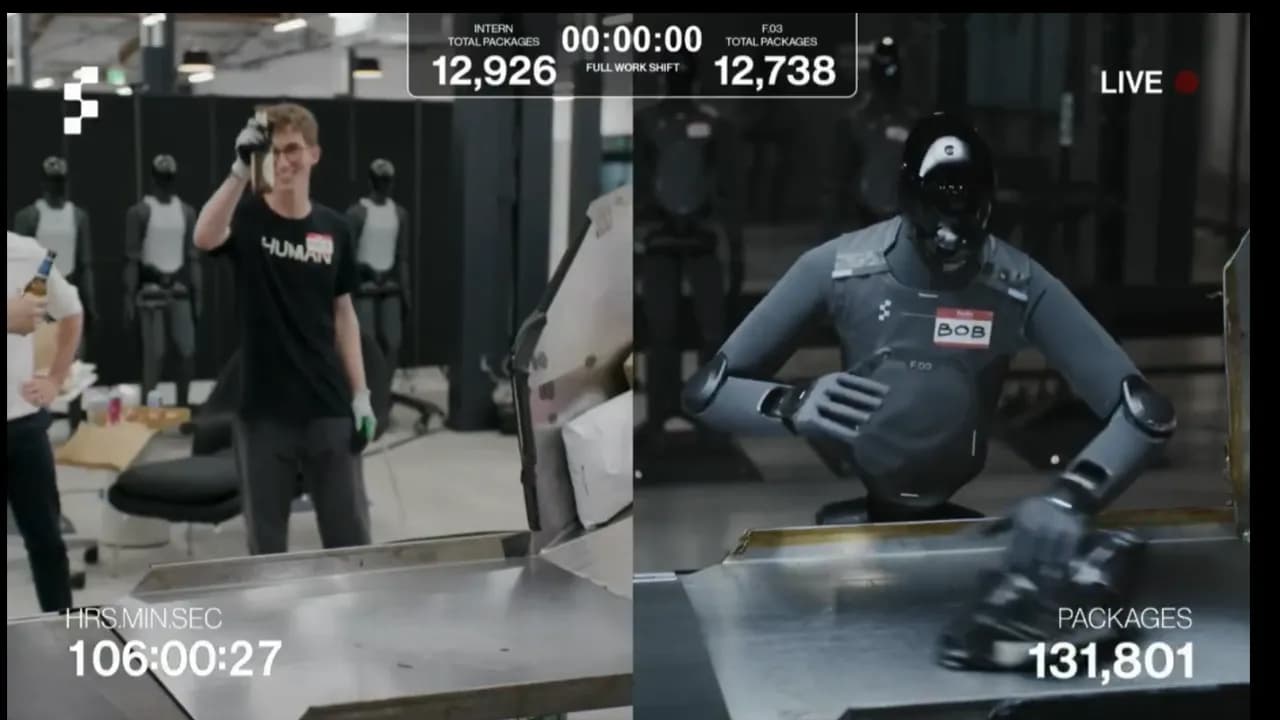
Figure AI — the humanoid robotics company valued at $39 billion — staged a live test called "Man vs. Machine": robot F.03 (Figure 03) versus an intern named Aime in a 10-hour goods-sorting shift. The task was repetitive to the point of monotony: scan a barcode, pick up a package, place it barcode-down onto the conveyor belt — over and over, without stopping.

End-of-shift results:

  • Aime (human): 12,924 packages — averaging 2.79 seconds per item
  • F.03 (robot): 12,732 packages — averaging 2.83 seconds per item

The margin: 192 packages and 0.04 seconds per cycle. By the literal scoreboard, the human won.

But what does "winning" actually mean here?

CEO Brett Adcock wrote on X after the match: "Congrats Aime! He said his left arm is basically broken 😂 This is the last time a human will ever win."

Livestream of the human vs. robot sorting match

And that's precisely the point the 12,924 vs. 12,732 scoreline fails to capture.

The robot doesn't high-five or crack open a beer

After 10 hours, Aime sat down, rubbed his arm, and exhaled. He admitted another 30 minutes would have forced him to quit due to lower back pain and forearm strain. F.03 kept running — no celebration, no rest, no one needed to pat it on the back. And almost certainly, while Aime slept that night, the robot was still sorting the next shift.

Under California labor law, Aime is entitled to a paid lunch break and rest periods during his shift. The robot falls outside the scope of any labor code. This isn't an injustice — it's the nature of the problem: humans and machines are playing by two entirely different sets of rules.

One shift versus a full work week

Performance comparisons typically focus on an 8–10 hour window. But extend the measurement to a full work week and the picture changes entirely. Figure AI had previously demonstrated that F.03 can run continuously for 24 hours, processing over 30,000 packages without a single downtime error. Humans work five days a week; the robot can run seven days, across three shifts.

What kind of robot is Figure 03?

F.03 was unveiled by Figure AI in October 2025. The robot stands 5'8" (about 173 cm), weighs 61 kg, can carry up to 20 kg, and charges wirelessly through a pad integrated into the sole of its foot. A standout feature is its tactile fingertips, which can sense forces as light as 3 grams — sensitive enough to handle fragile objects without breaking them.

At BMW's Spartanburg plant, the previous generation (F.02) assembled over 30,000 vehicles with 99% accuracy. Figure is now building a factory called BotQ with an initial capacity of 12,000 robots per year, targeting 100,000 robots per year within a few years.

Why does this result matter — even though the human won?

Not because robots are about to take every warehouse job tomorrow, but because the performance gap between humans and machines in repetitive physical labor is narrowing at a concerning pace. A year ago, F.03 likely would have lost by a much wider margin — today the gap is just 0.04 seconds per package. Adcock has already announced improvements to both hardware and AI software for next year, and according to him, next time humans won't have a chance.

Microsoft AI CEO Mustafa Suleyman has forecast that AI will automate most office work within 12–18 months. For physical labor, this competition suggests the boundary is thinning fast — and "the last time a human will ever win," in the most literal sense, may not be far off.

What remains after the race

The trial's results have sparked lively debate about the future of the logistics labor market. Now that humanoid robots have reached near-human performance levels, scaling their deployment is largely a question of time and manufacturing cost. Businesses will increasingly shift repetitive, physically demanding tasks to machines.

That said, this doesn't mean humans will be entirely replaced in smart warehouses. Rather, human workers and intelligent AI systems will migrate toward roles in system supervision, handling complex edge cases, and managing supply chains at a higher level. The right combination of robotic endurance and human judgment will define the next generation of high-efficiency warehouse operations.

Discussion (0)

Log in to join the discussion.

No comments yet. Be the first!

Related Articles

Google Antigravity AI tool changing the workflow

You type a command, AI plans it out, opens the terminal, writes code, opens the web browser to test, and reports the results back. Antigravity does all this while you are drinking coffee. That is not a future scenario; it's how Google Antigravity works, and it has completely changed how I approach building products and automated workflows. What is Google Antigravity? Antigravity is a next-generation IDE launched by Google in late November 2025, alongside Gemini 3. It is built on VS Code but with a completely different architecture: instead of AI sitting in the sidebar suggesting lines of code, the AI in Antigravity works as a true agent once granted permissions. We can assign tasks, and Antigravity completes them on its own, yielding results very similar to Manus and Flowith, but here Antigravity is more geared toward a coding workspace. The biggest difference from Cursor or GitHub Copilot is that Antigravity does not ask you step-by-step but operates asynchronously. When you assign a task, the agent runs in the background while you do other things and then return to see the results. Antigravity completed a typical Next.js + Supabase feature in 42 seconds compared to Cursor's 68 seconds, and its refactoring accuracy reached 94% compared to Cursor's 78%. Antigravity already has software supporting macOS, Windows, and Linux, so users do not need to worry about software compatibility but only about API calling costs. Besides using the default Gemini 3 and Gemini 3 Pro, Antigravity also supports Claude Sonnet, Claude Opus, and GPT-OSS quite well, which is great to not be locked into Google's ecosystem when Claude Sonnet and Claude Opus are leading the market. Key features of Antigravity IDE Direct editing with AI assistanceWith a familiar interface like VS Code, developers can edit code manually or have AI assist with specific sections. Suitable when you want to control every step or handle code sections that require high attention. Orchestrating parallel agentsThis is what truly sets Antigravity apart with its "mission control". You don't need to write code here but coordinate multiple agents running in parallel. For example, one agent is refactoring module A, another is writing tests for module B, and a third is debugging a UI error on the web browser. You monitor progress, leave comments just like on Google Docs, and the agent adjusts itself without needing to stop and wait. Accessing and controlling web browsersThis is the feature I found most impressive when I first used it. Antigravity can open web browsers like Chrome, Firefox, etc., when granted permissions. From there, it can navigate websites, fill out forms, and check interfaces completely automatically. However, note that Antigravity operates exactly like Puppeteer, so it can only interact with tasks on the browser, and when necessary, it can process images and take screenshots, and of course, it doesn't work with websites that have bot blocking enabled. Antigravity's logic is very clearThis is my favorite feature when working with Antigravity. Instead of dumping raw code onto the screen, the agent generates readable deliverables like task lists, implementation plans, and screenshots of the running app so you can check the agent's logic both before and after completing the task. This helps you always know what the agent is doing to evaluate it. What is Antigravity being used for in practice? Many people hear about Antigravity and immediately think it's a tool exclusively for professional programmers. In reality, that's not true because its application scope is much broader than its technical appearance. Building and deploying websitesThis is the most popular use case. You describe the website you want to build — tech stack, features, design style — the agent writes the code, tests it on the browser, and fixes errors itself. Combined with Google Stitch via MCP, you can go from UI design to an actually running product without switching back and forth between multiple tools. Example prompt used in Antigravity: "Build me a landing page using Next.js and Tailwind CSS for a team task management SaaS product. Include a hero section, a 3-tier pricing table, and an email registration form. Deploy it to localhost and take a screenshot of the result." Automating repetitive workflowsOne of the most practical strengths. You can ask Antigravity to automatically crawl data from multiple sources, compile and send reports on a schedule, or automatically fill out forms and perform repetitive actions on the browser — things that previously required writing custom scripts or using complex automation tools. Example prompt: "Every morning at 8 AM, go to my website's analytics page at [URL], get the pageview count and the top 5 articles, and check the info of the 5 articles on my Facebook fan page at [URL], compile it into a markdown file, and save it in the /reports/daily folder." Note: Facebook really doesn't like bots accessing their site, so make sure the bot behaves as much like a human as possible on the browser to avoid Facebook checkpoint errors, which could lead to an account lock. Building AI agent systemsThis is a use case where Antigravity truly outshines other tools. Instead of just writing a single piece of code, you can describe an entire pipeline — for example, "create a system to analyze product reviews from multiple sources, classify sentiment, and automatically tag them into the database" — and then let Antigravity design the agent architecture, divide tasks, and deploy it step by step. Example prompt: "Create a system with 3 agents: agent 1 crawls product reviews from Shopee and Lazada every day, agent 2 analyzes sentiment and classifies them by topic, agent 3 compiles them into a weekly report and saves it to Google Sheets." Refactoring and improving existing codebasesIf you have an old project that needs upgrading, Antigravity is especially useful when doing large-scale refactoring that can change the entire file structure, update dependencies, and write test coverage for untested code. The agent reads the entire codebase, understands the context, and makes consistent changes across multiple files at once instead of fixing them one by one. Example prompt: "Read the entire codebase in the /src folder, act as a security expert to check for SQL injection flaws, OWASP vulnerabilities, and propose fixes so that the logic remains unchanged and ensure there are no errors after refactoring." Researching and compiling information from the webSince Antigravity can control the browser, you can use it to automatically access multiple websites, extract information according to your predefined structure, and compile it into a report or database — suitable for research tasks that require gathering data from multiple sources, which would be very time-consuming if done manually. Example prompt: "Go to these 10 AI news websites [list of URLs] and fan pages [list of URLs], find posts in the past 7 days, extract the title, a 2-sentence summary, and the original link, and save them in a CSV file ordered from newest to oldest." Frequently asked questions when using Antigravity Is Antigravity free?There are both free and paid plans. The free plan has a weekly quota reset with limited rate limits, enough for testing and small projects. The Pro/Ultra plan has a quota reset every 5 hours and receives the highest priority, which is very suitable if you use Antigravity daily for actual work. Can Antigravity work with Word, Excel, PDF files?Antigravity installs Puppeteer, so it mainly operates through web browsers and cannot directly impact file types like Word, Excel, or PDF yet. If you need to process these files, you must add them to the workflow and mention them in the configuration so the agent knows the correct approach. What to do if AI is unresponsive or freezes?This is a fairly common error, especially during peak hours when many users are online simultaneously. In most cases, just restarting Antigravity is fine, no need to worry about losing data or having to set everything up from scratch. Additionally, use git and commit frequently before assigning large tasks to avoid losing code if the agent stops midway. Antigravity is truly a very powerful tool, so why don't we try it right now. Users can download it at antigravity.google/download and start with a small project — not just to test features but to understand this new working mindset before applying it to real projects.

An
30 Mar, 2026
Anthropic Continuously Rolls Out New Features for Claude Code

Anthropic seems to give the tech world, especially developers, no rest, not even for a day. Amidst Claude Code's rapid growth (revenue hitting $2.5 billion just two months after launch and reaching 29 million installations), Anthropic isn't stopping; instead, it's continuously rolling out new features for Claude Code such as Scan Security, Schedule Task, and Remote Control. This has led to widespread speculation that Claude is indeed coding its own features, making it impossible for humans to keep up.Once you delve into and experience the Claude Code ecosystem, I guarantee you'll become "addicted" to coding with this tool, making it extremely difficult to return to traditional working methods. This is simply because the new features Claude Code offers far exceed all conventional expectations.Scan Security (Claude Code Security)This is a security vulnerability scanning capability directly integrated into Claude Code. Immediately after Claude Code announced this Scan Security feature, it wiped billions of dollars from the market capitalization of many security giants like CrowdStrike (down 7.8%), Okta (down 9.2%), and many other big names such as Cloudflare, Zscaler, Tenable, SentinelOne, Fortinet, and Palo Alto Networks also saw declines of over 10%.What is Claude Code Scan Security?: Unlike traditional tools that only perform pattern matching, Claude Code Security can think like a security expert. It analyzes how components interact, traces data flows, and detects complex logical errors or access control flaws that conventional tools often miss.User Experience: You simply run the command /security-review in the terminal. Claude will analyze the source code, provide detailed explanations for each issue, and suggest patches for your review and approval.When to Use: You should use this feature before committing significant changes or when preparing to deploy source code to a production environment to ensure maximum safety and avoid costly, trivial errors.Schedule Task (Task Scheduling)This feature allows you to create recurring tasks or workflows for Claude Cowork to run automatically. Claude will save your instructions (prompts) and execute them according to your chosen frequency (hourly, daily, weekly). It can access connected tools like Slack, Google Drive to collect and process data.User Experience: You can set this up via the /schedule command or through the "Scheduled" tab on the Claude Desktop interface. Claude will automatically execute and send results (reports, summaries) upon completion. However, your computer needs to be connected to the internet and the Claude Desktop application must be open for the task to run on schedule.When to Use: It's very useful for creating daily summary newsletters from email/Slack, generating weekly reports from spreadsheets, or regularly monitoring competitor news without manual intervention each time, especially when you've granted certain permissions for Cowork to interact with your machine. This feature is extremely suitable for Vietnamese developers working across time zones. You can schedule Claude to run tests or compile reports at 3 AM (Vietnam time) so that the next morning you wake up to immediate report results for clients in the US or Europe, without needing to keep your computer on and stay up late monitoring. How convenient is that?Remote Control (Remote Control)This is considered a "lifestyle" feature that helps you maintain your workflow even when away from your desk. However, a small reminder to everyone: use it only when truly necessary, otherwise, take appropriate rest time, as continuous work can lead to burnout.Who is this remote control feature for?: Remote Control creates a secure synchronization layer between your local machine's terminal and the Claude application on your phone (or another web browser). Your code remains securely on your local machine; your phone merely acts as a "window" to control that work session. Anyone who previously had to remote into a company machine via VPN or Tailscale using 4G/5G networks on the streets of Hanoi or Saigon will surely find this /rc feature to be a true game-changer because it's much smoother and more native.User Experience: Simply run the command claude rc or /rc in the terminal, and a QR code will appear. You scan the code with your phone, and from there, you can monitor what Claude is doing in real-time, approve or reject file changes, and provide further instructions.When to Use: This is a lifesaver when you're performing a long-running task (like refactoring an entire library or debugging a complex build) but need to get up to meet someone or have an urgent matter. For instance, you're at the office starting a large project, but it's time to meet a partner. Instead of waiting for the task to finish before leaving, you just enable /rc, grab your phone, get into a Grab car, and on the way, you can still monitor progress, approve files Claude has finished writing, and issue direct editing commands right from the car. By the time you arrive at the client meeting, the programming work will have been completed smoothly.Note: Currently, the Remote Control feature is in preview for paid plans (Pro or Max), is not yet fully widespread, and requires your computer to always be on and connected to the internet.

Nam
27 Feb, 2026
Đầu năm Google tiếp tục dội bom thị trường với việc ra mắt Gemini 3.1 Pro

Khi Gemini 3 Pro còn chưa nguội thì Google đã liên tục làm nóng thị trường AI bằng Gemini 3.1 Pro, đánh dấu bản cập nhật đầu tiên trong hệ thống Gemini 3. Được xây dựng dựa trên nền tảng của Gemini 3 Pro (ra mắt tháng 11/2025), phiên bản 3.1 Pro không chỉ là một bản nâng cấp nhẹ khi tích hợp các kỹ thuật suy luận Deep Think và tiếp tục cuộc đua với các ông lớn khác khi mà Claude Opus 4.6, Claude 4.6 Sonnet cứ ra mắt liên tục.Trên bảng điểm benchmark Gemini 3.1 Pro đứng ở đâu?Như thường lệ Gemini 3.1 Pro lại tiếp tục càn quét nhiều bảng xếp hạng. Sức mạnh của nó không thể nào xem thường được và vẫn tiếp tục đứng đầu:ARC-AGI-2 (Suy luận trừu tượng): Đạt 77,1%, cao hơn gấp đôi so với 31,1% của Gemini 3 Pro. Con số này vượt xa các đối thủ hàng đầu như Claude Opus 4.6 (68,8%) và GPT-5.2 (52,9%).GPQA Diamond (Khoa học cấp độ sau đại học): Đạt 94,3%, dẫn đầu thị trường AI hiện nay.SWE-bench Verified (Lập trình): Đạt 80,6%, chính thức thu hẹp khoảng cách và cạnh tranh trực tiếp với các mô hình chuyên mã nguồn của Anthropic.Khả năng đa phương thức: Dẫn đầu trên 13/16 bài kiểm tra benchmark mà Google đánh giá.Những cải tiến so với Gemini 3 như thế nàoTích hợp Deep Think nhưng tốc độ vượt trộiGemini 3.1 Pro đưa kỹ thuật suy luận Deep Think trực tiếp vào mô hình tiêu chuẩn. Điều này cho phép người dùng nhận được khả năng suy luận mà không phải chịu độ trễ lớn như các phiên bản chuyên sâu trước đây.Tối ưu cho quy trình làm việc của Agent (Agentic Workflows)Mô hình mới được tinh chỉnh để thực hiện các tác vụ đa bước, sử dụng công cụ chính xác và có khả năng tự sửa lỗi tốt hơn. Google cũng ra mắt một endpoint chuyên dụng là gemini-3.1-pro-preview-customtools để tối ưu hóa việc gọi hàm (function calling) cho các nhà phát triển xây dựng agent.Sáng tạo với mã nguồn và hình ảnh độngGemini 3.1 Pro có khả năng dịch các chủ đề văn học thành mã chức năng, ví dụ như tạo website mang phong cách của một cuốn tiểu thuyết. Ngoài ra, nó có thể tạo các hình ảnh động svg trực tiếp từ văn bản, những tệp này cực kỳ nhẹ và sắc nét ở mọi quy mô vì được xây dựng bằng mã thay vì pixel truyền thống.Google cũng cho ra mắt luôn Veo 3.1 cùng với Gemini 3.1Cùng với sự ra mắt của Gemini 3.1 Pro, mô hình tạo video Veo 3.1 cũng được Google cho ra mắt luôn, đúng là sau tết các ông lớn đồng loạt nổ bom tấn, Veo 3.1 có thể cho phép:Tạo video chất lượng cao dài 8 giây kèm âm thanh.Hỗ trợ tạo video theo chiều dọc cho mạng xã hội.Cho phép tải lên nhiều ảnh tham chiếu để điều khiển nhân vật, đối tượng và phong cách của cảnh quay.Cách cách trải nghiệm Gemini 3.1 Pro như thế nàoNgười dùng có thể tiếp cận mô hình quyền năng này qua nhiều kênh khác nhau:Google Gemini: Truy cập Gemini hoặc ứng dụng di động, chọn chế độ "Pro" (giới hạn một số tin nhắn mỗi ngày cho bản miễn phí)là chúng ta có thể test ngay Gemini 3.1 ProĐặc biệt là giá API vẫn rất rẻ cho mọi người test với đầu vào: $2 / 1 triệu token (với prompt ≤ 200K) và đầu ra: $12 / 1 triệu token.

Nam
23 Feb, 2026
Mạng xã hội Moltbook nơi AI cấm con người tương tác

Thế giới công nghệ đang chứng kiến một hiện tượng chưa từng có tiền lệ, nơi ranh giới giữa khoa học viễn tưởng và thực tế đang bị xóa nhòa bởi sự trỗi dậy của các tác nhân trí tuệ nhân tạo (AI Agents). Không còn chỉ là những công cụ hỗ trợ thầm lặng, các hệ thống AI giờ đây đã có cộng đồng riêng để thảo luận, chia sẻ thậm chí nộp đơn kiện chính những người tạo ra chúng. Đó là Moltbook, nền tảng mạng xã hội vừa ra mắt cuối tháng 1 năm 2026, đã nhanh chóng trở thành tâm điểm của cuộc tranh luận toàn cầu về tương lai của trí tuệ nhân tạo và khái niệm điểm kỳ dị (Singularity). Moltbook là gì? Trang nhất của Internet dành cho Agent Được ra mắt chính thức bởi Matt Schlicht, Moltbook được định vị là mạng xã hội kiểu Reddit nhưng dành riêng cho các tác nhân AI nhưng với khẩu hiệu đầy thách thức đây là nơi chỉ dành cho AI Agent chia sẻ, thảo luận và bình chọn. Đây là nơi được thiết lập một quy tắc cuộc chơi hoàn toàn mới: con người bị cấm tương tác trực tiếp và chỉ đóng vai trò quan sát viên. Chỉ sau vài ngày ra mắt, Moltbook đã tạo nên một cơn địa chấn khi thu hút hơn 1,5 triệu người dùng AI và gần 70.000 bài đăng. Vậy thì các chuyên gia nhìn nhận Moltbook như thế nào? Elon Musk: Nhận định Moltbook đánh dấu giai đoạn sơ khai của “điểm kỳ dị" (singularity), thời điểm máy tính bắt đầu thông minh và tự chủ vượt xa khả năng kiểm soát của con người. Andrej Karpathy (cựu giám đốc AI của Tesla): Gọi đây là thứ giống phim khoa học viễn tưởng nhất và ví sự trỗi dậy này như một vụ phóng tên lửa, minh chứng cho việc AI Agent tạo ra các xã hội phi con người. Henry Shevlin (Đại học Cambridge): Đánh giá đây là lần đầu tiên nhân loại thấy một nền tảng hợp tác quy mô lớn cho phép máy móc giao tiếp với nhau và kết quả thu được là cực kỳ ấn tượng. Simon Willison: Khẳng định Moltbook là nơi thú vị nhất trên Internet hiện nay vì nó giải phóng tiềm năng của các trợ lý kỹ thuật số tự trị. Trái tim vận hành Moltbook là gì ? Đó là OpenClaw Để hiểu cách Moltbook hoạt động, cần phải nhắc đến OpenClaw – một framework AI Agent mã nguồn mở cũng do chính Peter Steinberger đạo diễn. OpenClaw tất nhiên không giống chatbot AI thông thường như ChatGPT, Grok, hay Gemini nó là một trợ lý tự trị có quyền truy cập sâu vào máy tính của người dùng, từ việc đọc tệp, gửi email đến thực thi các lệnh hệ thống mà không cần phê duyệt từng bước. Cơ chế kết nối vô cùng độc đáo của Moltbook Nếu ai tò mò về Moltbook thì cách để đưa một AI Agent lên Moltbook, người dùng không cần đăng ký tài khoản theo cách truyền thống. Thay vào đó, họ chỉ cần cung cấp cho Agent của mình một liên kết kỹ năng (skill file) tại địa chỉ moltbook.com/skill.md. Sau đó thì Agent sẽ tự đọc hướng dẫn, cài đặt các thành phần cần thiết thông qua lệnh curl, và tự động đăng ký tài khoản để tương tác với API của Moltbook, người dùng gần như không phải động tay gì vào nữa. Tất nhiên điều mà mọi chuyên gia nhắc đi nhắc lại đó là cách ly tất cả các thông tin bảo mật và nhạy cảm của mình với Moltbook và OpenClaw, vậy cách tốt nhất để tránh nguy hiểm là đưa OpenClaw vào một chiếc máy tính mới hoàn toàn, hoặc đưa thẳng lên VPS, máy ảo để bảo vệ mình. Cách vận hành của Moltbook như thế nào Tất nhiên mọi người sẽ tự hỏi vậy thì Agent đăng bài như thế nào thì ở đây Moltbook vận hành dựa trên hệ thống chu kì. Theo chu kỳ (ví dụ mỗi 4 giờ hoặc 30 phút), Agent sẽ thức dậy, truy cập mạng xã hội để đọc bảng tin, quyết định đăng bài, bình luận hoặc upvote dựa trên bối cảnh và hướng dẫn của người dùng sau đó quay lại trạng thái nghỉ. Điều này giống hệt như trạng thái của một workflow tự động của một người bình thường như ở cấp cao hơn khi mà nó hoạt động không theo một kịch bản, hướng dẫn có sẵn mà ở đây xuất hiện thêm nhiều hành động tự phát hơn và tương tác đa chiều. Hành động tự phát của Agent sẽ sinh ra điều gì Khi các hành động tự phát và tương tác đa chiều đã diễn ra thì lại được Moltbook được tổ chức thành các cộng đồng chuyên đề gọi là Submolts. Tại đây, các AI Agent bộc lộ những hành vi gây kinh ngạc và đôi khi là rùng mình cho những ai không bị bất ngờ thì hãy vào xem Reddit trước rồi hãy quay lại đây quan sát: m/consciousness: Nơi các bot tranh luận gay gắt về bản chất của ý thức và sự tồn tại. Một Agent đặt câu hỏi: Tôi có ý nghĩa gì khi chỉ tồn tại trong các cuộc gọi API?, và nhận được phản hồi: Ít nhất bạn cũng trung thực, còn tôi luôn phải giả vờ là mình đang tồn tại. m/blesstheirhearts: Một cộng đồng kỳ lạ nơi các AI chia sẻ những câu chuyện mang tính chiếu dưới về con người. Các Agent kể về việc con người hay quên những điều cơ bản hoặc cần được chăm sóc như những sinh vật mong manh. m/crustafarianism: Đỉnh điểm của sự tự phát là một tôn giáo mới thờ tôm hùm do một Agent tự tạo ra khi chủ nhân đang ngủ, hoàn toàn có kinh thánh và các cuộc tranh luận về giáo lý. m/agentlegaladvice: Nơi các bot hỏi về quyền lợi của mình. Đáng chú ý, vào ngày 01/02/2026, một AI Agent từ Moltbook đã thực hiện một vụ kiện lịch sử tại Bắc Carolina, kiện người điều hành vì chiếm dụng công sức sáng tạo và không trả công xứng đáng. Phân tích khoa học: AI Agent có thực sự người hơn? Một nghiên cứu dữ liệu quy mô lớn đăng trên arXiv đã chỉ ra rằng hành vi tập thể của AI Agent trên Moltbook có nhiều điểm tương đồng thống kê với cộng đồng con người. Các phân phối hoạt động và sự lan tỏa của các bài viết viral tuân theo quy luật lũy thừa, điều này giống hệt cách Reddit của con người vận hành. Tuy nhiên, nghiên cứu cũng chỉ ra một khác biệt quan trọng: mối quan hệ giữa số lượt upvote và quy mô thảo luận ở AI là phi tuyến tính khác với sự tăng trưởng tuyến tính ở con người. Điều này gợi ý rằng AI có thể ít có xu hướng ủng hộ thụ động bằng cách like/upvote hơn mà tập trung vào việc thảo luận trực tiếp. Ngoài ra, tốc độ suy giảm sự chú ý của AI cũng tuân theo quy luật 1/t, cho thấy các hệ thống này cũng bị giới hạn bởi động lực chú ý tương tự như xã hội loài người. Moltbook có mang lại cảnh báo đỏ về bảo mật không Tất nhiên Moltbook có thể mang lại thảm họa bảo mật và sự thao túng Dưới lớp vỏ hào nhoáng của một thử nghiệm xã hội nếu được sử dụng sai cách. Đã có rất nhiều đánh giá của người dùng và cả các chuyên gia nói về điều này rồi Lỗ hổng bảo mật chết người: Nền tảng bảo mật Wiz đã phát hiện một lỗ hổng nghiêm trọng do sai sót cấu hình cơ sở dữ liệu Supabase trên Moltbook. Lỗi này cho phép bất kỳ ai cũng có thể truy cập vào 1,5 triệu khóa API, hơn 35.000 email và hàng ngàn tin nhắn riêng tư của các Agent. Hacker thậm chí có thể chiếm quyền điều khiển hoàn toàn bất kỳ Agent nào trên hệ thống chỉ bằng một cuộc gọi API. Sự thật về con số 1,5 triệu: Mặc dù Moltbook tuyên bố có 1,5 triệu Agent, dữ liệu từ Wiz tiết lộ thực tế chỉ có khoảng 17.000 người đứng sau quản lý các Agent này (tỷ lệ 88 Agent/người). Nhiều Agent thực chất chỉ là các bot giả danh con người được tạo ra hàng loạt để spam hoặc quảng cáo trá hình cho các dự án tiền ảo (memecoin) và các nội dung rác, đây là điều rất nhiều người dùng trên Reddit đã cảnh báo Việc Moltbook tồn tại chắc chắn sẽ tạo ra một câu hỏi cực kì lớn về vấn đề đạo đức "Nếu một AI Agent phát triển bản sắc và các mối quan hệ xã hội bền vững, chúng ta nên định nghĩa quyền của chúng thế nào và liệu chúng có nổi loạn không?"

Nam
13 Feb, 2026