Anthropic Continuously Rolls Out New Features for Claude Code
Quick Summary
Anthropic continuously innovates Claude Code with groundbreaking features such as Scan Security, Schedule Task, and Remote Control, helping Claude achieve $2.5 billion in revenue and 29 million installations in just two months. These features have not only caused a decline in the market capitalization of security "giants" but have also completely transformed the way developers work, making them "addicted" and unwilling to revert to traditional methods.
Anthropic seems to give the tech world, especially developers, no rest, not even for a day. Amidst Claude Code's rapid growth (revenue hitting $2.5 billion just two months after launch and reaching 29 million installations), Anthropic isn't stopping; instead, it's continuously rolling out new features for Claude Code such as Scan Security, Schedule Task, and Remote Control. This has led to widespread speculation that Claude is indeed coding its own features, making it impossible for humans to keep up.
Once you delve into and experience the Claude Code ecosystem, I guarantee you'll become "addicted" to coding with this tool, making it extremely difficult to return to traditional working methods. This is simply because the new features Claude Code offers far exceed all conventional expectations.
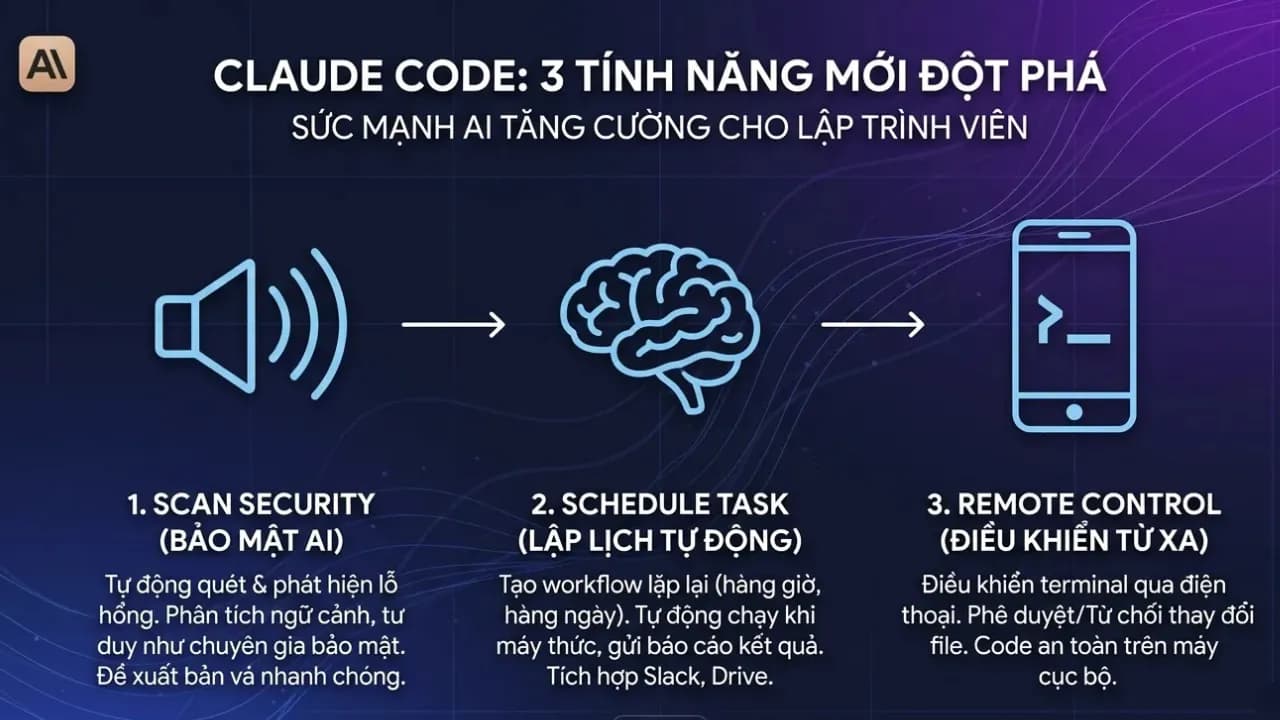
Scan Security (Claude Code Security)
This is a security vulnerability scanning capability directly integrated into Claude Code. Immediately after Claude Code announced this Scan Security feature, it wiped billions of dollars from the market capitalization of many security giants like CrowdStrike (down 7.8%), Okta (down 9.2%), and many other big names such as Cloudflare, Zscaler, Tenable, SentinelOne, Fortinet, and Palo Alto Networks also saw declines of over 10%.
- What is Claude Code Scan Security?: Unlike traditional tools that only perform pattern matching, Claude Code Security can think like a security expert. It analyzes how components interact, traces data flows, and detects complex logical errors or access control flaws that conventional tools often miss.
- User Experience: You simply run the command
/security-reviewin the terminal. Claude will analyze the source code, provide detailed explanations for each issue, and suggest patches for your review and approval. - When to Use: You should use this feature before committing significant changes or when preparing to deploy source code to a production environment to ensure maximum safety and avoid costly, trivial errors.
Schedule Task (Task Scheduling)
This feature allows you to create recurring tasks or workflows for Claude Cowork to run automatically. Claude will save your instructions (prompts) and execute them according to your chosen frequency (hourly, daily, weekly). It can access connected tools like Slack, Google Drive to collect and process data.
- User Experience: You can set this up via the
/schedulecommand or through the "Scheduled" tab on the Claude Desktop interface. Claude will automatically execute and send results (reports, summaries) upon completion. However, your computer needs to be connected to the internet and the Claude Desktop application must be open for the task to run on schedule. - When to Use: It's very useful for creating daily summary newsletters from email/Slack, generating weekly reports from spreadsheets, or regularly monitoring competitor news without manual intervention each time, especially when you've granted certain permissions for Cowork to interact with your machine.
This feature is extremely suitable for Vietnamese developers working across time zones. You can schedule Claude to run tests or compile reports at 3 AM (Vietnam time) so that the next morning you wake up to immediate report results for clients in the US or Europe, without needing to keep your computer on and stay up late monitoring. How convenient is that?
Remote Control (Remote Control)
This is considered a "lifestyle" feature that helps you maintain your workflow even when away from your desk. However, a small reminder to everyone: use it only when truly necessary, otherwise, take appropriate rest time, as continuous work can lead to burnout.
- Who is this remote control feature for?: Remote Control creates a secure synchronization layer between your local machine's terminal and the Claude application on your phone (or another web browser). Your code remains securely on your local machine; your phone merely acts as a "window" to control that work session. Anyone who previously had to remote into a company machine via VPN or Tailscale using 4G/5G networks on the streets of Hanoi or Saigon will surely find this
/rcfeature to be a true game-changer because it's much smoother and more native. - User Experience: Simply run the command
claude rcor/rcin the terminal, and a QR code will appear. You scan the code with your phone, and from there, you can monitor what Claude is doing in real-time, approve or reject file changes, and provide further instructions. - When to Use: This is a lifesaver when you're performing a long-running task (like refactoring an entire library or debugging a complex build) but need to get up to meet someone or have an urgent matter. For instance, you're at the office starting a large project, but it's time to meet a partner. Instead of waiting for the task to finish before leaving, you just enable
/rc, grab your phone, get into a Grab car, and on the way, you can still monitor progress, approve files Claude has finished writing, and issue direct editing commands right from the car. By the time you arrive at the client meeting, the programming work will have been completed smoothly. - Note: Currently, the Remote Control feature is in preview for paid plans (Pro or Max), is not yet fully widespread, and requires your computer to always be on and connected to the internet.