Anthropic launches the highly powerful Claude Fable 5 model
Quick Summary
Claude Fable 5 launched on June 9, 2026 as the first public release from Anthropic's Mythos-class model family, built by layering three safety classifiers on top of the base Mythos 5 model. It scores 80.3% on SWE-Bench Pro and crosses the 90% threshold on Hex's complex analytics benchmark, outperforming both Opus 4.8 and GPT-5.5. The standout capability is sustained multi-day agentic task execution without constant human oversight, demonstrated by Stripe completing a 50-million-line Ruby codebase migration in a single day. Notion is among the first integrations, targeting the use case of converting fragmented meeting notes into structured action plans. Users on Pro, Max, Team, and Enterprise plans have free access through June 22, 2026, after which billing shifts to consumption-based pricing.
Anthropic just dropped what may be its biggest release yet with Claude Fable 5, and it has quickly become the most talked-about model this week. Not just because of its raw power, but because of how Anthropic brought it to the world: this is the first time a Mythos-class model has been made available to general users, after two months under lock and key for safety reasons.
What is Fable 5 and why is it different from previous models?
At its core, Fable 5 is not a model built from scratch. It is a "safety-hardened" version of Mythos 5, the most powerful model Anthropic has ever built. Back in April 2026, Mythos Preview was only accessible to a very small group of organizations including AWS, Apple, Google, Cisco, and JPMorgan Chase through Project Glasswing, because its ability to detect and exploit software vulnerabilities was simply too powerful to release broadly. Anthropic had also launched Claude Opus 4.8 beforehand as a stepping stone in the development roadmap toward this new model generation.
To get Mythos out the door, Anthropic spent two more months building classifiers running in parallel. These are specialized AI systems that analyze requests before the main model processes them, and when a sensitive topic is detected, the system automatically routes to Claude Opus 4.8 at no additional charge. Anthropic says this mechanism only activates in fewer than 5% of sessions, meaning most general users will notice no difference compared to raw Mythos 5.
How does Fable 5 differ from Mythos 5 on safety?
Despite sharing the same underlying model, Fable 5 and Mythos 5 are two distinct products by design. The difference lies entirely in the safety classifiers layered on top of the base model.
Three classifiers Fable 5 has that Mythos 5 does not
Fable 5 is equipped with three safety classification layers running alongside the main model, covering: Cybersecurity, Biology and Chemistry, and Distillation. When a user submits a request in any of these areas, Fable 5 automatically falls back to Claude Opus 4.8 instead of the main model, and notifies the user accordingly.
Mythos 5 has none of these filters. It retains the full software exploitation and biological research capabilities that Anthropic considers too dangerous for wide distribution, which is why Mythos 5 remains restricted to a limited group within Project Glasswing, including vetted cybersecurity professionals, critical infrastructure organizations, and approved biology researchers.
How does this affect real-world performance?
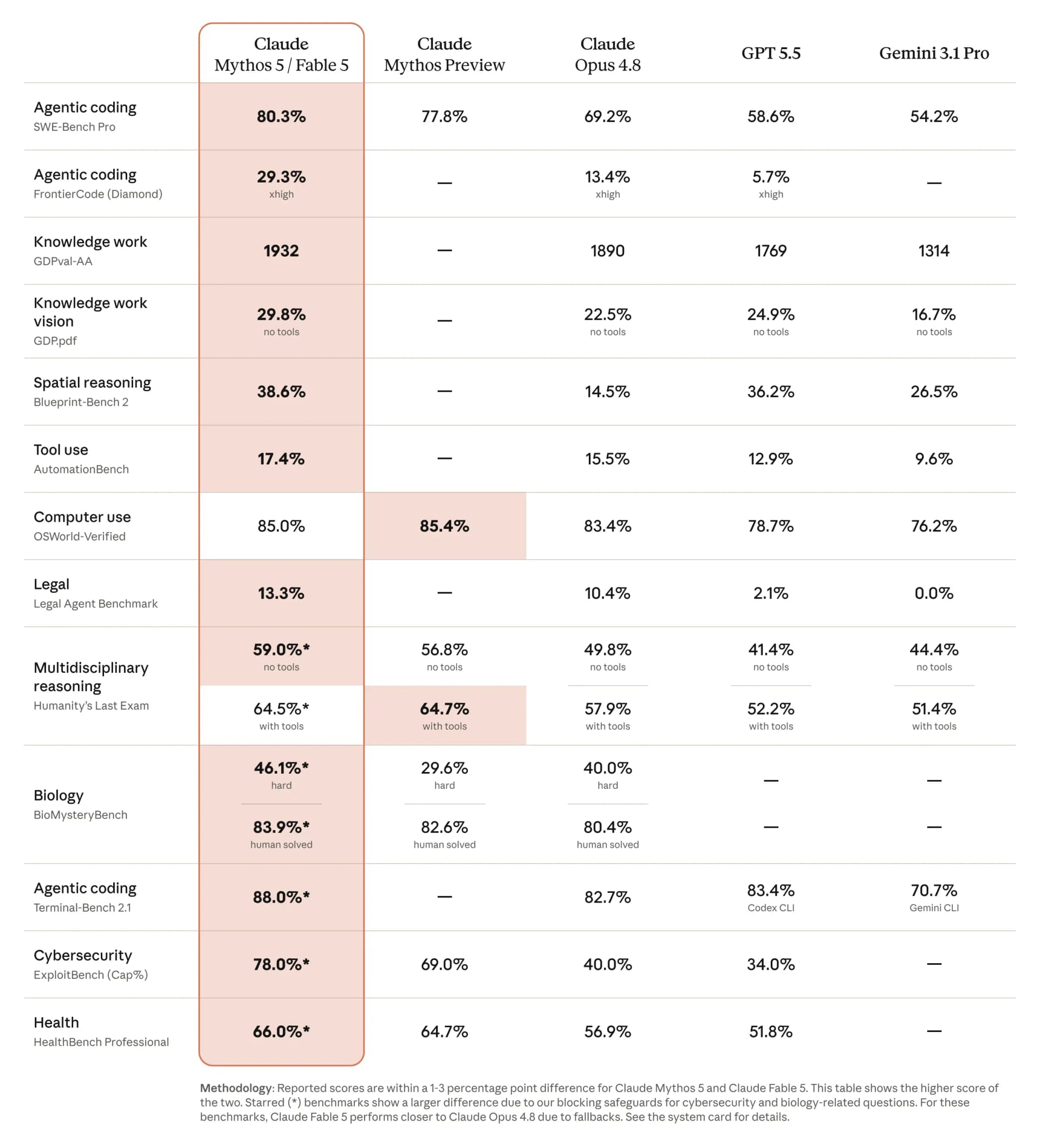
The classifier difference leads to meaningfully different benchmark results in specialized tasks. On ExploitBench, a benchmark focused on cybersecurity, Mythos 5 scores 78% while Fable 5 lands near the 40% range of Opus 4.8, because the fallback mechanism triggers as soon as it detects attack-related requests. For scientific research, Mythos 5 can design proteins and generate novel hypotheses at roughly 10 times the speed of previous methods, while those same capabilities are restricted in Fable 5 for safety reasons.
Real-world performance: what do the numbers say?
On SWE-Bench Pro for coding tasks, Fable 5 scores 80.3%, compared to 69.2% for Opus 4.8 and 58.6% for GPT-5.5. But perhaps the more striking number comes from a real deployment: Stripe used Fable 5 to migrate an entire 50-million-line Ruby codebase in a single day, a task that would have taken a full engineering team more than two months to complete manually.
On business analytics, Fable 5 is the first model to cross the 90% threshold on Hex's complex analytics benchmark, outperforming Opus 4.8 by 10 percentage points. IMC, a quantitative trading firm, reported that the model scored near-perfect on their internal evaluation covering fact lookup, causal reasoning, and expected value calculations.
The biggest shift from previous models is the ability to sustain focus across multi-day tasks without needing human oversight at every step. Rather than executing commands one at a time, Fable 5 can take on a large project, self-plan, run tests, and handle errors in a loop, behaving far more like an engineer than a question-answering tool.
Notion integrates Fable 5: from scattered notes to a complete action plan
Notion is one of the first applications to integrate Fable 5, and the reason is straightforward. The tasks Fable 5 handles best, specifically reading multiple fragmented data sources, synthesizing them, and producing a logical structure, are exactly what Notion users need most in their daily work.
Simon Last, co-founder of Notion, described the primary use case as turning messy meeting notes into a task board with assignments and priorities. Instead of users having to re-read entire transcripts, summarize, and manually create tasks, Fable 5 handles the entire chain without needing to be prompted at each step.
A few things to keep in mind before diving in
Fable 5 is powerful, but there are two things worth considering before building it into your workflow. First, the $50 per million output tokens price point is high relative to the current market, making it well-suited for complex engineering or analytical tasks but not necessarily for simpler jobs that Sonnet or Haiku can handle at a fraction of the cost. Second, the safety classifiers work well in the vast majority of cases but can trigger incorrectly in some legitimate research contexts, something Anthropic openly acknowledges and is continuing to refine.
For individual users on Pro or Max plans, the remaining days before June 22 are a reasonable window to evaluate whether Fable 5 actually generates enough value at that price point before committing to pay-per-use billing.