4AIVN
Back to News

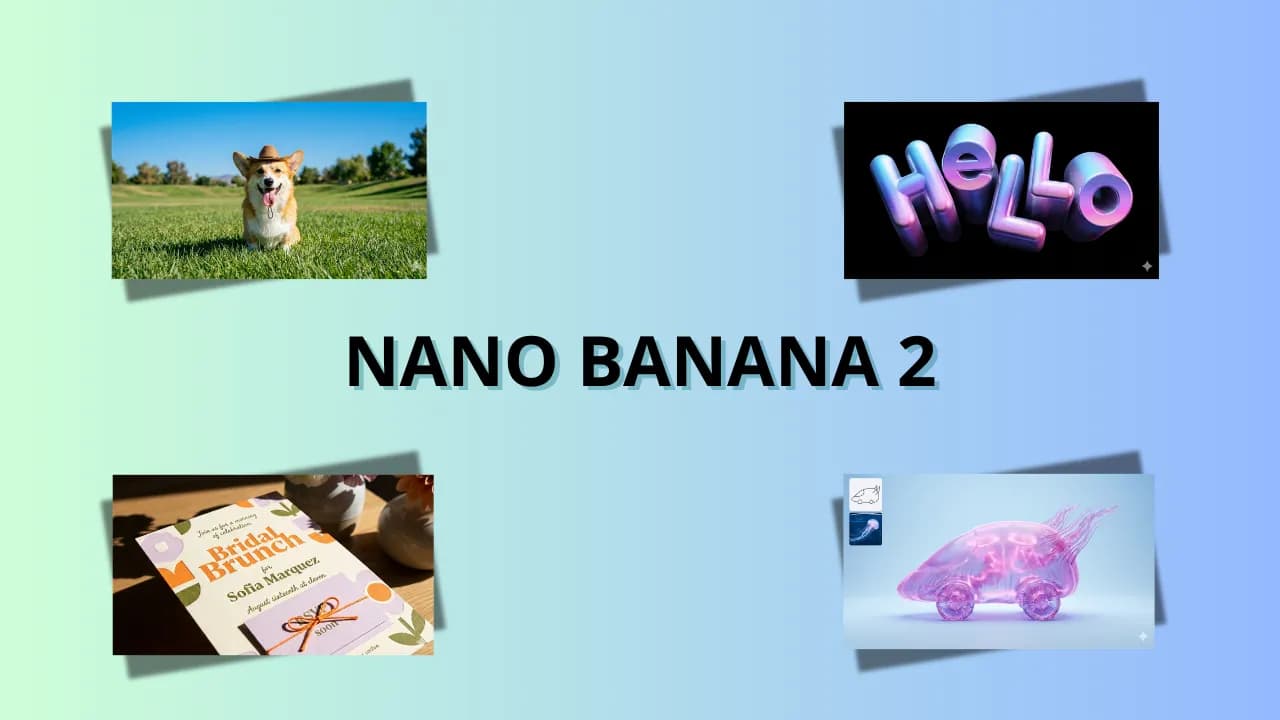
Google Unveils Nano Banana 2 with Supercharged Speed for AI Image Generation
Published on 2 March, 2026
Google Unveils Nano Banana 2 with Supercharged Speed for AI Image Generation

Quick Summary

Google has officially launched Nano Banana 2, an AI image generation model powered by Gemini 3.1 Flash Image. This release brings flagship features previously exclusive to Nano Banana Pro to mainstream and free users, highlighting lightning-fast processing speeds and significantly reduced API costs (down from $0.13 to $0.07 for a 1024x1024 image). Nano Banana 2 inherits key advantages such as object consistency, accurate text rendering, real-time web integration, and up to 4K resolution support. When compared with OpenAI's GPT Image 1.5, Google emphasizes visual impact and hyper-realism, whereas OpenAI focuses on strict prompt adherence and a natural, everyday photo style. While GPT Image 1.5 remains more cost-effective for API usage ($0.009/image), Nano Banana 2 excels at image blending and in-image text translation.

Google has officially launched Nano Banana 2 (Gemini 3.1 Flash Image), marking a notable move as the company decided to bring features that were once exclusive to Nano Banana Pro down to the mainstream line. This is truly a powerful upgrade and a testament to Google's promise to democratize pro-level technology for more users, allowing even free users to experience pro features.

What is Nano Banana 2 and how does it differ from Nano Banana Pro?

Nano Banana 2 leverages the power of the latest Gemini 3.1 Flash Image model to perform image generation and editing requests at a significantly faster speed than the pro version.

Core differences compared to the Pro version

  • Speed: Speed is the primary focus of Nano Banana 2. While Nano Banana Pro focuses on tasks requiring the highest fidelity and absolute factual precision, Nano Banana 2 prioritizes fast processing speeds (Flash speed) while still maintaining image quality comparable to the Pro version.
  • Cost: The Nano Banana 2 API is significantly cheaper. For example, a 1024x1024 resolution image that previously cost around $0.13 is now reduced to approximately $0.07 with Nano Banana 2. While still slightly high, Google has made efforts to lower prices to make it more accessible to everyone.
  • Target Audience: Nano Banana 2 definitely targets a broader user base, as free users can now experience it instead of being restricted to paid Pro or Ultra plans as before.
  • Inherited Features: Nano Banana 2 inherits premium features from the Pro version, such as maintaining character consistency and interpreting complex prompts.

Key Pro-like features in Nano Banana 2

  • Subject Consistency: This is an incredibly useful yet familiar upgrade for marketers, comic creators, and graphic designers. Similar to the Pro version, this feature in Nano Banana 2 allows maintaining the consistent appearance of up to 5 characters and the stability of up to 14 objects within the same workflow.
  • Accurate and Multilingual Text Rendering: Concerns over typos or language barriers in AI-generated images are no longer an issue when using Nano Banana. All the flagship features that made the Pro line famous—from correct spelling rendering to direct text translation within images—are now integrated into Nano Banana 2. The chances of image typos, broken fonts, or language mix-ups have been reduced significantly, making them very rare.
  • Real-time Information Integration: Nano Banana 2 uses Gemini and web search data, enabling it to update changes in real time to accurately render specific subjects and avoid going off-topic when generating images.
  • Pro-level Resolution: Nano Banana 2 narrows the feature gap with the pro lineup by supporting output resolutions from 512px up to 4K. Users also gain access to new aspect ratio options such as 4:1, 1:4, 8:1, and 1:8.
  • Transparency: Google has ensured that all images generated by Nano Banana 2 are embedded with a watermark via the SynthID system and comply with C2PA standards for AI provenance verification.

How to use Nano Banana 2 on the Gemini App

You can easily experience Nano Banana 2 directly on the Gemini app or Google AI Studio whether you are using a Free, Pro, or Ultra plan:

  • A pleasant surprise: It is truly surprising that Nano Banana 2 allows users to directly select output image styles with presets right inside the Gemini app without needing to type them into the prompt. Although the results are not always perfect, removing the need to type prompts reduces the chance of forgetting to include the style in the prompt, helping Nano Banana generate images that better match user intent.
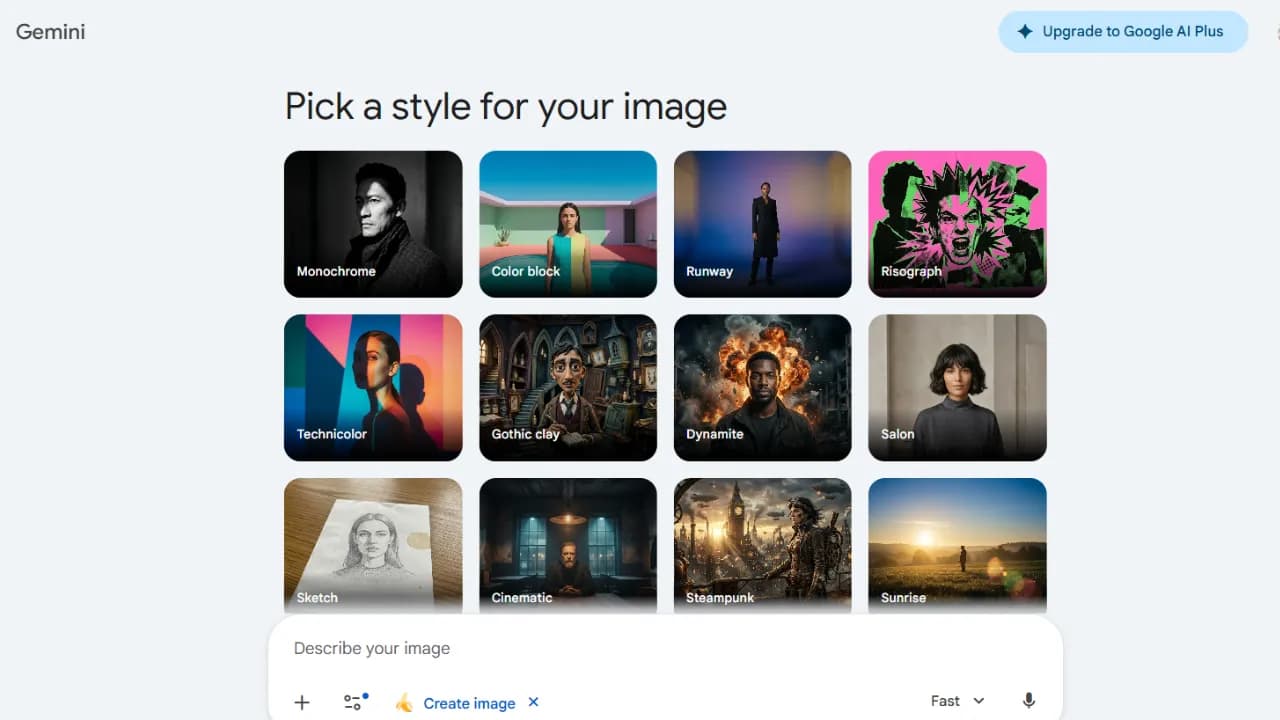
Nano Banana 2 cho phép chọn kiểu ảnh trước khi tạo

Regarding aspect ratios, users still need to specify them directly in the prompt, which is something I frequently forget to include.

Note: If you are a Pro/Ultra user who requires maximum factual accuracy, you can still switch back to Nano Banana Pro via the three-dots menu (select regenerate/redo).

Nano Banana 2 vs. GPT Image 1.5 Showdown

Although GPT Image 1.5 should ideally be compared with the Pro lineup, I still want to draw an interesting comparison, as GPT Image 1.5 and Nano Banana 2 target different image generation goals and user bases:

Different design philosophies between OpenAI and Google

  • GPT Image 1.5 is designed by OpenAI as a creative studio focused on precision. It delivers experiences closer to everyday photography styles compared to Nano Banana.
  • Nano Banana 2, on the other hand, is likened to a cinematographer focusing on visual impact. Google emphasizes "real-world" knowledge to produce images with exceptionally high realism, vivid lighting, and sharp details.

Do real-world experiences differ significantly between the two models?

Based on head-to-head testing, the results reveal distinct differences in style:

  • Realism and Image Style: GPT Image 1.5 excels at producing everyday images with noise and a natural feel similar to photos taken on an iPhone with flash. In contrast, Nano Banana often delivers overly perfect results, sometimes looking like studio shots or heavily post-processed commercial photography.
  • Prompt Adherence: GPT Image 1.5 naturally stands out in terms of strict prompt adherence, as Google users would need to upgrade to the Pro version for similar adherence levels. For instance, in a 6x6 grid test featuring 36 distinct objects, it accurately rendered the position of every single object—a task where previous generations of Nano Banana consistently failed. Nano Banana 2 has improved significantly in this area, but it still occasionally leans toward a more pre-arranged composition.
  • Text in Images: Both models have effectively resolved spelling errors in images. However, GPT Image 1.5 tends to output layouts resembling pre-designed Canva templates, while Nano Banana 2 excels at translating text directly within the image itself—for example, translating inscription text on a gravestone inside the picture.
  • In-place Editing: GPT Image 1.5 excels at in-painting—changing a specific detail (such as shirt color) while keeping facial features and lighting intact. Nano Banana 2 shines at blending, capable of merging up to 14 reference images to create a complex final render regarding lighting, depth, and color.
  • Speed: Both are lightning-fast. To the naked eye, it is nearly impossible to tell whether GPT Image 1.5 or Nano Banana 2 is faster.
  • API Pricing: GPT Image 1.5 offers a more cost-optimized rate for standard image generation (around $0.009 per image). Below is a detailed cost comparison table for reference:

So sánh chi phí API của các model tạo ảnh hiện nay

With Nano Banana 2, Google is not only racing in technology but also focusing on practical user experience through ultra-fast speeds and professional image control. It is undeniably an indispensable tool for content creators and marketers in 2026.
Discussion (0)

Log in to join the discussion.

No comments yet. Be the first!

Related Articles

Gemini 3.6 Flash Launches but Disappoints in Practice

Google announced Gemini 3.6 Flash on July 21, 2026, with sharp benchmark gains over 3.5 Flash: DeepSWE rose from 37% to 49%, MLE Bench from 49.7% to 63.9%, and OSWorld Verified reached 83%. Yet 4AIVN's hands-on experience tells a very different story. The model handles small jobs reasonably well, but a multi-step plan can make it forget the objective, skip steps, and drift halfway through the work. Stronger benchmarks do not reflect real-world use According to Google's official announcement, Gemini 3.6 Flash uses 17% fewer output tokens than 3.5 Flash on the Artificial Analysis Index, while tests such as DeepSWE show token reductions of up to 65%. Its input window reaches 1,048,576 tokens and its output limit is 65,536 tokens, impressive numbers on paper. The problem is that these figures come from designed tests with a fixed objective and a relatively contained run. That is not how a real plan operates. Production work changes continuously in response to feedback rather than ending after one self-contained attempt. Following a long plan is the critical weakness In hands-on use, Gemini 3.6 Flash performs poorly as soon as it moves beyond a single task. Give it a small job with explicit checks and it can work well with few unnecessary loops. Give it a multi-step plan and it may forget the original objective, skip previously agreed steps, or drift after several turns. When corrected, it sometimes apologizes and then repeats the same mistake instead of actually fixing it. A one million token window describes input capacity, not memory quality. The model may be able to “see” the full context and still miss details during execution; one overlooked constraint can push the entire plan off course. This is not a rare random failure but a repeated weakness that is difficult to ignore. Gemini 3.6 Flash is strong at completing one job quickly, but it is not yet dependable at completing a sequence of jobs correctly. That is the gap the benchmarks do not measure. A 17% price cut may not match the quality Gemini 3.6 Flash is priced at $1.50 per million input tokens and $7.50 per million output tokens, about 17% below the $9 output price of 3.5 Flash. On the surface, this is a sensible improvement: lower cost and higher benchmark scores. But if long tasks are executed poorly, the savings can quickly disappear through repeated reminders, corrections, and complete reruns of the plan. Gemini 3.5 Flash Lite is cheaper still at $0.30 per million input tokens and $2.50 per million output tokens, but it targets simple classification and data transformation workloads that do not require the model to preserve a long plan. What do you gain and lose with Gemini 3.6 Flash? Objectively, this is not a failed upgrade. Google has likely made careful tradeoffs among output quality, speed, and cost, even if real-world behavior does not fully meet the high expectations attached to its engineering team. The improvements are real rather than purely theoretical: responses are faster, output costs are lower, and the model is efficient on short, narrow tasks such as content classification, writing one code function, or answering a specific question. In those cases, it keeps unnecessary loops to a minimum. The cost becomes visible when work extends beyond a few steps. The more constraints and earlier decisions the model must preserve, the more likely it is to drift. For coding agents or long workflows already running reliably on Claude Fable 5 or GPT 5.6, there is not yet a convincing reason to switch to Gemini 3.6 Flash solely because of benchmarks or lower pricing. Gemini 3.5 Pro is still the model to wait for Google says Gemini 3.5 Pro is still being tested with partners and will be released broadly when it is ready. The central story of this launch is therefore the sizeable gap between benchmarks and real work. Anyone looking for a dependable agent for long-running workflows may still need to wait and see whether 3.5 Pro delivers a genuine step forward. If future releases remain underwhelming in practice, Google risks surrendering its advantage to competitors including Anthropic, OpenAI, and Meta.

Nam
23 Jul, 2026
Gemini powers Argentina and Messi at World Cup 2026

Gemini has won big in the most literal sense, right as Messi scored his first hat-trick at the 2026 World Cup, leading Argentina to a crushing 3-0 victory over Algeria and equaling Miroslav Klose's record of 16 World Cup goals. That historic moment became the perfect launchpad for Gemini. Back in March 2026, Google and the Argentine Football Association (AFA) made a bold decision: rather than simply printing a logo on training kits, they signed a deal for the AI to actively support tactical preparation and professional decision-making. That bet has now proven to be the right call. From training kit to the tactical meeting room The agreement between AFA and Google was unveiled at Times Square, New York, a venue deliberately chosen to capture global media attention. The Gemini logo appears across all training apparel for Argentina's men's, women's and youth squads, sitting alongside Adidas and American Express in AFA's top sponsorship tier. But the interesting part isn't the jersey. According to Inside World Football, Argentina's coaching staff will use Gemini for three specific purposes: tactical analysis, injury prevention and decision support. In other words, Gemini now has a seat in meetings that previously belonged only to Scaloni and his assistants. Google has not publicly disclosed which specific Gemini tools have been integrated into AFA's workflow. What is clear is that they are using the World Cup to bring Gemini into the reality of professional football, and the results will be graded in public. What is Gemini actually doing in the dressing room? Argentina arrives at the 2026 World Cup as the reigning champion. Every decision Scaloni makes, from the squad list to the starting eleven, is scrutinized more closely than any other team, and that is precisely why Argentina has become the most ideal testing ground Google has ever had for Gemini in professional football, especially at a major tournament. Tactical analysis Gemini is used to process match data for both Argentina and their opponents, covering movement statistics, attacking patterns and defensive vulnerabilities. Instead of the coaching staff spending hours reviewing footage, AI synthesizes the data and generates tactical diagrams automatically, saving significant preparation time before each match. Injury prevention This is a problem every major team wants to solve, especially when Messi and several key players are at an age that requires careful management of training loads. Gemini analyzes biometric data and injury history to issue early warnings, helping the coaching staff adjust intensity before problems actually occur. That is part of the reason why, immediately after completing his hat-trick, Scaloni chose to substitute Messi off, prioritizing fitness and safety for the matches ahead. AI in injury prevention is nothing new. Premier League clubs have had Microsoft as a partner for similar purposes. What is different this time is that Gemini is integrated directly into the workflow of a national team competing at a major tournament, not just at club level. For fans: create Messi content, follow scores without unlocking your screen Alongside supporting the coaching staff, Gemini has also rolled out a range of features aimed at fans, and this is the side that hundreds of millions of people will actually experience. Gemini lets you create content about players directly Users can generate images, songs and digital content featuring Argentina players like Messi directly inside the Gemini app. The feature is designed to bring the World Cup experience closer to those who cannot attend matches in person. Real-time scores and automated daily briefings On Google Search, live match scores can be pinned to the lock screen and update in real time, with dedicated animations for goals and red cards, all without needing to unlock the phone. For paid Gemini users, the Scheduled Actions feature allows an automated daily football briefing to be set up, covering scores, news and fixtures, delivered at a chosen time without needing to prompt it each day. Match-day infrastructure Google has updated Street View at all 16 host stadiums and optimized routing on Waze for match days. Waze also surfaces live scores when the car is stopped at red lights, so drivers do not need to pick up their phones while on the move. The 2026 World Cup is the real test for AI in sport Google is not sponsoring Argentina alone. Gemini also appears on the kits of France, Morocco, Iraq, Turkey and the United States, while Pixel is the official phone of the French squad, which is also using Gemini for internal communications. This is clearly a comprehensive strategy from Google, not a one-off deal. What makes the 2026 World Cup particularly significant is that it will answer a question no lab environment can: what do users actually do with AI when a World Cup runs for six weeks across 104 matches? Features that run on initial novelty will fade after the group stage. Whatever users keep coming back to all the way through the final is the honest answer to where AI actually fits in everyday life, and Google knows it. Google's communications director for Latin America, Flor Sabatini, stated that the 2026 World Cup will mark a before and after in the history of football because of AI. It sounds like marketing, but the reality is that this is the first time a major AI model has been integrated into the preparation of the reigning world champions, right in the middle of the most-watched sporting event on the planet. The 2026 World Cup is Gemini's real test The most significant part of this entire story is not the Gemini logo on Messi's jersey. It is the fact that Argentina, still the most expected to win and the most scrutinized team, carrying the pressure of defending the title, has committed part of its preparation process to AI. If Argentina succeeds, Gemini will have a case study that no advertising budget can buy. If Argentina falls short and the coaching staff attributes any part of it to AI, the narrative will flip entirely. Either way, this is the first time AI has been held accountable on a stage that genuinely matters, not a benchmark, not a demo, but the World Cup. For AI users, what is worth watching is not just whether Argentina wins, but whether Gemini actually changes how a football team operates, or whether it turns out to be nothing more than a logo on a training kit that looks better than previous years.

Nam
17 Jun, 2026
How Muse Image Differs from Nano Banana 2, GPT Image 2.0

Muse Image is Meta’s latest effort to turn Meta AI into a creative studio embedded directly in social media. The model can not only generate or edit images, but also search, write code, reason, and check its own results. Compared with Nano Banana 2 and GPT Image 2.0, Muse Image does not try to win on a single metric. Instead, it relies on deep integration with Meta AI, Instagram, and WhatsApp, together with an agentic approach to image creation. How does Muse Image work? Meta Superintelligence Labs announced Muse Image in July 2026 alongside a preview of Muse Video. This is Meta AI’s first image generation model intended to compete with major players such as Google and OpenAI. Meta says Muse Image follows instructions well, performs precise edits, and can combine multiple reference images in a single request. The difference lies in the process before an image is produced. Instead of receiving a prompt and immediately rendering an image, Muse Image can plan, call tools, and evaluate its own drafts. The system works with Muse Spark to share tools and plan together, bringing the reasoning capabilities of language models into the visual content creation process. Search and code help improve image accuracy Muse Image has two notable groups of tools. Web search helps the model obtain real-time context and visual references for topics that require up-to-date knowledge. The coding tool is used when an image requires structured details such as charts, formulas, or scannable QR codes. Rather than merely “drawing something close,” the system can generate data with code, render the result, and then use it as a condition for the final image. In principle, this approach is quite similar to the techniques used by GPT Image 2.0 and Nano Banana 2: all three go beyond the initial prompt by using context, reasoning, or supporting information to improve image accuracy. According to Meta, the difference with Muse Image is its emphasis on an agentic workflow that combines web search, code rewriting, and draft evaluation. If a small detail is wrong, Muse Image can edit it locally; if the overall composition is significantly wrong, the model can regenerate the image or change tactics by calling additional tools. Meta says quality improves when the model receives more inference budget and additional self-refinement steps at runtime.Note: Current claims about Muse Image’s capabilities and rankings come primarily from Meta. Actual results also depend on the prompt, reference images, supported region, and whether the features have been fully rolled out to a given account. What stands out about the image generation and editing experience? In Meta AI, users can of course describe their requests conversationally, start from a blank image, or upload an existing one. This is now almost a minimum requirement when interacting with an image generation tool; lacking it would be considered a step backward from the current standard. Meta’s examples include removing an unwanted person from the background, placing the user at a landmark, restoring old photos, trying different hairstyles, creating infographics, and generating QR codes. Suggested presets help beginners get started without writing long prompts.Edit directly with sketches while preserving multi-turn contextMuse Image lets users circle, draw, or annotate directly on the area they want to edit. Because Meta AI retains conversational context, users can change styles, add objects, or refine details over multiple turns without starting over. This interaction is well suited to phone and social media users, for whom direct manipulation matters more than a panel of technical parameters.The ability to combine multiple references is also a major advantage. A single prompt can bring together a person from a portrait, clothing from another image, a background from a third, and a style from a separate reference in one composition. Muse Image supports interleaving text and images within a prompt, making complex requests easier to describe.Meta integration sends images directly where they need to be sharedMuse Image is available in the Meta AI app and on the Meta AI website. It also provides effects for Instagram Stories and image generation in WhatsApp conversations in selected countries. Meta plans to expand it to Facebook and Messenger, additional surfaces on Instagram and WhatsApp, and Advantage+ creative for advertising.This significantly shortens the path from an idea to a published post. Users do not need to create an image in one app, download it, and then import it into a social network. The trade-off is that availability and workflows depend more heavily on Meta’s ecosystem than on models with clearly established public APIs. Muse Image compared with Nano Banana 2 and GPT Image 2.0 All three tools generate and edit high-quality images, but they are optimized around three different starting points. Muse Image begins with Meta AI and social media. Nano Banana 2, the name of the Gemini 3.1 Flash Image model, emphasizes speed, cost, and deployment volume. GPT Image 2.0 connects the ChatGPT Images 2.0 experience with the `gpt-image-2` API model for high-quality image generation and editing.CriterionMuse ImageNano Banana 2GPT Image 2.0ApproachAgentic image creation using search, code, and self-refinementFlash model optimized for speed, cost, and throughputHigh-quality model in ChatGPT and the OpenAI APIKey strengthsMultiple reference images, direct editing, and Meta integrationWeb and image grounding, text localization, and multiple resolutionsHigh fidelity, high-quality image inputs, and diverse stylesResolution and aspect ratiosMeta has not widely published a standardized set of API specifications0.5K, 1K, 2K, and 4K, plus very wide aspect ratios such as 8:1Flexible sizes through ChatGPT and the APIAccess channelsMeta AI, meta.ai, Instagram, WhatsApp, with further expansion underwayGemini, Google AI Studio, and the Gemini APIChatGPT, Playground, and the OpenAI APIBest suited forFast creation and sharing within Meta’s ecosystemApplications that need speed, cost efficiency, and high-volume image generationDesign, editing, and pipelines that require high quality and controlNano Banana 2 focuses on speed and scaleNano Banana 2 is positioned by Google as a highly efficient Flash model. It supports web and image search to obtain fresh context, improves text in images, and offers multilingual localization. Developers can select reasoning levels, many aspect ratios, and resolutions ranging from 0.5K to 4K.The most appealing aspect of Nano Banana 2 is its suitability for production workflows. Google publishes resolution-based pricing and offers a cheaper batch mode, making it appropriate for e-commerce applications, market-specific advertising, or tools that need to generate a large number of variations. If the task demands speed, predictable costs, and API access, Nano Banana 2 has a clear advantage. GPT Image 2.0 focuses on quality and a broad creative space ChatGPT Images 2.0 demonstrates strengths in multilingual typography, visual styles, photorealism, posters, comics, infographics, and multi-panel designs. The `gpt-image-2` model is also available through the OpenAI API, offering fast generation, editing, flexible sizes, and high-fidelity image inputs.The ChatGPT experience is well suited to extended idea development: users can provide documents and reference images, then request changes conversationally. For developers, separate image generation and editing APIs make it easier to integrate the model into products. GPT Image 2.0 therefore strikes a good balance between an end-user tool and programmable infrastructure.Which tool should you choose for each type of work?No model wins in every situation. If the final result is a Story, post, message, or advertisement within Meta’s ecosystem, Muse Image offers the shortest workflow. Sketch-based editing and presets also help users who are unfamiliar with prompting get started quickly.Choose Muse Image when you need to combine multiple personal images, create social content, edit on a phone, or share directly within Meta.Choose Nano Banana 2 when building a large-scale image generation application that requires multiple resolutions, localization, and optimized API costs.Choose GPT Image 2.0 when you need diverse styles, conversational editing, faithful image inputs, or integration with the OpenAI API.A production team can also use multiple models. Nano Banana 2 can generate large numbers of variants, GPT Image 2.0 can handle assets that require careful art direction, and Muse Image can serve personalized content intended for distribution on Instagram, WhatsApp, or Facebook.Can Muse Image become a major competitor?Meta says Muse Image ranks second on the Arena leaderboard for text-to-image, single-image editing, and multi-image editing based on user preference. This indicates that the model offers competitive quality, but Meta’s more durable advantage may lie in distribution rather than leaderboard position.Muse Image is entering products where billions of people already chat, post Stories, share images, and buy advertising. If its reasoning, search, and self-refinement capabilities work reliably, Meta could turn AI image generation into a default feature of everyday communication rather than a specialized tool.Conversely, Nano Banana 2 and GPT Image 2.0 still maintain clearer API ecosystems for developers, while Muse Image needs broader regional availability, greater transparency about usage limits, and sufficiently powerful integration options if it wants to compete beyond Meta’s apps. At present, it is the most noteworthy tool for social media creativity, even though Meta AI has long had a reputation for lagging behind in model quality. This time, the gap appears to have narrowed considerably, but whether Meta has truly caught up will still need to be judged by users over time through real-world use.

Liên
19 Jul, 2026
Did Kimi K3 pressure OpenAI into cutting GPT-5.6 API prices by 80%?

Just two weeks after Kimi K3 launched, OpenAI cut GPT-5.6 Luna API pricing by as much as 80%. This is not proof that OpenAI reacted directly to Kimi K3, but it is a clear sign that the 2026 AI race is shifting from "who is smarter" to "who delivers comparable performance for less". OpenAI cuts API prices sharply, with Luna down 80% Beginning July 30, OpenAI adjusted API pricing across the GPT-5.6 lineup. GPT-5.6 Luna, the fastest and lowest-priced tier of the three, fell by 80% to $0.20 per million input tokens and $1.20 per million output tokens. Terra, the balanced tier for everyday work, fell by 20% to $2/$12 per million input/output tokens. GPT-5.6 Sol, the family flagship, keeps the same price but adds Fast mode in place of Priority Processing. OpenAI says Fast mode is up to 2.5 times faster than Standard at twice the price, with no change in model intelligence. The new pricing is also reflected in credit usage for ChatGPT Work and Codex. Terra and Luna users on those plans consume fewer credits for the same workload, although subscription prices do not change. See the details in OpenAI's official pricing announcement. Is OpenAI under pressure from Kimi K3? OpenAI does not mention Kimi K3 in its announcement, so the price cuts cannot be attributed to that model alone. Still, the timing of the two events makes the market-pressure argument worth examining. On July 16, Moonshot AI launched Kimi K3, an open-weight model with a one-million-token context window. Within days, Kimi K3 drew attention from developers for competitive API pricing and performance that exceeded expectations for an open-weight release. Where does Kimi K3 approach GPT-5.6 Sol? On several benchmarks, Kimi K3 comes close to the max version of GPT-5.6 Sol. The overall gap remains, but it is far smaller than many expected from an open-weight model. Kimi K3 also leads on several specific measurements, including FrontierSWE, BrowseComp, and Frontend Code Arena, while its API is priced at $3/$15 per million input/output tokens, below Sol. Sol still leads on many aggregate benchmarks and its Ultra multi-agent mode scored 91.9% on Terminal-Bench 2.1. Even so, an open-weight model approaching OpenAI's closed flagship at a lower price creates real competitive pressure, especially for enterprises and developers sensitive to long-term operating costs. Compare current models in the 4AIVN rankings. Linking the price cuts to Kimi K3 is an interpretation based on timing and market context, not an official confirmation from OpenAI. AI pricing across the industry is changing Kimi K3 is not the only source of pressure. DeepSeek continues to pursue a low-price strategy: DeepSeek V4 Flash is listed at $0.14/$0.28 per million tokens, while DeepSeek V4 Pro is listed at $0.435/$0.87; both have one-million-token context windows. Even after an 80% cut, GPT-5.6 Luna at $0.20/$1.20 remains more expensive than DeepSeek V4 Flash on output tokens, although the gap has narrowed substantially. OpenAI's change therefore fits a broader trend rather than a one-off response to Kimi K3. Chinese labs are pushing prices lower while maintaining competitive performance, forcing US companies to optimize pricing strategies faster than before. How do users benefit? For ChatGPT users who do not use the API, there is little direct impact because subscription prices are unchanged. For teams building applications, chatbots, or automated agents on GPT-5.6, however, the difference is meaningful. Tools such as Hermes Agent, which lets users choose GPT-5.6 Sol, Terra, or Luna as the base model, can reduce operating costs when each tier is matched to the right task. Luna suits repetitive, high-volume work that does not need complex reasoning.Terra is the balanced choice for everyday work and general-purpose assistants.Sol remains the better choice when accuracy and deeper reasoning are the priority. 4AIVN's view The capability gap among leading models is narrowing faster than the price gap. When an open-weight model such as Kimi K3 can approach a top closed model, major companies must choose between protecting margins and retaining enterprise customers. OpenAI's move suggests it is prioritizing stronger performance per dollar, at least for Luna and Terra. If you operate an application or agent on the GPT-5.6 API, this is a good time to redistribute work across Sol, Terra, and Luna rather than using one model for every task. The price difference between the three tiers is now large enough that matching the model to the task is a genuine cost-optimization decision, not merely a technical preference.

Liên
31 Jul, 2026