7 Core Principles from Boris Cherny for Using Claude Code

Quick Summary
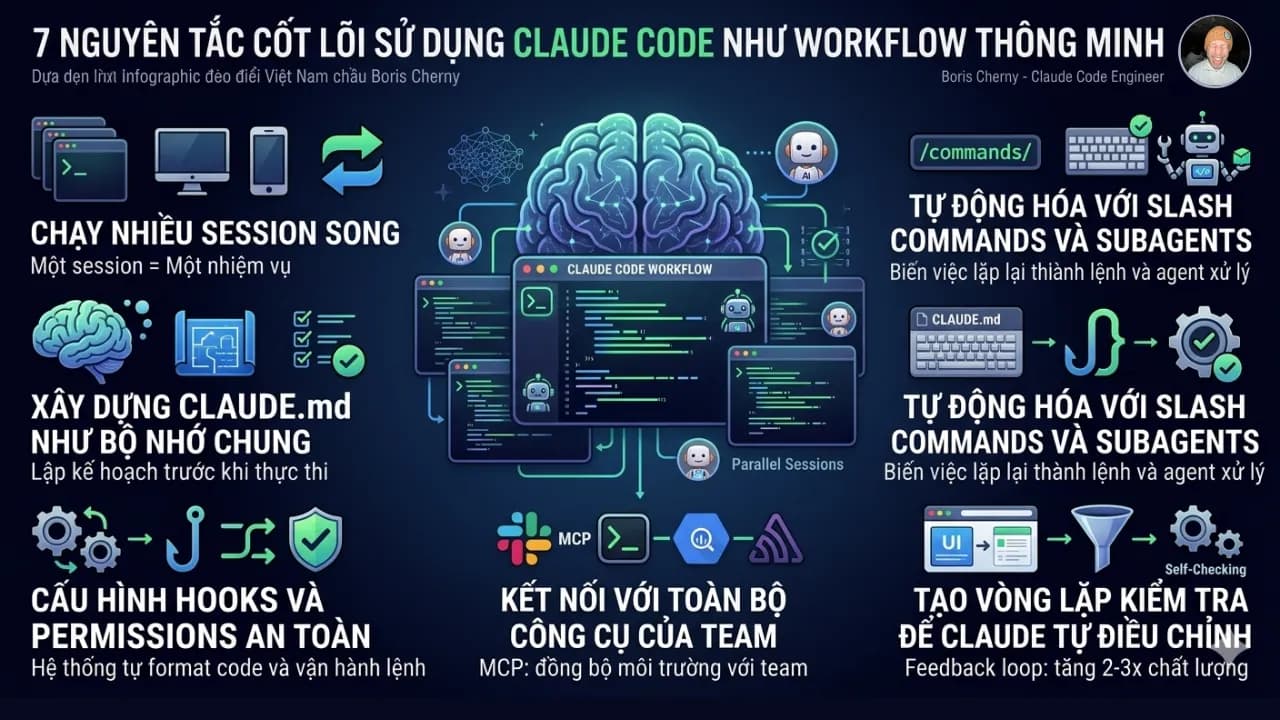
Boris Cherny – the engineer behind Claude Code – doesn't use it as a typical code-writing chatbot, but transforms it into a truly intelligent workflow. He runs multiple parallel sessions (terminal, web, mobile), with each session handling only one specific task to avoid context confusion. Before coding, he always starts with Plan Mode and builds a CLAUDE.md file as the team's 'shared brain,' accumulating conventions and lessons from every error. The entire repetitive process is automated using Slash commands, Subagents, and Hooks, while connecting Claude with Slack, BigQuery, and Sentry for more powerful debugging and data analysis. Most importantly, he creates an automatic testing loop, helping Claude self-detect and fix errors. In summary, the true power comes from using Claude Code as a teammate engineer with memory, tools, and self-operating capabilities. Below are 7 core principles derived, emphasizing the use of Claude Code as an intelligent workflow.
Boris Cherny — the engineer behind Claude Code — doesn't like to explain the tool he created with slides; instead, he shares 13 practical tips from how the Anthropic team itself uses it daily. Below are 7 core principles I've extracted from that, and the common thread is that he doesn't use Claude Code as a code-writing chatbot but as an intelligent workflow. He shared this many months ago, so some things might be old, but there's still a lot to learn from these talented individuals.
Clone Yourself by Running Multiple Parallel Sessions
Claude Code is certainly not designed to be used in just a single tab. Boris runs 5 terminal tabs simultaneously, combining 5–10 sessions on claude.ai/code and the mobile app, with each session handling exactly one independent task.
The practical reason: if too many tasks are crammed into one context, Claude starts to have priority conflicts, and output quality significantly decreases. Instead:
- Use the hand-off feature (&) to transfer tasks between terminal and web.
- "Teleport" context from computer to phone when needing to continue work on the go. This is a feature that has been available for a long time.
- One session, one task is a vital principle when using Claude Code to avoid context overflow.
Choose the Strongest Model and Always Start with Plan Mode
Boris uses Claude Opus 4.5 (as Opus 4.6 had not been released by January 2026) combined with Thinking for most serious work. Before letting Claude run code autonomously, he almost always starts with Plan Mode — pressing Shift + Tab twice.
Plan Mode forces Claude to plan in writing before execution, and this is when problems are detected earliest with the lowest correction cost. According to Boris: "A good plan is really important." for Claude Code to have a planning step, it's extremely crucial, just like a builder laying a foundation without a blueprint.
Build CLAUDE.md as a Shared Team Memory
CLAUDE.md is the single file the entire team checks into git, containing all accumulated conventions, context, and lessons. Operating principles:
- Every time Claude makes a mistake, such as a convention error, incorrect processing flow, or wrong directory structure, Claude is made to not only fix that instance but immediately add it to CLAUDE.md so it doesn't repeat next time.
- During code review, tag @.claude to add context directly from the PR to this file.
Boris calls this "compounding engineering": the system doesn't stand still; it improves daily with every recorded error. After 3 months of serious use, a team's CLAUDE.md truly becomes an engineering asset — not just a config file.
Automate All Repetitive Tasks with Slash Commands and Subagents
Anything you type more than 3 times a day should become a Slash command. Place them in .claude/commands/. For example:
/commit-push-pr— combines the entire commit, push, and PR creation flow into a single command.
For standard steps in the PR process, Boris uses Subagents like code-simplifier or verify-app to handle them automatically without manual intervention. The result is a significantly shortened time from "code finished" to "PR ready for review" and fewer errors due to missed steps.
Use Hooks and Permissions for Self-Operating Systems
Three important mechanisms Boris configures for Claude Code:
- PostToolUse hook — automatically formats code every time Claude uses a tool. You no longer need to remember to run the linter manually.
- /permissions — pre-declares safe bash commands so Claude doesn't ask for confirmation every time. Boris does not recommend using
--dangerously-skip-permissionsbecause it bypasses control without a truly good reason. - Agent Stop hook or ralph-wiggum plugin — for long-running background tasks, this hook allows Claude to self-verify results upon completion without you having to wait. Instead of monitoring a 20-minute session, you let it report when it's done.
Connect Claude with All Team Tools
Claude Code is not a standalone tool. Boris configures Claude to have access to Slack (via MCP), BigQuery, Sentry, terminal, and any other tools the team is using. Of course, all MCP configurations and shared permissions are set up so everyone on the team has the same environment.
In practice, when Claude can directly query Sentry for stacktraces and simultaneously view BigQuery to understand data patterns, the debugging quality is vastly different from manually pasting data into chat.
Creating a Testing Loop is the Most Important Step
Boris emphasizes this as "perhaps the most important thing" among all 13 tips.
Core idea: instead of you checking Claude's output, give Claude a way to check itself. The testing loop can be:
- A web browser extension that automatically takes screenshots and compares UI.
- A test suite that runs after every change.
- A bash script that checks endpoints.
- A simulator that recreates user flows.
When the feedback loop works well, Claude immediately knows whether its output is correct or incorrect without you acting as an arbiter. From this, output quality can increase 2–3 times, not because the model is better, but because Claude has the information to self-adjust.
Lessons from How Boris Uses Claude Code
Looking back at the 7 principles, the common thread isn't "use this feature, enable that feature" but rather the mindset of using Claude Code as an agent with context, tools, a way to self-check results, and accumulated memory over time. If you're using a single tab, typing prompts, and waiting — you're only utilizing about 10% of this tool's capabilities.
A practical step today: create a CLAUDE.md file in your current project, and write down a convention or an error Claude just made. That's the starting point of an accumulating system, and it begins with the first line.
If you want to refer to Boris's 13 tips, you can find the actual article here https://x.com/bcherny/status/2007179832300581177