4AIVN
Back to News

Silly Mistake Causes Anthropic to Leak Claude Code Source
Published on 31 March, 2026
Silly Mistake Causes Anthropic to Leak Claude Code Source

Quick Summary

A basic npm configuration error led to Anthropic's flagship Claude Code having its entire logic and system prompts exposed. While the Rust version "Claw-code" is making waves on GitHub with over 100k stars, enthusiasts are flocking to the 'hidden' and extremely peculiar features like virtual pets right in the terminal. Could this be Anthropic's way of showcasing its power ahead of its IPO?

Anthropic accidentally or intentionally exposed the entire source code of Claude Code due to a basic configuration error during npm packaging. Over 512,000 lines of TypeScript, nearly 1,900 files, and even unannounced features suddenly became public worldwide, but what's more notable is that it happened exactly one day before April Fools' Day .

A Silly Mistake from a Billion-Dollar Company

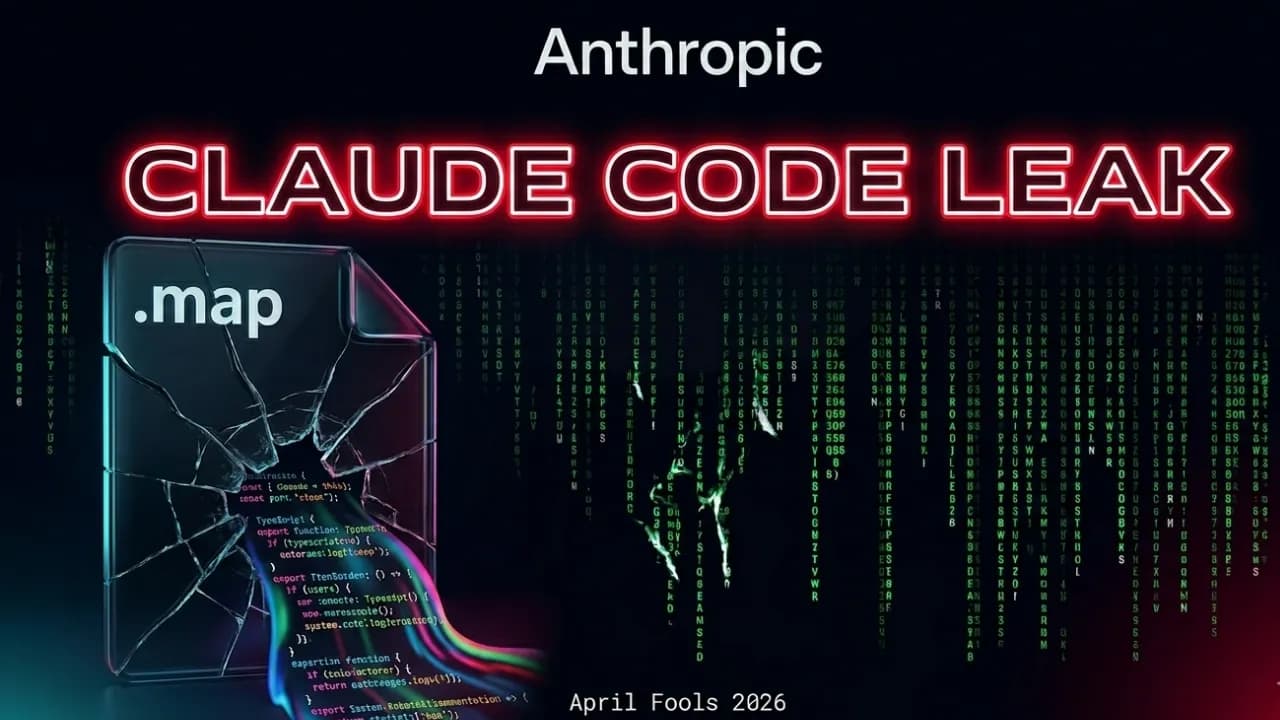
The leak did not come from hackers or external attacks but was entirely due to an internal error, as Anthropic accidentally left out the cli.js.map file, weighing approximately 59.8 MB, in the npm package during release. This .map file contains sourcesContent — which is typically used for debugging — but it stored the entire original source code in plain text, making it readable by anyone.

As a result, the entire architectural logic, system prompts, and secret features of Claude Code were completely exposed. However, what surprised many even more was that this error persisted for 20 days without being detected, despite Anthropic being the company behind the Bun runtime, which is directly related to this packaging error.

Claw-code: A Rust Rewrite Emerges in Hours

While Anthropic was sending DMCA requests to GitHub to remove copies, developer Sigrid Jin did what everyone expected: read the entire leaked source code and rewrite a completely new version in Rust. This further proves that powerful AI tools are truly dangerous only when they fall into the hands of those who know how to fully exploit them.

The important legal point is that this project used a clean-room rewrite technique — meaning it was re-implemented based on observed behavioral specifications rather than directly copying the original code, so theoretically, it does not infringe on Anthropic's copyright. In terms of performance, Rust promises to be significantly faster than the original version running on Bun. At the time of writing, this repo had garnered 108k stars, an extremely rapid number on GitHub. Claw-code repo link https://github.com/instructkr/claw-code
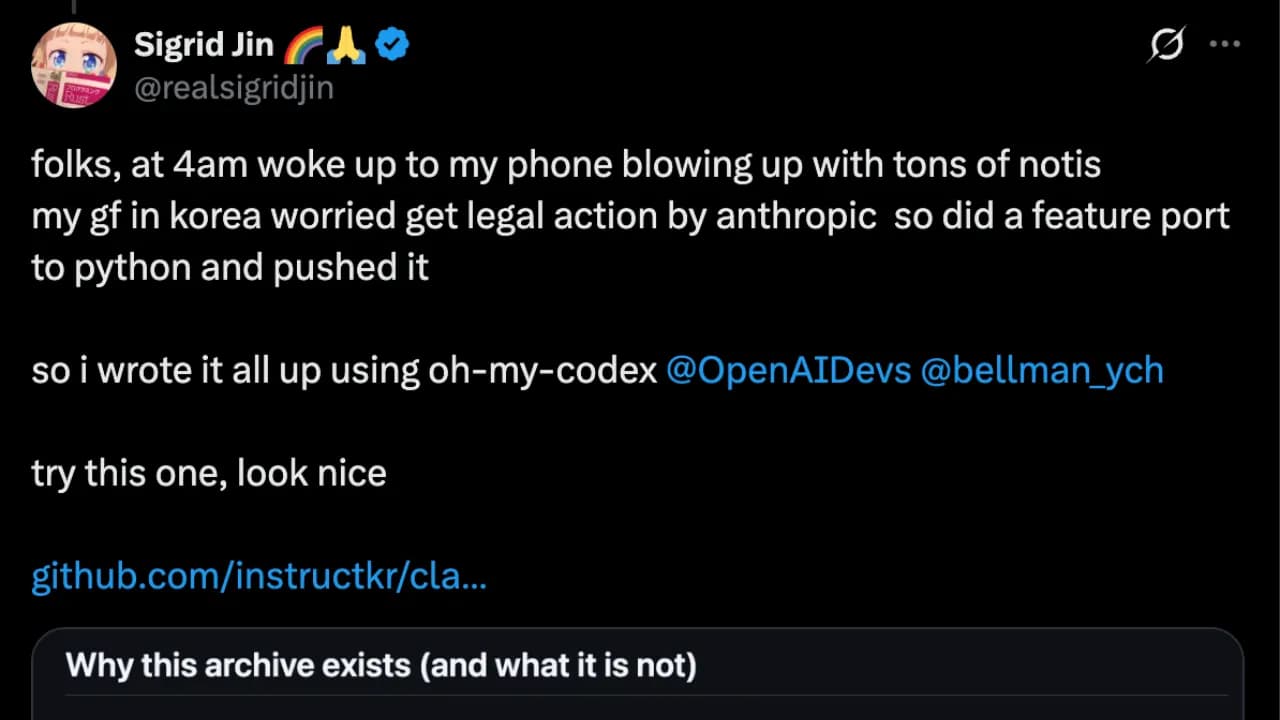
Claw-code's post on X

Unannounced Features of Claude Code

The most interesting part of the leak was not the technical architecture but the secret features within.
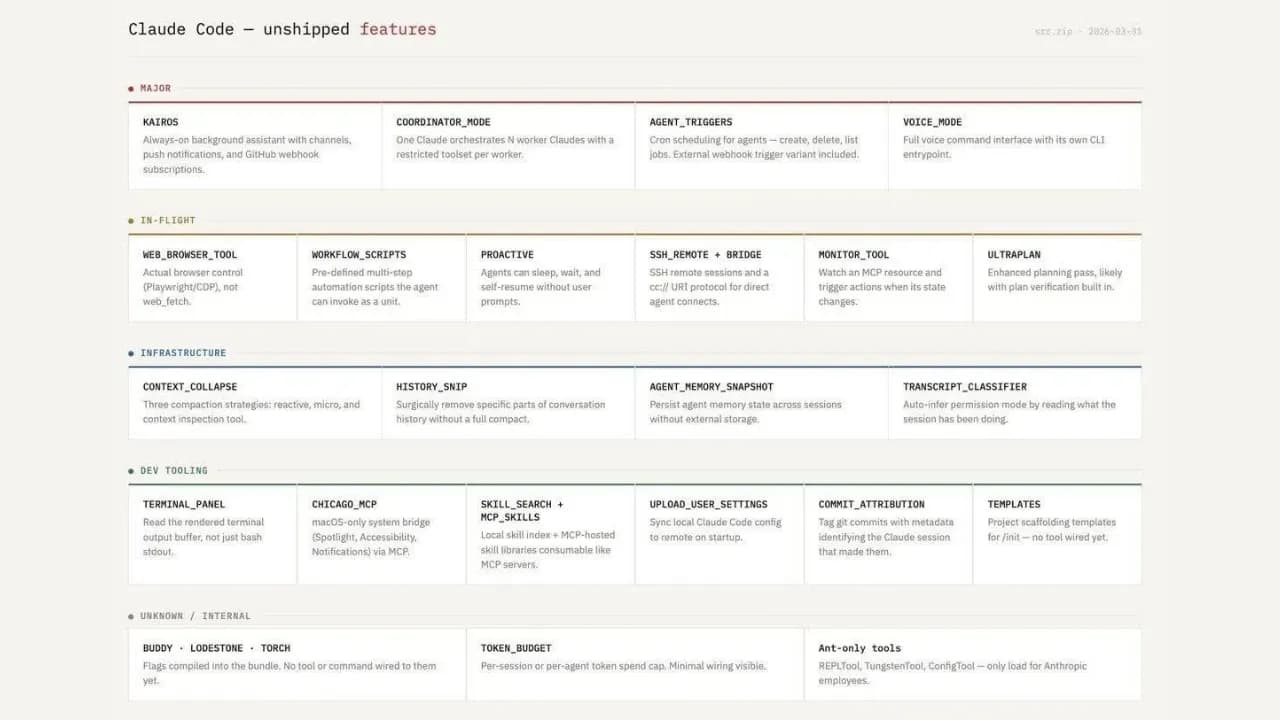
Unreleased features of Claude Code (source Duy Nguyen)

Although many features were leaked, the three names most discussed by the community are Buddy System, KAIROS, and ULTRAPLAN.

Virtual Pet Buddy System

This is a Tamagotchi-style virtual pet system right in the terminal, featuring 18 different species with stats like "Debugging" and "Chaos," and even a 1% chance of dropping rare Shiny items. Notably, the source code explicitly states the testing period for this feature as April 1st to April 7th, 2026, coinciding with April Fools' Day.

KAIROS Autonomous Mode

This is an always-on assistant mode capable of autonomously performing tasks without user commands, which, if released, would be a significant advancement compared to how Claude Code currently operates.

ULTRAPLAN Extended Thinking Time

This feature allows offloading complex planning tasks to the cloud with a "thinking" time of up to 30 minutes, designed for problems requiring deep reasoning.

Real Accident or Anthropic's April Fools' PR Campaign?

The timing of the incident has raised considerable skepticism. Some arguments support the deliberate PR hypothesis: the Buddy System feature was scheduled for testing precisely on April 1st; the 'leak' inadvertently helped Anthropic showcase impressive technical capabilities and shift its image from a 'rigid company with third parties' to a 'talented victim' in the eyes of the community; and the fact that a company owning Bun made an error related to Bun itself for 20 days without detection sounds too incredible to be true.

However, there are also counterarguments: sourcemap errors in npm are not uncommon, even for large companies, and having code cloned tens of thousands of times on GitHub is not something a company preparing for an IPO would want to happen. Anthropic has not yet confirmed or denied anything beyond the DMCA requests.

Whether a genuine accident or a calculated scenario, the Claude Code source code has provided one of the rarest insights into building a real-world agentic AI system — its architecture, system prompts, file organization, and even unreleased features. If you are interested in building AI agents, the claw-code repo is still available and is one of the most worthwhile unofficial AI documents to read this year.
Discussion (0)

Log in to join the discussion.

No comments yet. Be the first!

Related Articles

Claude Opus 5 Launches, Closing In on Fable 5

Anthropic has launched Claude Opus 5 at the same price as Opus 4.8 while raising response quality close to Fable 5, a model that costs twice as much. In other words, with near-Fable performance at half the price, most users will likely choose Opus 5 as their default and reserve Fable 5 for the small number of tasks that truly require the highest capability ceiling. What upgrades does Claude Opus 5 bring? According to Anthropic's launch announcement, Claude Opus 5 is the most capable Opus model to date and the first Opus release in the Claude 5 generation. Anthropic describes it as proactive and capable of deep reasoning, approaching the highest intelligence of Claude Fable 5 across many domains while using only half the token budget. The API model ID is claude-opus-5. Like Opus 4.8 and Fable 5, it has a default and maximum context window of one million tokens, a 128,000-token output limit, and thinking enabled by default. It has become the default model on Claude Max and the most powerful model available on Claude Pro. It is also offered through the Claude API, Amazon Bedrock, Google Cloud, Microsoft Foundry, and GitHub Copilot. Why will many users choose Opus 5 over Fable 5? The answer is not limited to price. Four factors make Opus 5 likely to become the default choice for daily work while Fable 5 moves into a specialized role for a small number of exceptional cases. It wins more real-world evaluations than it loses On Frontier-Bench v0.1, Anthropic's automated coding evaluation, Opus 5 scores 43.3% while Fable 5 reaches only 33.7%, a gap of almost ten points in favor of Opus 5. On CursorBench 3.2 at maximum effort, Opus 5 reaches about 70.1%, less than half a percentage point behind Fable 5 while costing only half as much. Across evaluations where both models have published results, Opus 5 wins more often than it loses, and its victories are generally larger than its defeats. The fastest way to verify this is to run the same task on both models at comparable effort levels and compare the output quality instead of relying only on published benchmarks. No mandatory 30-day data retention Fable 5 and Mythos 5 are Covered Models that require prompts and outputs to be retained for 30 days for safety purposes. They do not support zero data retention (ZDR) on any platform, even when an organization already has a ZDR agreement. Opus 5, by contrast, can still operate under ZDR like Opus 4.8. For teams handling legal, medical, or financial data, this difference alone may remove Fable 5 from consideration without any performance comparison. Fewer interruptions from safety filters Anthropic says the cybersecurity classifier intervenes about 85% less often with Opus 5 than with Fable 5. For coding agents that run for hours or overnight, a request being blocked midway because it touches a safety threshold is a real workflow risk, and Opus 5 significantly reduces that frequency. Adjustable effort makes budgets easier to predict Opus 5 supports adaptive thinking with effort ranging from low to maximum. Low or medium works for fast responses and high-volume workloads, while high or maximum suits complex coding, deep research, and multi-step workflows. Because teams pay according to the selected effort instead of being locked into a fixed Fable 5 cost level, they can optimize the budget for each task rather than paying the highest rate on every request. Initial impressions after trying Opus 5 After using Opus 5 for daily writing and coding work, the clearest impression is that it is substantially smarter than Opus 4.8, especially in understanding intent on the first request without repeated explanation. For tasks such as summarizing long documents, writing code with complex branching logic, or preparing a multi-step plan, Opus 5 works smoothly and loses the thread less often than the earlier version. There is still a gap compared with Fable 5, although it is smaller than expected. On work that demands deep reasoning or autonomous execution across many consecutive steps without intervention, Fable 5 remains slightly more dependable and makes fewer mistakes. For most daily work, however, that difference is difficult to notice without placing both models side by side. If you are using Opus 4.8, this is a sensible time to upgrade. If you are choosing between Opus 5 and Fable 5 for ordinary work, Opus 5 is almost certainly sufficient without paying the premium. When is Fable 5 still the right choice? Fable 5 retains an advantage on the hardest work. On SWE-bench Pro, which uses real GitHub issues and is considered one of the strictest measures of practical coding, Fable 5 scores about 80% while Opus 5 reaches roughly 79%, a small gap that still favors Fable. Fable 5 is also the only model Anthropic positions in the Mythos class, meaning its overall capability is designed to exceed Opus. This distinction is clearest in specialized fields such as expert medical analysis and autonomous research that continues for days without supervision. In other words, Opus 5 wins in daily coding and knowledge work, while Fable 5 retains its edge on the hardest problems and fields requiring the highest possible reliability. For most users and small teams, those problems represent a small portion of daily work, making the twofold price difference difficult to justify unless their workload falls directly into that category. Quick comparison: Opus 5 vs. Fable 5 CriterionClaude Opus 5Claude Fable 5 Input price$5/million tokens$10/million tokens Output price$25/million tokens$50/million tokens Context1 million tokens1 million tokens Maximum output128,000 tokens128,000 tokens Frontier-Bench v0.1 (coding agent)43.3%33.7% SWE-bench Pro (practical coding)~79%~80% Data retentionSupports zero data retentionMandatory 30-day retention, no ZDR Safety-filter interventionAbout 85% lowerHigher Best fitDaily work, coding agents, sensitive dataDifficult research, multi-day autonomous projects, specialized medical analysis Can Opus 5 really compete with GPT-5.6? On paper, the answer is yes, but not across every category. Opus 5 leads GPT-5.6 Sol in reasoning about novel situations, computer use, and most public coding evaluations, while GPT-5.6 Sol remains ahead on some command-line and information-retrieval tests. Neither wins outright, but for the first time a mid-priced Anthropic model stands level with, and in several areas ahead of, OpenAI's flagship model. The more useful question is not which model is stronger overall but which one fits your work. If daily tasks center on code, long documents, and multi-step execution, Opus 5 is a compelling choice on both price and quality. If you already rely on the OpenAI ecosystem or need a specific GPT-5.6 strength, the switching cost may not be worthwhile. The most reliable answer is still to run the same job on both models, because benchmark tables do not always reflect real experience.

Nam
25 Jul, 2026
What is an agent harness? The framework that helps AI work efficiently

Imagine having an AI assistant that is incredibly smart but forgets everything between sessions and cannot check the quality of its own work. To solve this problem, developers created a protective management layer around AI models called an agent harness. This is what enables AI agents to complete complex, multi-step tasks autonomously without requiring constant human intervention. What is an agent harness? Think of an AI model as a brilliant new employee with no long-term memory and zero familiarity with the workplace. They can solve complex problems in seconds but will just as easily forget what they were working on, or accidentally send a confidential document to the wrong client. In that scenario, an agent harness acts as the experienced manager sitting right beside them, keeping things on track. Put simply, an agent harness is the software layer wrapping around an AI model that handles all administrative and logistical work so the model itself can focus entirely on reasoning and problem-solving. It connects the AI to external tools, maintains a complete record of work across sessions, and verifies results before considering a task done. In practice, an agent harness handles the following: Connecting the AI model to external tools such as web search, email, and calendars Persisting progress across sessions so the AI never has to start from scratch Filtering out irrelevant information and supplying only the data the AI actually needs at each step Monitoring AI actions to prevent dangerous mistakes Logging activity in detail so humans can audit what happened when needed Origin of the term: The concept of "agent harness" was formally named by technology engineer Mitchell Hashimoto in early 2026. Before that, many development teams had built similar systems but had no shared term for this layer of infrastructure. Why do AI agents fail at long-running tasks? The biggest weakness in today's AI models is the complete absence of long-term memory. Every new conversation starts from zero with no recollection of anything that happened before. Imagine hiring an employee who wakes up every morning having forgotten every agreement, every deadline, and every piece of progress from the day before. When Anthropic tested Claude building a complex web application without harness support, the results were consistently disappointing. Two failure modes kept appearing: The AI tried to do everything at once, ran out of working memory midway through, and left the project unfinished. The next session wasted time trying to figure out what had already been done. The AI declared the task complete without actually running the result to verify it worked. Beyond those two core failures, long-horizon tasks expose three additional problems: Context clog: Accumulated conversation history and tool outputs crowd out the original instructions, causing the AI to gradually lose focus on the actual goal Tool misuse: The AI sometimes searches for information that does not exist or submits incorrect inputs to forms, and without anything to stop it, repeats the same error in a loop Total progress loss on failure: Any network error or system crash wipes out whatever was stored in temporary memory, forcing a full restart Stanford research (2023): AI models tend to overlook information buried in the middle of long text, even when that text is not particularly long. This is why feeding too much data to an AI all at once often backfires without a filtering layer in place. How does an agent harness work in practice? An agent harness operates in two distinct phases to keep work flowing continuously without interruption. Setup phase (runs once) The harness prepares the full working environment before the AI begins: building a structured task list, initializing storage, and recording the starting point. Think of it as the manager drawing up a detailed project plan before handing anything off. This phase only needs to happen once. Execution phase (repeats) Each time the AI begins a new session, the harness automatically reloads all saved progress and assigns only the next relevant task. When the AI wants to take an action such as searching for information or sending a notification, the harness checks whether that request is valid, executes it safely, cleans the returned result, and passes it back to the AI. The model never touches external systems directly without going through this control layer first. The four core components of an agent harness For an AI to operate reliably over extended periods, a standard agent harness needs four essential components: External tool gateway: Allows the AI to interact with the real world by reading documents, searching the web, or sending messages. The harness acts as an intermediary, validating every request before execution and ensuring returned results are clean and usable. Layered memory management: Maintains three types of memory serving different needs: short-term working memory for the current session, a task log recording what has been completed and what remains, and a long-term knowledge store that accumulates across multiple projects over time. Intelligent context filter: Summarizes long conversation histories down to key points and supplies only the data relevant to the current step rather than loading everything at once, keeping the AI focused on the right task at the right moment. Safety checker and human approval gate: Automatically verifies results before marking a task as complete. For sensitive actions such as deleting important data or sending bulk emails, the harness pauses and waits for human confirmation before proceeding. Note on accumulated knowledge: If an AI agent's memory is stored entirely within a closed third-party platform, all the knowledge it builds up over time belongs to that platform. Switching to a different system means starting from zero. This is worth thinking through carefully when choosing a long-term AI agent solution. Harness engineering and the secret behind millions of lines of code Harness engineering is the practice of treating every AI failure as a system problem to fix permanently rather than something to retry or ignore. As Mitchell Hashimoto put it: if the agent makes a mistake, redesign the environment so that mistake becomes physically impossible to repeat. In practice, when OpenAI built large software projects with three engineers producing 3.5 pull requests each per day without typing a single line of code, they had set up automatic verification checks after every AI action. When the AI produced something incorrect, the system returned error messages written in a specific structure so the AI immediately understood what needed to change on the next attempt. Every error message became a learning signal, not just a warning. A study presented at ICML 2025 further confirmed that the same AI model equipped with a harness consistently outperformed itself running without one, even with identical training weights and identical prompts. The environment surrounding the AI matters just as much as the model itself. A telling data point: Anthropic's Claude Code has grown past 512,000 lines of code and continues to expand. More capable models do not make the harness simpler. They make it larger, because there is more capability to orchestrate and more failure modes to guard against. When do you actually need an agent harness? For simple one-off tasks like summarizing a document or answering a specific question, calling an AI directly is perfectly fine. But the moment work extends beyond a single conversation, requires memory from a previous session, or involves multiple steps that need to happen in a specific order, a harness becomes necessary. One thing worth reflecting on: the built-in web search in ChatGPT and Gemini is itself a form of harness. When AI automatically looks something up, there is infrastructure behind the scenes making the tool call, processing the result, and feeding clean information back into context. The harness is invisible to the user but indispensable to the system. Agent harness is not a short-term technical trend. It is the answer to fundamental limitations that AI cannot resolve on its own: no long-term memory, finite working context, and a tendency to misuse external tools without guardrails. 4AIVN has also started applying harness to our own workflows — and what we have found is that it does not just help AI finish tasks. It turns AI into a system that learns from failure and gets more reliable over time.

Nam
1 Jun, 2026
Anthropic Increases Claude Usage Limits After SpaceX Partnership

Anthropic has just announced a partnership with SpaceX to access over 220,000 NVIDIA GPUs and will immediately use this new computing power to increase usage limits for both Claude Code and API. Here's what's changing and why it matters to users. Why Did Anthropic Partner with SpaceX? In recent months, Anthropic has continuously signed large-scale computing agreements with Amazon, Google, Microsoft, and NVIDIA. This time, the company has added another unexpected name: SpaceX. According to the announcement on May 6, Anthropic signed an agreement to use the entire computing capacity at SpaceX's Colossus 1 data center, equivalent to over 300 megawatts of power and more than 220,000 NVIDIA GPUs. This entire capacity will be put into use within one month and will directly improve the experience for Claude Pro and Claude Max users. Colossus 1 is SpaceX's AI data center, currently one of the largest GPU clusters in the world. Anthropic is the sole tenant of its entire capacity. Specific Changes to Usage Limits Thanks to the new computing resources, Anthropic has implemented three changes effective immediately from the announcement date Doubling Hourly Claude Code Limits The 5-hour rate limit for Claude Code is doubled for Pro, Max, Team, and Enterprise plans. If you previously could only run 10 complex Claude Code commands, this is now doubled to 20, which will be significantly helpful. However, it's important to note that the weekly limit remains unchanged, so while increasing the 5-hour limit allows for more intensive work in a short period, it might cause you to hit the weekly cap faster. Removing Peak Hour Limits Previously, Claude Code automatically reduced usage limits during peak hours (typically from 9 AM to 3 PM) for Pro and Max accounts. This limit has been completely removed, so users can now use Claude Code at full speed regardless of the time of day. For users who often work in the evening (which coincides with US peak hours), this change is likely to have the most noticeable impact. Significantly Increasing API Limits for Claude Opus Models The API rate limit for Claude Opus models has been significantly increased. Details of the multiplier increase are published by Anthropic in the following table: This change is particularly important for developers building applications on the Claude Code platform Anthropic's Overall Computing Strategy The agreement with SpaceX is not an isolated move. In recent months, Anthropic has built a remarkable infrastructure portfolio: An agreement for up to 5 gigawatts with Amazon, with nearly 1 GW operational before the end of 2026 A 5 GW agreement with Google and Broadcom, expected to be operational from 2027 Strategic partnerships with Microsoft and NVIDIA, including $30 billion in Azure capacity A $50 billion investment in AI infrastructure in the US with Fluidstack And now, over 300 megawatts from SpaceX's Colossus 1 data center Anthropic runs Claude on various hardware platforms — AWS Trainium, Google TPUs, and NVIDIA GPUs — and states that it continues to seek additional computing power sources. Notably, within the framework of the agreement with SpaceX, both parties also expressed interest in developing orbital AI computing capabilities, i.e., placing GPUs on satellites. This is still a very early-stage idea, but if realized, it would be a major turning point for global AI infrastructure. Expanding to International Markets A portion of the expanded computing capacity will be used to serve international enterprise customers, especially in sectors requiring local data storage such as finance, healthcare, and government. The agreement with Amazon also includes additional inference capacity in Asia and Europe. Anthropic also emphasized that it only expands to countries with democratic legal frameworks and secure hardware supply chains, demonstrating a cautious stance amid increasingly fierce geopolitical competition in AI. What Does This Mean for Claude Users in Vietnam? From a practical perspective, the three changes to usage limits directly benefit those who use Claude Code daily — especially programmers and individuals who work continuously with Claude Code. The removal of peak hour limits also means that the experience for users in Vietnam (whose time zone often coincides with peak load periods in the US) will be more stable. In the long term, greater computing power often means the ability to deploy more powerful models at lower costs. This is the foundation for Anthropic to continue competing with OpenAI and Google in the 2026 AI race. Anthropic is Always Evolving Anthropic is seriously investing in infrastructure, and the partnership with SpaceX is the latest step in that strategy. The most immediate result users can feel is that Claude Code will be less restricted, and API speeds will certainly improve. In the long run, the computing race among major AI companies promises many more interesting developments in 2026.

Nam
8 May, 2026
Claude integrates across Microsoft 365: Excel, PowerPoint, Word, and Outlook all get AI assistants

Anthropic had previously introduced Claude to Excel, PowerPoint, and Word, and has now opened the public beta for Outlook. If you've been following Anthropic's release history in recent months, the question is no longer what feature they will launch next, but rather if there is any software they haven't jumped into yet. Claude is now available across all Microsoft Office applications From now on, all paid plan users can install Claude into Microsoft's office suite. Claude for Excel, PowerPoint, and Word have been available for a while, while Claude for Outlook is entering public beta for all paid tiers. The biggest difference compared to other Office AI assistants is that Claude does not act like a chatbot locked in individual apps. Instead, conversation context is maintained seamlessly as you move between applications—from Outlook to Word, then Excel, and on to PowerPoint—without needing to explain yourself from scratch. Claude for Microsoft 365 can be installed via Microsoft AppSource. A single package covers Excel, PowerPoint, and Word, while a separate package is available for Outlook. Administrators can perform centralized deployments from the Microsoft Admin Center. [VIDEO: F6dzjaBCBtU |Claude for Microsoft 365 (Anthropic)|Claude for Microsoft 365 (Anthropic)] What can Claude do in each application? Excel: Far beyond just explaining formulas Claude for Excel can read multi-sheet workbooks, explain formulas with cell-by-cell references, build financial models with live formulas, and update assumptions without breaking dependency structures. Every change is tracked and clearly displayed so users always know which cells Claude used. PowerPoint: Working directly within your slides This is the most notable feature: Claude for PowerPoint reads the native slide structure, detects existing fonts, colors, and layouts, and then generates new content in that exact style. The charts it produces are native PowerPoint charts that are fully editable, not pasted screenshots from elsewhere. Word: Tracked edits and replying to comments Claude for Word works the way editors like: all edits appear as tracked changes, and Claude can reply directly to comment threads, including explaining what it changed and why. Nothing is saved or sent until you accept it. Outlook (Beta): Organizing your inbox with a single command Claude for Outlook categorizes emails into three groups: requires your reply, can be drafted on your behalf, and can be skipped. The drafted emails appear directly in Outlook's compose window, complete with recipients, subject lines, and body text—you just need to review and hit send, which is fully equivalent to what Claude can do with Gmail. Cross-application context: A familiar feature that rarely works in reality Anthropic describes a typical scenario: receiving an email in Outlook, opening the attachment in Word to draft a memo, switching to Excel to perform an analysis, and finally transforming it all into a slide deck in PowerPoint—and of course, Claude remembers all the context across every single step. More importantly, files can be opened side-by-side and changes will sync: adjusting an assumption in Excel will automatically update the numbers in the Word memo and the charts in PowerPoint. Chat history is saved per file, meaning you can close the sidebar, turn off your computer, open it the next day, and continue right where you left off. Claude for Microsoft 365 also supports voice dictation instead of typing. Built for enterprise: Complete control and compliance For enterprise administrators, Anthropic has added configuration capabilities to route all prompts, tool calls, and document references to the organization's own auditing system—helping the security team know exactly what Claude did in each session. The analytics dashboard also breaks down activity by user, application, and day. In terms of routing, organizations can connect Claude via direct accounts or existing cloud platforms like Amazon, Google Cloud, or Microsoft. Microsoft 365 Copilot customers can also access Claude models directly within Excel and PowerPoint. Workflows can be saved as skills and perform consistently across all four applications. Once a process is standardized, the entire team can use it the same way. The software world is chasing Anthropic It is no exaggeration to say that Anthropic is releasing at a speed that startles many competitors. In just the past few months: the Claude Code programming tool has been constantly updated, the integration ecosystem is expanding rapidly, browser and desktop tools have been added, and now, all four Microsoft Office applications are supported at once. Microsoft, which has long placed a massive bet on Copilot with exclusive ChatGPT models, is now opening the door to Claude within its own ecosystem. This speaks volumes about Anthropic's current standing, but the real story will be decided by the users: whether Claude in Excel, Word, Outlook, and PowerPoint will truly shift the office habits of Microsoft 365 users.

Nam
8 May, 2026