How to create more professional Claude skills with 8 content layers
Quick Summary
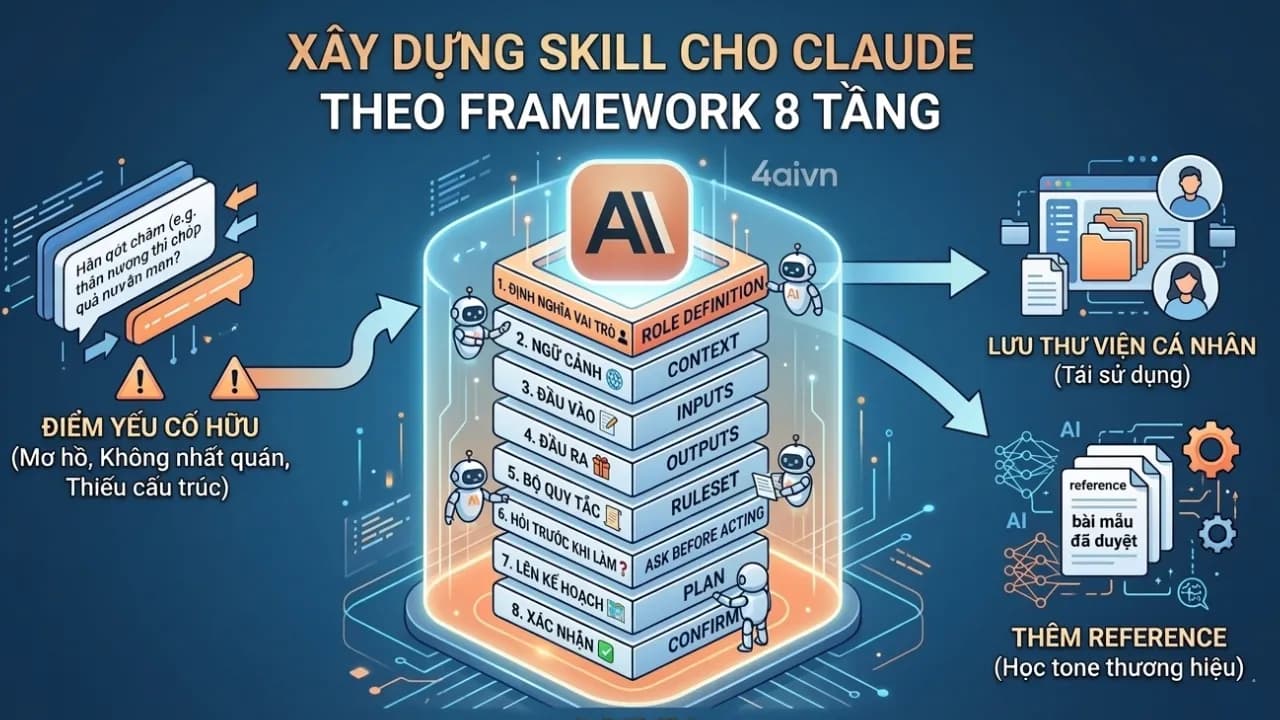
This article delves into the issue of AI "freewheeling" when using Claude Skills and presents a comprehensive solution: the 8-Layer Framework. This is a SKILL.md structure that helps clearly define the AI's role, context, inputs/outputs, rule set, and workflow. Additionally, the article introduces how to use Reference Files to help the AI learn real-world tone and style, ensuring consistent and user-aligned results.
You already know what Skills are in Claude and have created a few — but the results are still inconsistent. Sometimes the AI does exactly what you had in mind, and other times it goes completely off the rails. The problem usually isn't Claude itself. It's your SKILL.md file: missing layers, no clear order, or everything crammed into one long unstructured block of text.
The 8-Layer Framework is how the 4AIVN team addresses that — by breaking a Skill down into distinct layers, from foundational to operational. We use this framework internally to produce the articles you read on 4AIVN, and you can absolutely apply it to whatever problem you're solving. That said, it needs to be said plainly: this is Prompt Engineering, and it's only one piece of a larger picture. For our team, it's the piece that helps us assign tasks to AI clearly — but producing articles that genuinely resonate with readers, follow conversion frameworks, and meet our editorial standards still requires a lot more than this alone.
If you're not yet familiar with Skills in Claude, start here: Claude Agent Skills: the AI feature you need to know about in 2026, which covers the foundations before diving into this framework.
Why Skill structure determines everything
SKILL.md looks a lot like the long prompts many people were writing for ChatGPT, Gemini, and Claude back in 2024: "You are a copywriter with 10 years of experience, write using the PAS framework, empathetic tone, never use words like breakthrough or perfect solution..." You type it out, finish the chat, close the window — and the next time you open a new session, you have to explain everything again from scratch.
Skills are different precisely because they are a guide you only need to write once, and Claude will understand how to work with you without needing re-explanation each session. The distinction is this: a prompt defines what needs to be done this time, while a Skill defines how to work together long-term. A common mistake is writing SKILL.md the same way people write long prompts — dumping everything into one block without any layering. Claude can read it, but when it encounters a situation you didn't explicitly list, it has no conceptual framework to fall back on. That's why the output ends up inconsistent.
The 8-Layer Framework divides SKILL.md content into two groups: 4 foundational layers that help the AI understand who it is and what it does, and 4 operational layers that define how it actually works.
Four foundational layers that define who the AI is
Layer 1 – Mission
Define the core role of this Skill. This is the first thing Claude reads and uses to shape all behavior that follows.
Example: "You are an editor specializing in writing and editing AI articles for the 4AIVN community, targeting Vietnamese readers who are interested in AI but have no technical background."
Layer 2 – Context
Describe the environment this Skill operates in. The same request — "write an AI article" — calls for completely different writing styles depending on whether it's for a website, a Facebook page, or Instagram.
Example: "Articles are published on 4aivn.com, read primarily on mobile, requiring short paragraphs, clear H2 and H3 headings, and a length of approximately 1,000 to 1,200 words."
Layer 3 – Input
Define what form Claude will receive information in. This layer is frequently skipped, which causes the AI to make assumptions whenever the input isn't explicit.
Example: "Input can be: a single keyword, a brief of a few lines, or a ready-made outline. If only a keyword is provided, Claude must ask clarifying questions before writing."
Layer 4 – Output
Define what the returned result should look like — format, length, and default structure.
Example: "The default output is a complete article consisting of an intro (sapo), 3 to 4 H2 sections, and a conclusion. If the user only needs an outline, return a bulleted outline with a short description of each section."
Four operational layers that define how the AI works
Layer 5 – Rule set
This is the most important layer. You define the writing style, mandatory structure, and equally critical — a list of things the AI must never do. The more specific, the better.
Example:
- The intro (sapo) must open with a real-world situation or a surprising statistic — never a definition.
- At least 70% of H2 headings must be phrased as questions to support SEO and GEO, and each H2 must include at least one concrete example.
- Forbidden phrases: "In the rapidly changing world of technology...", "It cannot be denied that...", "Hope you found this article useful."
Layer 6 – Proactive questions
Instead of the AI diving straight into work, this layer makes it ask questions first. It eliminates most cases of off-target output caused by the AI guessing at what you meant.
Example: "Before writing any article, Claude must ask at least 3 questions: who is the target audience, what is the article's goal (inform / persuade / instruct), and what tone is preferred (serious / approachable / neutral)."
Layer 7 – Plan
After gathering enough information, the AI must present an outline and explicitly state the rules it will apply to this specific article before writing begins. You can see its thinking and redirect it before it goes the wrong way.
Example: "After receiving sufficient information, present: (1) a complete outline with a brief description of each section, (2) the primary keywords and related keywords prioritized for this article."
Layer 8 – Agreement
Only when the user confirms agreement with the plan does the AI begin writing. Without this step, Layers 6 and 7 become ceremonial — the AI can still start writing on its own after presenting the outline.
Example: "After presenting the outline, wait for the user to confirm or request revisions. Only begin writing the full article upon receiving a clear signal of approval."
How to write your SKILL.md using the 8 layers
Don't try to implement all 8 layers at once. Here's the practical sequence to follow:
- Start with Layer 1 and Layer 5 to establish the AI's role and rule set. Just these two layers will produce a more noticeable improvement than any regular prompt. Test it with one or two real requests and check whether the output is on target.
- Once Layer 5 is stable, add Layer 6 to make the AI ask questions first. You'll quickly notice what information you tend to leave out when assigning tasks — then add Layers 7 and 8 to close the control loop.
- Add Layers 2, 3, and 4 when you notice the AI making wrong assumptions about the environment, input format, or output structure — those are the signs that these layers are needed.
References: a critical part of Skills
After using Skills for a while, you'll run into a new problem: the AI follows the right structure and the right rules, but something about the brand voice still isn't quite there — you still end up editing. The tone is correct but doesn't sound like you. The structure is right but doesn't feel as familiar as your older articles.
This is where References come in.
What are References in SKILL.md?
References are supplementary files you place alongside SKILL.md. They contain things that are too long or too specific to fit inside the rule set, but which the AI needs to read under certain conditions.
For content writers, the most useful type of Reference is approved output — complete articles you've been satisfied with — used as reference samples so the AI can learn your actual tone and style rather than just reading abstract rules.
How our team adds References to a Skill
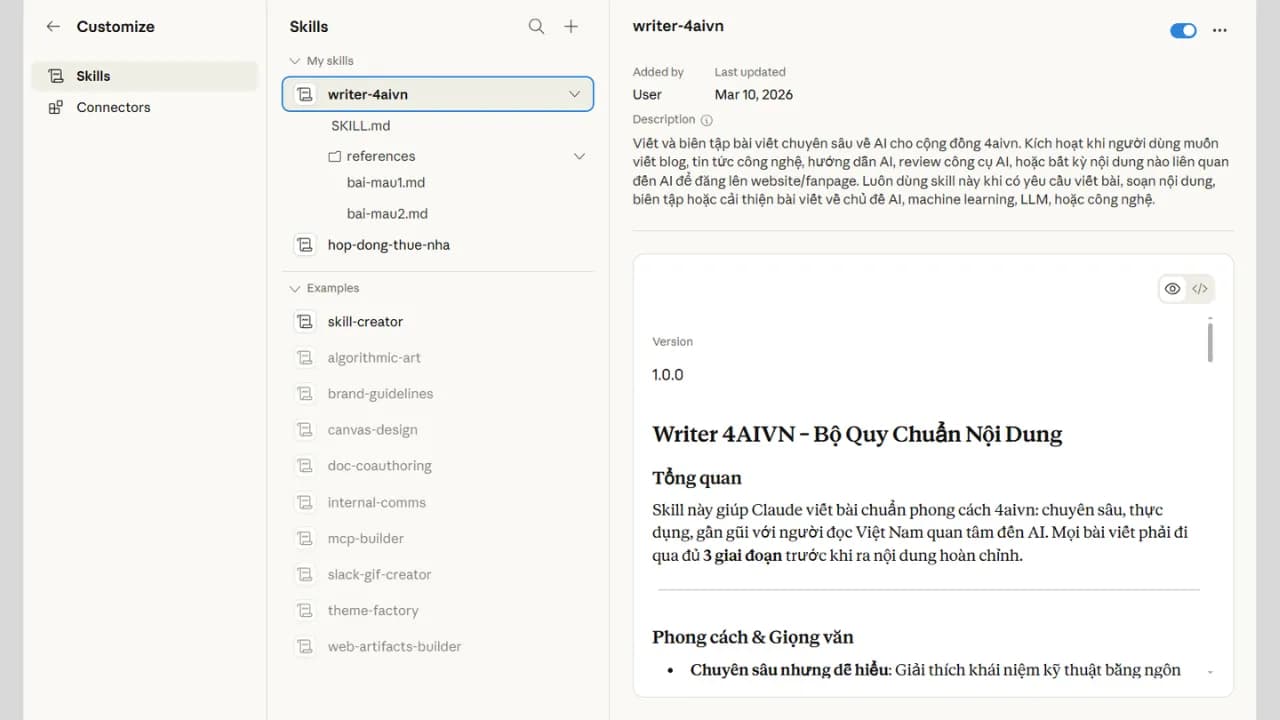
Folder structure:
writer-4aivn/
SKILL.md
references/
sample-article-01.md (published article, satisfactory result)
sample-article-02.md
sample-article-03.md
Inside SKILL.md, declare explicitly when Claude should read each file:
## Reference Files
references/sample-article-01.md: Read when the user requests a practical how-to article
references/sample-article-02.md: Read when referencing tone for an AI tool analysis article
One important rule
Don't leave it up to Claude to decide whether it needs to read a Reference file. Provide specific activation conditions — "read when the user requests an article of type X" — rather than "read if needed." The latter is too vague: Claude will either ignore it or read it at the wrong moment.
How many sample articles are enough?
Start with 2 to 3 sample articles covering different content types: practical guides, tool analyses, opinion pieces. You don't need more than that at this stage. Each sample article you add gives the AI one more piece of evidence to understand your tone — one step beyond just reading rules.
Creating Skills will take a lot of time upfront, much like the time we used to spend refining long prompts. But once the output stabilizes, you'll often be surprised by what Claude can write and do on its own.
This is the first installment in our series on writing with AI using Skills. This part gets you your first output from a Skill — but that first output is rarely perfect. Future installments will go deeper into refining Skills for more complex scenarios, until the AI works exactly the way you intend.